<?xml version="1.0" encoding="utf-8"?>
<feed xmlns="http://www.w3.org/2005/Atom">
  <title>WanLi&#39;s blog</title>
  <icon>https://www.gravatar.com/avatar/a560576344d33015bbc0603eeb844702</icon>
  <subtitle>Stay hungry,Stay foolish...</subtitle>
  <link href="https://www.beenli.cn/atom.xml" rel="self"/>
  
  <link href="https://www.beenli.cn/"/>
  <updated>2022-04-09T14:53:13.888Z</updated>
  <id>https://www.beenli.cn/</id>
  
  <author>
    <name>Wan Li</name>
    <email>wanli.99@qq.com</email>
  </author>
  
  <generator uri="https://hexo.io/">Hexo</generator>
  
  <entry>
    <title>gem5简介和dvfs应用初探</title>
    <link href="https://www.beenli.cn/posts/7774d1b8/"/>
    <id>https://www.beenli.cn/posts/7774d1b8/</id>
    <published>2021-08-24T20:48:32.000Z</published>
    <updated>2022-04-09T14:53:13.888Z</updated>
    
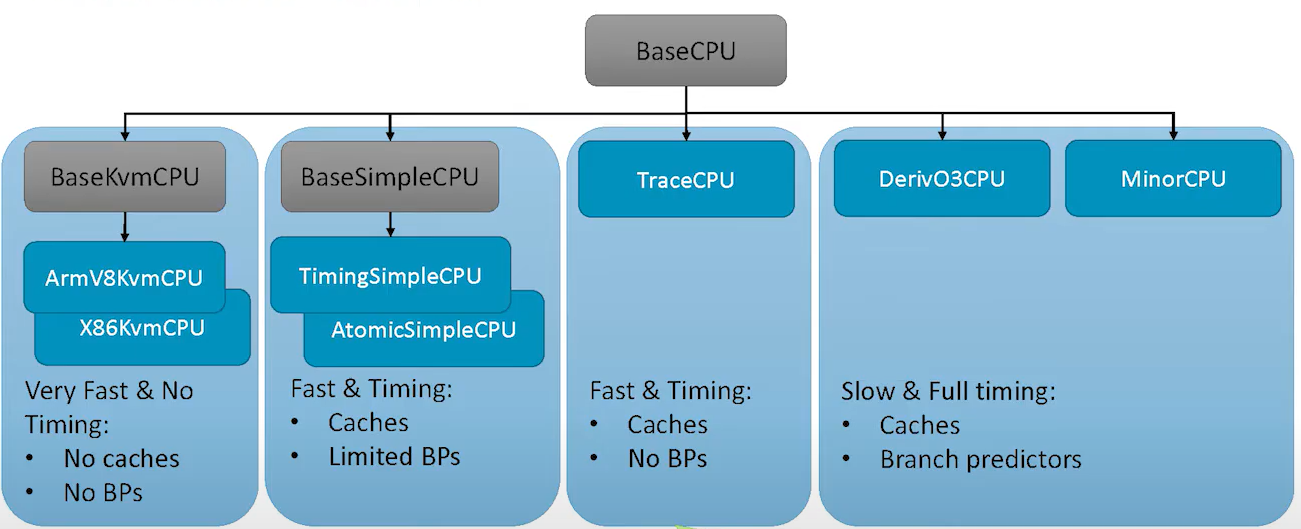
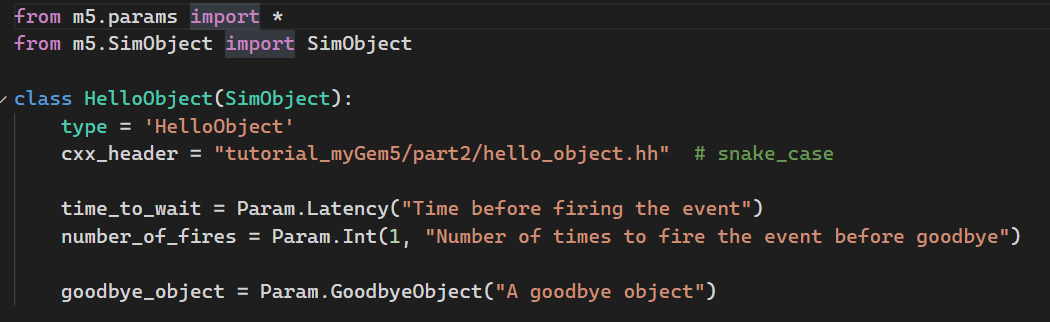
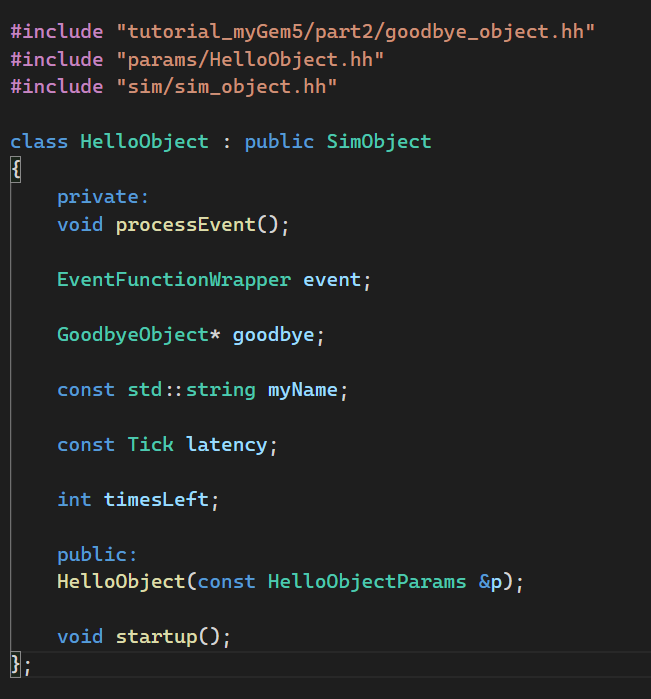
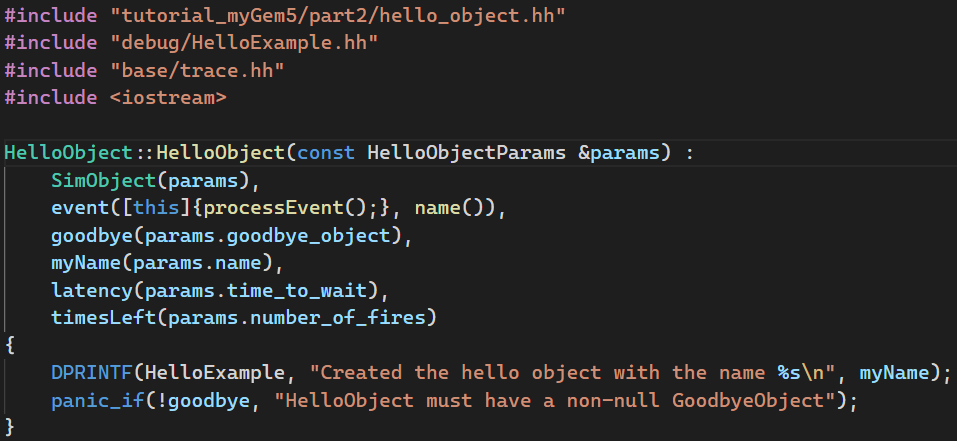
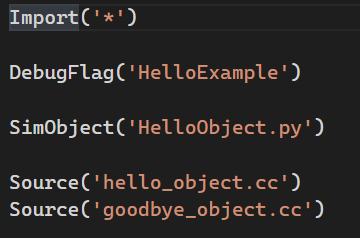
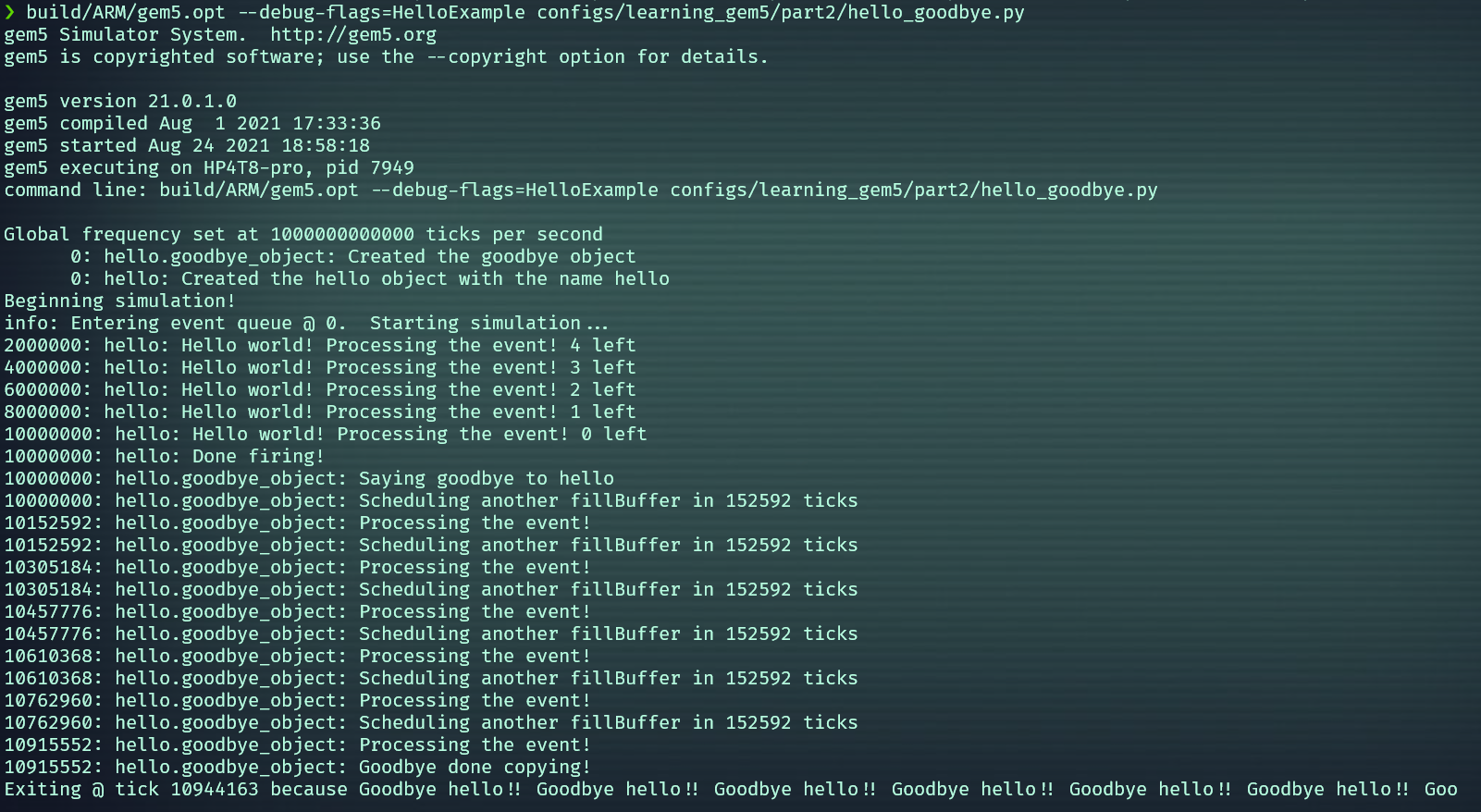
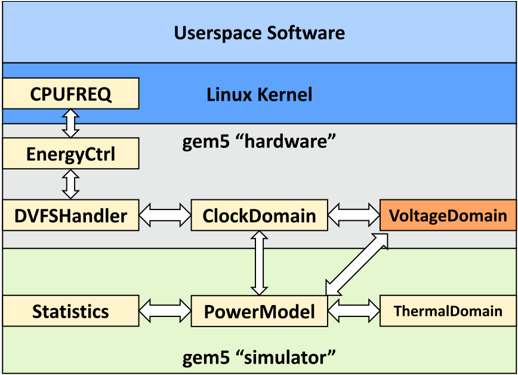
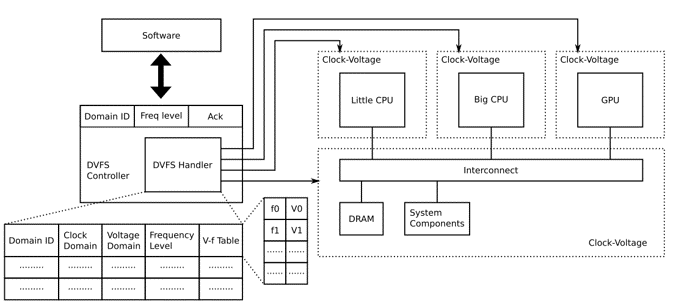
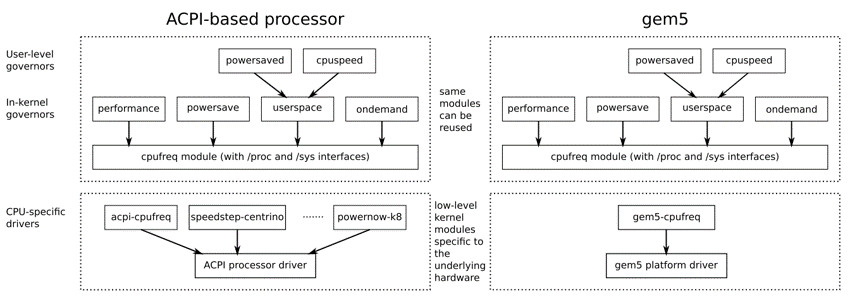
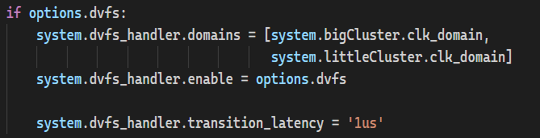
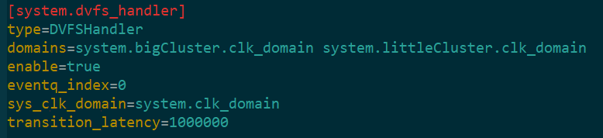
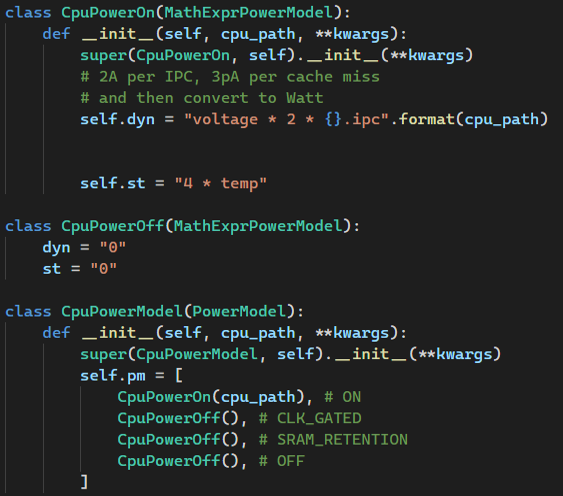
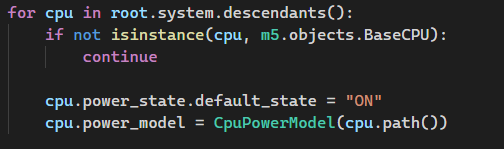
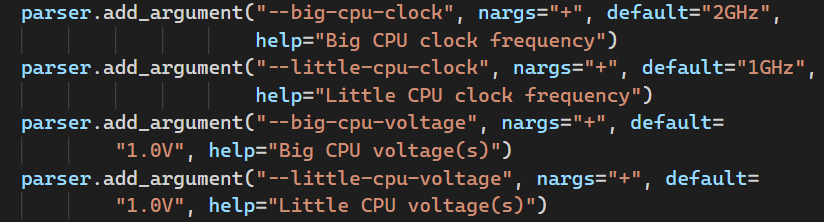
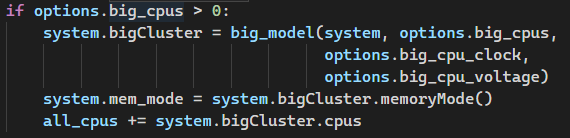
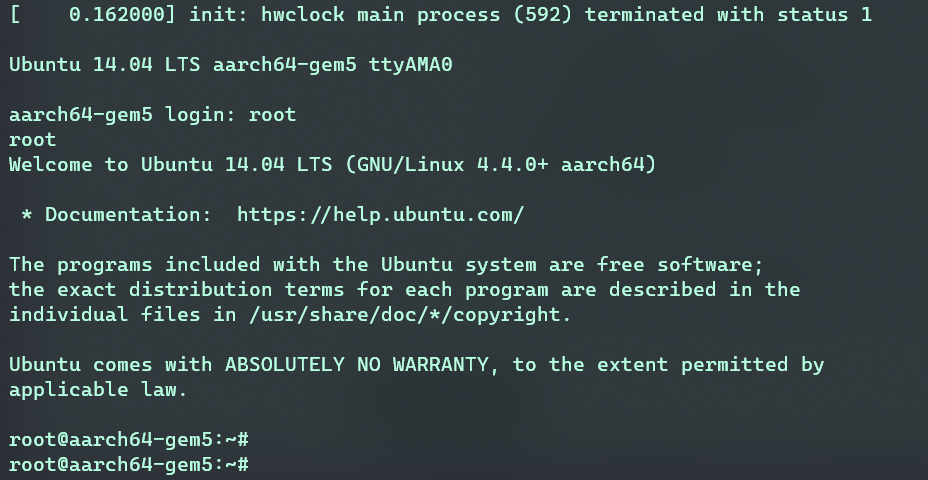
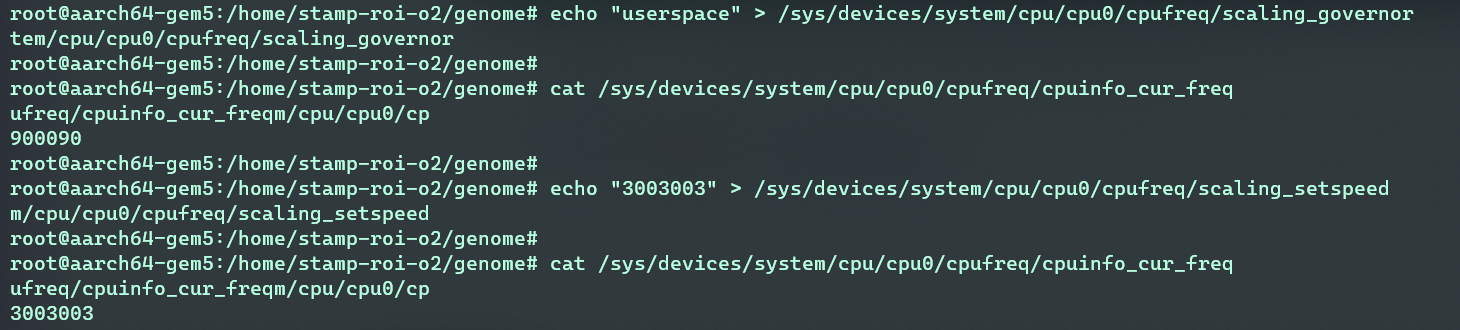
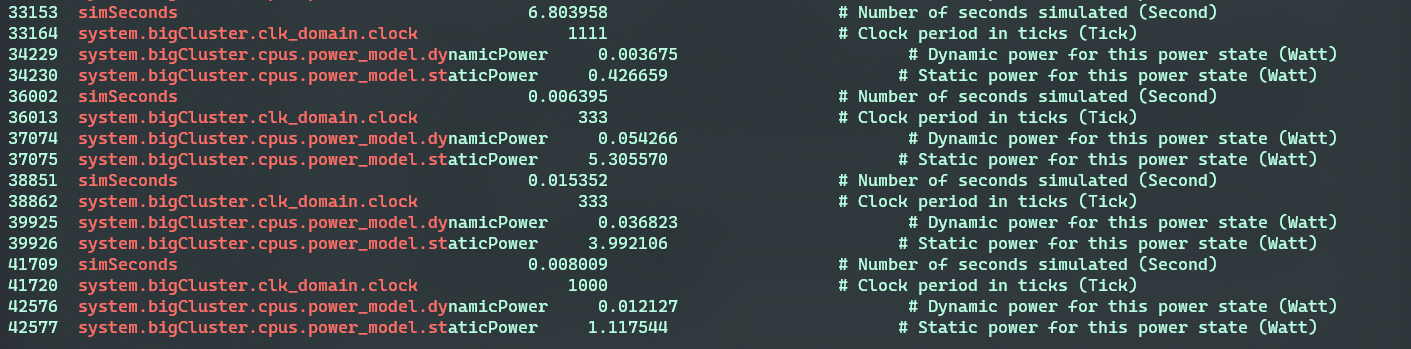
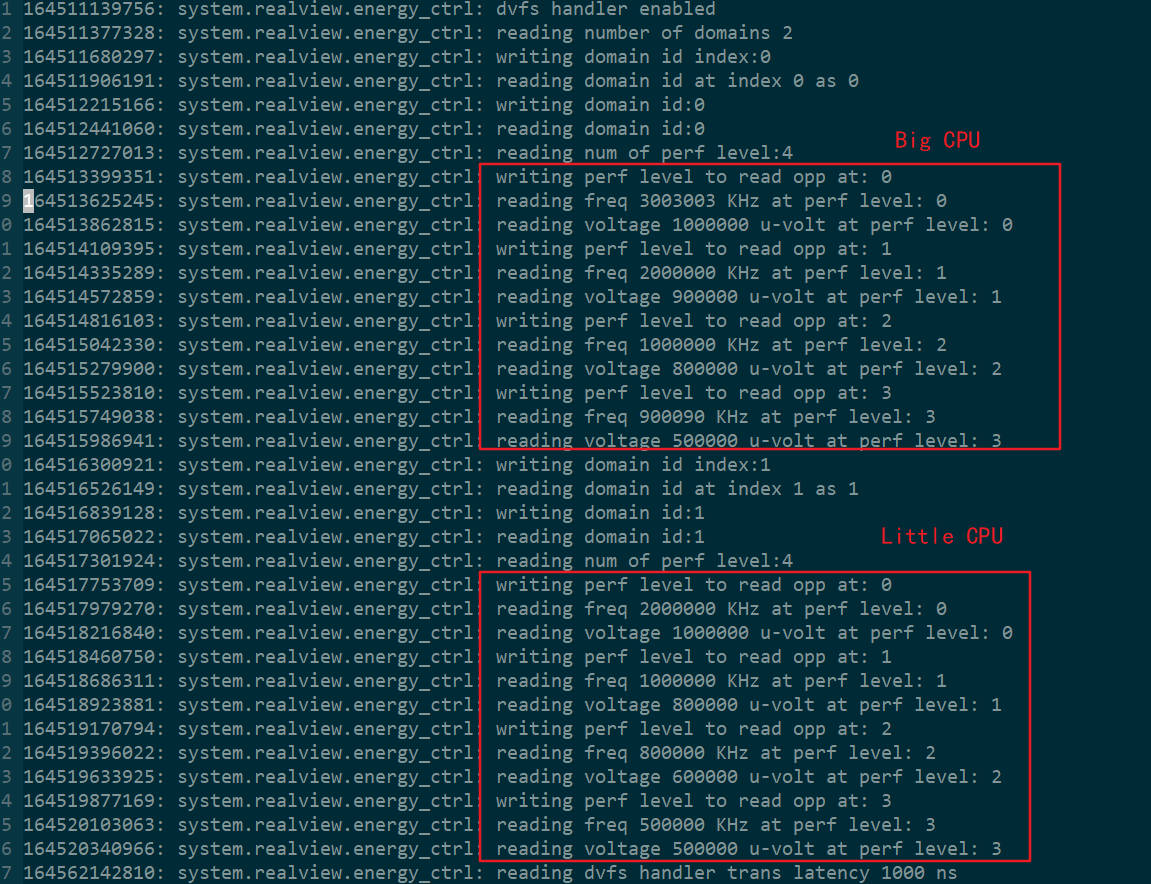
    <content type="html"><![CDATA[<h1 id="1-性能仿真器1"><a href="#1-性能仿真器1" class="headerlink" title="1 性能仿真器1"></a>1 性能仿真器<a href="#refer-anchor-1"><sup>1</sup></a></h1><p>上世纪80年代早期，高性能计算机的设计很大程度上是<code>数据驱动</code>的。例如对指令使用情况的分析发现在真实的机器上，不是每种指令都是以相同的频率被执行。设计人员利用这一观察来优化这些机器的具体实现。但是，这种直接的测量属于<code>后设计</code>操作步骤，并不总能在设计阶段帮助优化。作为替代方案，架构师们使用<code>分析模型</code>来预测性能，它们在初始阶段剔除一部分设计空间是成功的，但是在评估更复杂的<code>设计权衡</code>时不是那么奏效。</p><p>随着工艺节点的进步，片上能塞进更多的晶体管，计算机系统可以变得十分复杂。早在2004年，由于风冷芯片最大功耗和无法有效地开发更多指令集并行这两大孪生瓶颈，Intel取消自己的高性能单核处理器项目转向多核心开发。面对多核心，更深的存储层次，异构计算等日益复杂的计算系统，设计师们开始诉诸<code>仿真模型</code>在项目初期预测机器性能。</p><p>这些仿真模型大多使用高层次编程语言来编写，例如C或者C++。它们不仅要保证很高的评估保真度，而且在仿真速度上要比RTL高几个数量级。常见的性能仿真器有：<code>Rsim</code>, <code>Simics</code>, <code>SimpleScalar</code>和 <code>Asim</code></p><div class="table-container"><table><thead><tr><th style="text-align:center">仿真器</th><th style="text-align:center">特点</th></tr></thead><tbody><tr><td style="text-align:center"><a href="http://rsim.cs.illinois.edu/rsim/dist.html">Rsim</a></td><td style="text-align:center">仿真使用共享内存的ILP处理器的多核系统</td></tr><tr><td style="text-align:center"><a href="https://en.wikipedia.org/wiki/Simics">Simics</a></td><td style="text-align:center">全系统模拟器，用于以高性能速度运行目标硬件的未更改二进制文件</td></tr><tr><td style="text-align:center"><a href="http://www.simplescalar.com/">SimpleScalar</a></td><td style="text-align:center">计算机系统建模的基础设施（仿真框架)</td></tr><tr><td style="text-align:center"><a href="https://www.researchgate.net/publication/2955583_Asim_A_performance_model_framework">Asim</a></td><td style="text-align:center">一个性能模型框架，Asim 将 SimpleScalar 的重用理念扩展到模拟器本身内的细粒度模块化组件</td></tr></tbody></table></div><h1 id="2-gem5简介2"><a href="#2-gem5简介2" class="headerlink" title="2 gem5简介2"></a>2 gem5简介<a href="#refer-anchor-2"><sup>2</sup></a></h1><h2 id="2-1-gem5是什么"><a href="#2-1-gem5是什么" class="headerlink" title="2.1 gem5是什么"></a>2.1 gem5是什么</h2><blockquote><p>The gem5 <code>simulator</code> is a <code>modular platform</code> for computer-system architecture research, encompassing <code>system-level</code> architecture as well as <code>processor microarchitecture</code><a href="#refer-anchor-3"><sup>3</sup></a></p><ul><li>gem5是一个<code>开源</code>的计算机系统性能仿真器，既可以全系统仿真也可以进行处理器的微架构仿真。</li><li>gem5融合了<a href="https://www.computer.org/csdl/magazine/mi/2006/04/m4052/13rRUxYIMRJ">M5</a>和<a href="https://dl.acm.org/doi/10.1145/1105734.1105747">GEMS</a>仿真器两者最好的部分。M5提供高度可配置的仿真框架，多个ISAs还有多种CPU模型。GEMS通过详细且扩展性好的内存系统补充M5这些特点。</li><li>gem5是一个精英管理的社区工具。其良好的可扩展性，模块化仿真对象和简洁明确的接口使得研究者们可以专注于特定部分代码而无需理解全部代码。</li></ul></blockquote><h2 id="2-2-为什么使用gem54"><a href="#2-2-为什么使用gem54" class="headerlink" title="2.2 为什么使用gem54"></a>2.2 为什么使用gem5<a href="#refer-anchor-4"><sup>4</sup></a></h2><ul><li><code>运行真实的负载</code>(比如运行像Linux，Android等复杂的负载)</li><li><code>提供系统级别的视野</code>(比如设备之间的交互，操作系统交互)</li><li><code>挂载定制的模型</code>(gem5提供了封装有通用外设接口的基类，开箱即用的常见硬件模型)</li><li><code>早期快速原型验证</code>(通过参数化的模型使能快速设计空间探索)</li><li><code>gem5在工业和学术界有大量的用户群体</code>(自从2011年合并以来，gem5 已被 2900 多篇出版物引用)</li></ul><h2 id="2-3-gem5设计特色"><a href="#2-3-gem5设计特色" class="headerlink" title="2.3 gem5设计特色"></a>2.3 gem5设计特色</h2><blockquote><p>设计gem5时使用了很多卓越软件工程实践的方法：<code>无处不在的面向对象</code>, <code>集成Python</code>, <code>领域特定语言(DSL)</code>和<code>标准的接口</code></p></blockquote><ul><li><p><code>可扩展性</code>是gem5模拟器一个重要的目标，也是它成功的关键因素。而这种特性很大一部分是通过底层C++代码面向对象设计实现的。也正是由于gem5扩展性好，可以满足不同仿真任务的需求。例如，当一个想法从高层次的概念到具体的设计实现孵化过程中，架构师需要一个能在不同抽象层级上仿真的工具，兼具仿真速度和正确性。一个细粒度的门控实验可能需要详细的CPU模型，而对多核的建模不是必须的；与此同时一个高度可伸缩互连模型可能需要多个CPU,但是这些CPU没必要建模太多细节。此外，随着时间的推移，通过长期使用一个仿真配套设施，架构师能够以更少的开销更快地完成更多的工作。</p></li><li><p><code>Python集成</code>使得gem5的配置变得更加灵活，同时对用户的接口也更加友好。python主要完成仿真对象配置，初始化，构建系统的拓扑结构和仿真流的控制。</p></li><li><p><code>DSL</code>的使用使得gem5在<code>ISA</code>和<code>Cache Coherence</code>建模上更加简洁和高效。</p></li><li><p>gem5定义了一个重要的<code>port interface</code>，<code>Ports</code>用来连接gem5中两个内存对象。内存对象通过一个叫<code>Packet</code>的内存请求对象来传递消息。</p></li></ul><h2 id="2-4-gem5常见的模型"><a href="#2-4-gem5常见的模型" class="headerlink" title="2.4 gem5常见的模型"></a>2.4 gem5常见的模型</h2><ol><li><p><code>CPU 模型</code></p><p><img src="https://leeberty.uk/imgcdn/CPU%20model.png" alt="cpu model"></p><ul><li>从左到右建模得越来越详细，实现的功能也更多，但是仿真速度越来越慢。</li></ul></li><li><p><code>系统模式</code></p></li></ol><div class="table-container"><table><thead><tr><th>Full system mode(<code>FS</code>)</th><th>建模完整的计算系统，包括OS和外设。还需要建模中断，异常，特权指令，故障处理</th></tr></thead><tbody><tr><td>System-call Emulation mode(<code>SE</code>)</td><td>只用建模用户可见的ISA，加上常见的系统调用(通常通过调用主机的OS)</td></tr></tbody></table></div><ol><li><p><code>内存 模型</code></p><p><img src="https://leeberty.uk/imgcdn/Memory%20system.png" alt="memory system"></p><ul><li>gem5提供两种内存模型：<code>Classic</code> 和 <code>Ruby</code></li><li>在上图的例子中不需要使用Ruby选项运行gem5。但是如果研究缓存一致性协议，则可能需要使用Ruby模型，因为它提供了扩展性好的内存系统(SLICC用于缓存协议的领域专用语言），详细的统计数据和部件仿真模型。</li></ul></li></ol><h1 id="3-gem5开发介绍"><a href="#3-gem5开发介绍" class="headerlink" title="3 gem5开发介绍"></a>3 gem5开发介绍</h1><blockquote><p>几乎所有的gem5仿真对象使用C++编写，外面用Python包裹。gem5使用<a href="https://pybind11.readthedocs.io/en/stable/index.html">pybind11</a>工具完成C++对象和Python对象之间的绑定，而整个项目的编译则由<a href="https://scons.org/">Scons</a>构建工具完成。</p></blockquote><h2 id="3-1-gem5编译"><a href="#3-1-gem5编译" class="headerlink" title="3.1 gem5编译"></a>3.1 gem5编译</h2><ul><li><p>下载gem5源代码(写此文时最新稳定版本为v21.0.1.0)</p><p><code>git clone https://gem5.googlesource.com/public/gem5</code></p></li><li><p>编译gem5</p><ul><li><p><a href="https://www.gem5.org/documentation/learning_gem5/part1/building/">首先根据官方介绍下载依赖</a>(主要有python3和scons)</p></li><li><p>进行编译(可以选择<code>gem5/build_opts</code>下任意一个ISA和缓存一致性协议进行编译)</p><figure class="highlight bash"><table><tbody><tr><td class="gutter"><pre><span class="line">1</span><br></pre></td><td class="code"><pre><code class="hljs bash">python3 `<span class="hljs-built_in">which</span> scons` build/ARM/gem5.opt -j $(nproc)<br></code></pre></td></tr></tbody></table></figure></li><li><p>上面使用的ARM ISA进行编译，并编译了所有的CPU model，也可以修改<code>gem5/build_opts/ARM</code>，只编译一部分CPU模型。</p></li><li><p>gem5有五种二进制类型: <code>debug</code>, <code>opt</code>, <code>fast</code>, <code>prof</code> 和<code>perf</code>。具体差别见<a href="https://www.gem5.org/documentation/learning_gem5/part1/building/">官网介绍</a>。通常使用opt类型。</p></li></ul></li></ul><h2 id="3-2-创建gem5仿真对象"><a href="#3-2-创建gem5仿真对象" class="headerlink" title="3.2 创建gem5仿真对象"></a>3.2 创建gem5仿真对象</h2><blockquote><p>gem5 中的所有主要仿真组件都是继承<code>SimObjects</code>， 并都具有配置、初始化、统计和序列化(检查点)的常见行为。每个仿真对象由两个类代表，一个在C++中，一个在Python中。</p><p>所有的仿真对象需要放在<code>gem5/src</code>目录下面，每次修改后需要重新编译，才能在仿真脚本中引用得到。</p></blockquote><ol><li><p><code>Python file</code><br> <img src="https://leeberty.uk/imgcdn/python%20file.png" alt="Python file"></p><ul><li>创建一个与C++对象同名的类，并继承SimObject</li><li>指明C++头文件位置(相对gem5/src目录的位置)</li><li>声明该对象可配置的参数，并可以赋予初值。(第一次参数为初值，第二参数为说明)</li></ul></li><li><p><code>C++文件</code>(一个头文件声明，一个文件进行函数实现)</p><p><img src="https://leeberty.uk/imgcdn/c++%20head%20file.png" alt="c++ head file"></p><p><img src="https://leeberty.uk/imgcdn/c++%20file.png" alt="C++文件"></p><ul><li>C++对象继承SimObject,同时使用<code>member initializer lists(成员初始化列表)</code>给类成员在构造函数中赋初值</li><li>gem5有一种机制，根据python对象名自动创建一个<code>xxxParams</code>类，并且该类包含了python文件中给的初始值。</li></ul></li><li><p>SConscript文件(类似cmake中的CMakeLists.txt)</p><p> <img src="https://leeberty.uk/imgcdn/scons%20file.png" alt="scons file"></p><ul><li>SConscript相当于python脚本，可以写任何符合python语法的程序。</li><li>Import，DebugFlag，SimObject, Source都是Scons提供的方法，便于用户使用。</li></ul></li></ol><h2 id="3-3-仿真配置脚本"><a href="#3-3-仿真配置脚本" class="headerlink" title="3.3 仿真配置脚本"></a>3.3 仿真配置脚本</h2><blockquote><p>gem5 源代码提供了很多实用程序和通用的配置脚本文件，都放在gem5/config/目录下。</p></blockquote><ul><li><p>首先引入仿真对象</p><figure class="highlight python"><table><tbody><tr><td class="gutter"><pre><span class="line">1</span><br><span class="line">2</span><br></pre></td><td class="code"><pre><code class="hljs python"><span class="hljs-keyword">import</span> m5<br><span class="hljs-keyword">from</span> m5.objects <span class="hljs-keyword">import</span> *<br></code></pre></td></tr></tbody></table></figure></li><li><p>创建一个<code>root</code>对象，系统中所有对象都是它的子对象(注：通常所有对象挂载在root.system层次下面，本次实验为了简单，没有使用system对象)</p><figure class="highlight python"><table><tbody><tr><td class="gutter"><pre><span class="line">1</span><br></pre></td><td class="code"><pre><code class="hljs python">root = Root(full_system = <span class="hljs-literal">False</span>)<br></code></pre></td></tr></tbody></table></figure></li><li><p>实例化一个HelloObject对象，并挂载在root下面（gem5中内存对象至少有一个slave或master端口，当python中用=操作符进行连接时，底层调用端口连接函数）</p><figure class="highlight python"><table><tbody><tr><td class="gutter"><pre><span class="line">1</span><br><span class="line">2</span><br></pre></td><td class="code"><pre><code class="hljs python">root.hello_test = HelloObject(time_to_wait=<span class="hljs-string">'2ns'</span>, number_of_fires=<span class="hljs-number">10</span>)<br><span class="hljs-comment"># 可以通过配置脚本覆盖参数的默认值</span><br></code></pre></td></tr></tbody></table></figure></li><li><p>系统搭建完毕后就可以仿真</p><figure class="highlight python"><table><tbody><tr><td class="gutter"><pre><span class="line">1</span><br><span class="line">2</span><br><span class="line">3</span><br><span class="line">4</span><br></pre></td><td class="code"><pre><code class="hljs python">m5.instantiate()<br>print(<span class="hljs-string">"Beginning simulation!"</span>)<br>exit_event = m5.simulate()<br>print(<span class="hljs-string">'Exiting @ tick %i because %s'</span> % (m5.curTick(), exit_event.getCause()))<br></code></pre></td></tr></tbody></table></figure><h2 id="3-4-开始仿真"><a href="#3-4-开始仿真" class="headerlink" title="3.4 开始仿真"></a>3.4 开始仿真</h2></li></ul><blockquote><p>仿真命令类似如下：</p><p><code>build/ARM/gem5.opt --debug-flags=HelloExample configs/learning_gem5/part2/hello_goodbye.py</code></p></blockquote><p><img src="https://leeberty.uk/imgcdn/helloExample.png" alt="仿真结果"></p><blockquote><hr><p>完整的实验步骤请参考<a href="https://www.gem5.org/documentation/learning_gem5/part2/helloobject/">官网教程</a></p></blockquote><h1 id="4-DVFS背景"><a href="#4-DVFS背景" class="headerlink" title="4 DVFS背景"></a>4 DVFS背景</h1><blockquote><p>DVFS全称为动态电压频率缩放，是一种重要的电源管理方法。本部分内容主要来自2013年的一篇论文<a href="#refer-anchor-3"><sup>3</sup></a></p></blockquote><p>想要在gem5中模型DVFS需要做哪些东西呢？</p><p><img src="https://leeberty.uk/imgcdn/dvfs%E6%9E%B6%E6%9E%84.png" alt="DVFS在gem5系统中的架构"></p><ul><li>硬件支持<ul><li>CPU等硬件支持多频率电压工作</li><li>需要设计一个DVFS controller与软件交互</li></ul></li><li>软件支持<ul><li>通常Linux上已经存在DVFS governor可以复用(高层次模块)</li><li>我们只需要设计底层驱动，特定于硬件</li></ul></li><li>功耗评估模型<ul><li>实时统计系统功耗，输入给温控系统</li><li>比较DVFS策略的能耗效率</li></ul></li></ul><h2 id="4-1-DVFS-controller"><a href="#4-1-DVFS-controller" class="headerlink" title="4.1 DVFS controller"></a>4.1 DVFS controller</h2><p><img src="https://leeberty.uk/imgcdn/dvfs_controller.png" alt="dvfs controller"></p><ul><li>外部提供三个寄存器：<code>domain_id</code>(每个时钟域下可以有多个仿真对象),<code>Freq level</code>(从012开始编号,编号越小频率越高),<code>Ack</code>(只读寄存器，读完清零，当当前转换完成时硬件置1)</li><li>内部记录各个时钟域的相关信息，并响应请求进行时钟电压的变换。</li><li>还需要抽象一个<code>DVFS Handler</code>仿真对象(不是IO设备),方便用户将时钟域配置进去。</li></ul><h2 id="4-2-Linux-cpufreq-driver"><a href="#4-2-Linux-cpufreq-driver" class="headerlink" title="4.2 Linux cpufreq driver"></a>4.2 Linux cpufreq driver</h2><p><img src="https://leeberty.uk/imgcdn/cpufreq%E9%A9%B1%E5%8A%A8.png" alt="cpufreq 驱动"></p><ul><li>Linux内核一般有DVFS管理驱动程序。<code>performance</code>: 始终以最大频率运行;<code>powersave</code>: 始终以最低频率运行;<code>userspace</code>:用户自行调整频率，通过向<code>scaling_stepeed</code>文件写入频率值。<code>ondemand</code>:系统根据负载需要自行调整频率。</li><li>下层驱动需要与dvfs controller交互，同时给上层管理程序提供服务。这部分特定于硬件实现，但是只要符合上层驱动的接口规范，就可以不用修改地复用上层模块。</li><li>当需要模拟不同的电压-频率点时，只需要修改设备树文件，底层驱动从设备树文件初始化硬件，而不需重新编译下层驱动。</li></ul><h2 id="4-3-power-model"><a href="#4-3-power-model" class="headerlink" title="4.3 power model"></a>4.3 power model</h2><p><img src="https://leeberty.uk/imgcdn/power%20model.png" alt="能耗模型"></p><blockquote><p>gem5是个模块化的系统，通过累加每个模块的能耗得出整体的能耗。每个模块分为5种电源状态，每个状态又分别由动态功耗和静态功耗组成。模块处于何种状态由系统决定，模块每种状态下计算功耗的公式人为给定。</p></blockquote><h1 id="5-DVFS实验"><a href="#5-DVFS实验" class="headerlink" title="5 DVFS实验"></a>5 DVFS实验</h1><blockquote><p>本次实验主要参考官方教程中的<a href="https://www.gem5.org/documentation/learning_gem5/part2/arm_power_modelling/">ARM power Modelling</a>和<a href="https://www.gem5.org/documentation/learning_gem5/part2/arm_dvfs_support/">ARM DVFS Support</a></p></blockquote><ul><li><p>目前最新版本(v21.0.1.0)的gem5已经内置了DVFS controller，并且提供了DVFS_Handler仿真对象</p><p><img src="https://leeberty.uk/imgcdn/dvfs%E9%85%8D%E7%BD%AE%E8%84%9A%E6%9C%AC.png" alt="dvfs配置脚本"></p><p><img src="https://leeberty.uk/imgcdn/dvfs%E7%B3%BB%E7%BB%9F%E7%8A%B6%E6%80%81%E6%96%87%E4%BB%B6.png" alt="系统参数文件"></p><blockquote><ul><li><p>在系统仿真配置文件中使能DVFS_Handler，并将需要模拟的时钟域注册进去。</p></li><li><p>当前系统参数文件见：<code>gem5/m5out/config.ini</code> 或者config.json文件</p></li></ul></blockquote></li><li><p>gem5官方提供的修改过后的Linux版本内置了DVFS底层驱动</p><ul><li>当gem5以全系统模式仿真时，通过设置不同DVFS governor，即不同的策略，来实现动态的电压频率缩放。</li><li>本次实验使用的<a href="https://github.com/gem5/linux-arm-gem5/commits/gem5/v4.4">v4.4内核</a>，底层驱动为<code>arm-gem5-mc</code></li></ul><p><img src="https://leeberty.uk/imgcdn/arm-gem5-mc.png" alt="底层驱动"></p></li></ul><h2 id="5-1-功耗估计模型"><a href="#5-1-功耗估计模型" class="headerlink" title="5.1 功耗估计模型"></a>5.1 功耗估计模型</h2><blockquote><p>下面代码见gem5/configs/example/arm/fs_power.py文件</p></blockquote><p><img src="https://leeberty.uk/imgcdn/%E5%8A%9F%E8%80%97%E4%BC%B0%E8%AE%A1%E6%A8%A1%E5%9E%8B.png" alt="功耗估计模型"></p><blockquote><p>gem5提供的<code>MathExprPowerModel</code>类，用于用公式表达一种电源状态下模块的动静态功耗。gem5提供的<code>PowerModel</code>类用于封装模块4种状态下的功耗模型。</p><p>每个模块一般都会有各种统计信息可以用于功耗公式中，例如CPU模块的统计参数见:<code>gem5/src/cpu/base.cc</code>中的   <code>ADD_STAT(numCycles, UNIT_CYCLE, "Number of cpu cycles simulated")</code>等。Cache模块的统计参数见:<code>gem5/src/mem/cache/base.cc</code>中的<code>ADD_STAT(overallMisses, UNIT_COUNT, "number of overall misses")</code>等。</p><p>如果遇到<code>fatal: Failed to evaluate power expressions: [...]</code>，多半是因为当前模块没有该统计参数或者名称输入错误。解决办法：用vscode打开gem5/src文件夹，然后搜索ADD_STAT(xxx)，查看当前参数在哪个类中定义；或者查找相近的统计参数名称进行比对。</p></blockquote><p><img src="https://leeberty.uk/imgcdn/%E6%B3%A8%E5%86%8C%E5%8A%9F%E8%80%97%E6%A8%A1%E5%9E%8B%E5%88%B0%E6%A8%A1%E5%9D%97%E4%B8%AD.png" alt="注册功耗模型到模块中"></p><blockquote><p>将之前定义的<code>CPUPowerModel</code>类注册到系统中所有CPU中，这样全系统仿真时才会有CPU的功耗统计结果。</p><p>最后，可以设置每间隔多长时间，dump一次统计数据(👇使用间隔为0.01s仿真时间，默认为1s)</p><figure class="highlight python"><table><tbody><tr><td class="gutter"><pre><span class="line">1</span><br></pre></td><td class="code"><pre><code class="hljs python">m5.stats.periodicStatDump(m5.ticks.fromSeconds(<span class="hljs-number">0.1E-1</span>))<br></code></pre></td></tr></tbody></table></figure><h2 id="5-2-设置时钟-电压域"><a href="#5-2-设置时钟-电压域" class="headerlink" title="5.2 设置时钟-电压域"></a>5.2 设置时钟-电压域</h2></blockquote><ul><li>电压域包含在时钟域里面</li><li>电压域如果是单值——时钟域可以是单值也可以是多值</li><li>电压域如果是多值——时钟域必须是多值，且项数与电压域匹配(使用降序)</li></ul><ol><li>首先在gem5/configs/example/arm/devices.py中的<code>CpuCluster</code>类中self.clk_domain中，加入<code>domain_id=system.numCpuClusters()</code>，因为domain_id必须唯一。(当系统实例化bigCluster时domai_id=0，接着实例化littleCluster时domain_id=1)</li></ol><p><img src="https://leeberty.uk/imgcdn/%E6%97%B6%E9%92%9F%E5%9F%9Fdevices.png" alt="设置域id"></p><ol><li><p>接在在gem5/configs/example/arm/fs_bigLITTLE.py，加入对大小核时钟和电压的命令行参数输入。</p><p><img src="https://leeberty.uk/imgcdn/%E5%8F%82%E6%95%B0%E9%85%8D%E7%BD%AE%E7%94%B5%E5%8E%8B%E5%92%8C%E6%97%B6%E9%92%9F.png" alt="参数配置电压和时钟"></p></li><li><p>将电压和频率配置进<code>CpuCluster</code>中</p><p><img src="https://leeberty.uk/imgcdn/fs_bigLITTLE.png" alt="注册电压和频率"></p></li></ol><h2 id="5-3-全系统仿真"><a href="#5-3-全系统仿真" class="headerlink" title="5.3 全系统仿真"></a>5.3 全系统仿真</h2>   <figure class="highlight bash"><table><tbody><tr><td class="gutter"><pre><span class="line">1</span><br><span class="line">2</span><br><span class="line">3</span><br><span class="line">4</span><br><span class="line">5</span><br><span class="line">6</span><br><span class="line">7</span><br><span class="line">8</span><br><span class="line">9</span><br><span class="line">10</span><br><span class="line">11</span><br><span class="line">12</span><br></pre></td><td class="code"><pre><code class="hljs bash">&gt; <span class="hljs-built_in">cd</span> your/gem5/main/directory<br>&gt; build/ARM/gem5.opt \<br>--debug-flags=dvfs_handler,EnergyCtrl \<br>--debug-file=dvfs_debug.log  \<br>configs/example/arm/fs_power.py  \<br>--kernel=../full_system_for_gem5/binaries/vmlinux_4.4 \<br>--cache  \<br>--dvfs \<br>--big-cpu-clock 3GHz 2GHz 1GHz 900MHz \<br>--big-cpu-voltage 1.0V 0.9V 0.8V 0.5V \<br>--little-cpu-clock 2GHz 1GHz 800MHz 500MHz \<br>--little-cpu-voltage 1.0V 0.8V 0.6V 0.5Vs<br></code></pre></td></tr></tbody></table></figure><ul><li>设置debug-flags为<code>dvfs_handler</code>和<code>EnergyCtrl</code></li><li>设置debug-file为dvfs_debug.log，此文件将记录系统初始化DVFS，频率切换过程等</li><li>—kernel指定内核，本次实验使用的是v4.4。</li><li>可以使用—disk设置镜像文件位置，脚本默认镜像为aarch64-ubuntu-trusty-headless.img，可以通过<a href="http://dist.gem5.org/dist/current/arm/disks/aarch64-ubuntu-trusty-headless.img.bz2">网址</a>下载。</li><li>需要设置<code>M5_PATH</code>环境变量，该目录包含两个文件夹，分别为binary和disk，把编译好的内核vmlinux复制到binary文件夹下，下载好的镜像复制到disk文件夹下。</li></ul><hr><ol><li><p>另开一个终端，输入命令<code>telnet localhost 3456</code>，等待两到三小时后(因为默认大核使用的O3 CPU，小核使用的Minor CPU，所以启动Linux很慢)，进入Linux命令行，输入root即可。</p><p><img src="https://leeberty.uk/imgcdn/%E8%BF%9B%E5%85%A5Linux%E5%91%BD%E4%BB%A4%E8%A1%8C.png" alt="进入Linux命令行"></p></li><li><p>进入cpufreq目录(dvfs内核接口)</p><figure class="highlight bash"><table><tbody><tr><td class="gutter"><pre><span class="line">1</span><br><span class="line">2</span><br></pre></td><td class="code"><pre><code class="hljs bash">&gt; <span class="hljs-built_in">cd</span> /sys/devices/system/cpu/cpu0/cpufreq<br>&gt; ls<br></code></pre></td></tr></tbody></table></figure><blockquote><p>该目录下有很多与dvfs有关的信息文件，比如<code>scaling_driver</code>即底层驱动名称，scaling_governor为高层驱动名称。cpuinfo_tarnsition_latency为频率调整时间，cpuinfo_cur_freq为当前CPU频率等。</p></blockquote><p><img src="https://leeberty.uk/imgcdn/cpufreq%20directory.png" alt="cpufreq 目录"></p><figure class="highlight bash"><table><tbody><tr><td class="gutter"><pre><span class="line">1</span><br></pre></td><td class="code"><pre><code class="hljs bash">&gt; cat scaling_available_frequencies<br></code></pre></td></tr></tbody></table></figure><p><img src="https://leeberty.uk/imgcdn/scaling_frequency.png" alt="可以调整的频率"></p><figure class="highlight bash"><table><tbody><tr><td class="gutter"><pre><span class="line">1</span><br><span class="line">2</span><br><span class="line">3</span><br><span class="line">4</span><br></pre></td><td class="code"><pre><code class="hljs bash">&gt; <span class="hljs-built_in">echo</span> <span class="hljs-string">"userspace"</span> &gt; scaling_governor<br>&gt; cat cpuinfo_cur_freq<br>&gt; <span class="hljs-built_in">echo</span> <span class="hljs-string">"3003003"</span> &gt; scaling_setspeed<br>&gt; cat cpuinfo_cur_freq<br></code></pre></td></tr></tbody></table></figure><p><img src="https://leeberty.uk/imgcdn/%E6%89%8B%E5%8A%A8%E8%B0%83%E9%A2%91%E7%8E%87.png" alt="手动调频"></p></li></ol><h2 id="5-4-Benchmark比较"><a href="#5-4-Benchmark比较" class="headerlink" title="5.4 Benchmark比较"></a>5.4 Benchmark比较</h2><blockquote><p>通过跑stamp-roi-o2/genome/genome_roi_lock来比较<code>performance</code>和<code>Ondemand</code>不同调度策略的效率。</p></blockquote><ol><li><p>在5.3节中我们已经进入仿真系统的Linux命令行，由于Linux默认调度程序为<code>perfermance</code>，所以先保存一个检查点。</p><figure class="highlight python"><table><tbody><tr><td class="gutter"><pre><span class="line">1</span><br></pre></td><td class="code"><pre><code class="hljs python">&gt; m5 checkpoint <br></code></pre></td></tr></tbody></table></figure><p>保存的检查点文件夹在gem5/m5out下，一般以cpt.xxx命名的目录下(xxx为从仿真开始到执行checkpoint这段时间的时钟tick数)</p></li><li><p>然后，调整scaling_governor为ondemand后，再保存一个检查点。</p><figure class="highlight bash"><table><tbody><tr><td class="gutter"><pre><span class="line">1</span><br><span class="line">2</span><br></pre></td><td class="code"><pre><code class="hljs bash">&gt; <span class="hljs-built_in">echo</span> <span class="hljs-string">"ondemand"</span> &gt; /sys/devices/system/cpu/cpu0/cpufreq/scaling_governor<br>&gt; m5 checkpoint<br></code></pre></td></tr></tbody></table></figure></li><li><p>从<code>perfermance</code>恢复，然后开始执行程序</p><figure class="highlight bash"><table><tbody><tr><td class="gutter"><pre><span class="line">1</span><br><span class="line">2</span><br><span class="line">3</span><br><span class="line">4</span><br><span class="line">5</span><br><span class="line">6</span><br><span class="line">7</span><br><span class="line">8</span><br><span class="line">9</span><br><span class="line">10</span><br><span class="line">11</span><br><span class="line">12</span><br><span class="line">13</span><br><span class="line">14</span><br></pre></td><td class="code"><pre><code class="hljs bash">&gt; build/ARM/gem5.opt \<br>--debug-flags=dvfs_handler,EnergyCtrl \<br>--debug-file=dvfs_debug.log  \<br>configs/example/arm/fs_power.py  \<br>--kernel=../full_system_for_gem5/binaries/vmlinux_4.4 \<br>--cache  \<br>--dvfs \<br>--big-cpu-clock 3GHz 2GHz 1GHz 900MHz \<br>--big-cpu-voltage 1.0V 0.9V 0.8V 0.5V \<br>--little-cpu-clock 2GHz 1GHz 800MHz 500MHz \<br>--little-cpu-voltage 1.0V 0.8V 0.6V 0.5Vs<br>--retore-from m5out/performance<br><br>&gt; ./genome_roi_lock -g256 -s16 -n16384 -t1<br></code></pre></td></tr></tbody></table></figure><p><img src="https://leeberty.uk/imgcdn/perfermance_time.png" alt="performance运行时间"></p><p>再开一个窗口，查看gem5统计的数据(<code>gem5/m5out/stats.txt</code>)</p><figure class="highlight bash"><table><tbody><tr><td class="gutter"><pre><span class="line">1</span><br></pre></td><td class="code"><pre><code class="hljs bash">&gt; cat -n stats.txt | grep -E <span class="hljs-string">'system.bigCluster.clk_domain.clock|simSeconds|system.bigCluster.cpus.power_model.dy*|system.bigCluster.cpus.power_model.st*'</span><br></code></pre></td></tr></tbody></table></figure><p><img src="2021-08-25-gem5简介和dvfs应用初探\performance_statistic.png" alt="performance 统计数据"></p></li><li><p>从<code>ondemand</code>中恢复,然后开始执行程序</p><figure class="highlight bash"><table><tbody><tr><td class="gutter"><pre><span class="line">1</span><br><span class="line">2</span><br><span class="line">3</span><br><span class="line">4</span><br><span class="line">5</span><br><span class="line">6</span><br><span class="line">7</span><br><span class="line">8</span><br><span class="line">9</span><br><span class="line">10</span><br><span class="line">11</span><br><span class="line">12</span><br><span class="line">13</span><br><span class="line">14</span><br></pre></td><td class="code"><pre><code class="hljs bash">&gt; build/ARM/gem5.opt \<br>--debug-flags=dvfs_handler,EnergyCtrl \<br>--debug-file=dvfs_debug.log  \<br>configs/example/arm/fs_power.py  \<br>--kernel=../full_system_for_gem5/binaries/vmlinux_4.4 \<br>--cache  \<br>--dvfs \<br>--big-cpu-clock 3GHz 2GHz 1GHz 900MHz \<br>--big-cpu-voltage 1.0V 0.9V 0.8V 0.5V \<br>--little-cpu-clock 2GHz 1GHz 800MHz 500MHz \<br>--little-cpu-voltage 1.0V 0.8V 0.6V 0.5Vs<br>--retore-from m5out/ondemand<br><br>&gt; ./genome_roi_lock -g256 -s16 -n16384 -t1<br></code></pre></td></tr></tbody></table></figure><p><img src="https://leeberty.uk/imgcdn/ondemand_time_2.png" alt="ondemand 运行时间"></p><p><img src="https://leeberty.uk/imgcdn/on_demand_statistic_2.png" alt="Ondemand统计数据"></p><ul><li><p>从statistic可以看出，在跑程序之前CPU工作在最低频率下，即图中的clock=1111(900MHz)；当进入程序时，governor将CPU频率从1111变化到333(即3GHz)，以最高频率工作。当工作完成后，CPU继续以3GHz进行程序的收尾部分，然后在某一瞬间，变化到1GHz(1000)，如果后续没有负载则在这个过渡态待一会儿，又将CPU调度到900MHz工作。</p><p><img src="2021-08-25-gem5简介和dvfs应用初探\Ondemand全过程.png" alt="Ondemand时序图"></p></li></ul></li><li><p>结果比较</p><p>| <code>dvfs调度策略</code> | 时间(s)  | 动态功耗(w) | 静态功耗(w) |<br>| :——————: | :———: | :————-: | :————-: |<br>|  performance   | 0.004403 |    1.65     |    93.84    |<br>|    ondemad     | 0.007800 |    0.05     |     5.3     |</p><ul><li>由于Ondemand将cpu调整到3GHz，有延迟并且需要转换时间，而Performance策略CPU一直在3GHz运行，因此Ondemand运行的时间更长。</li><li>由于本次实验只是想通过DVFS达到控制频率点的目的，对于CPU还有其它模块的动静态功耗公式只是用单一指标简单示意(比如动态功耗定义成与电压成正比，静态功耗定义成与温度成正比)，没有进行详尽的建模和修正，所以计算得到的结果只能比较相对值，绝对值没有意义。</li><li>在Performance的调度策略下，CPU一直处于最高频率下工作，温度会较低频率更高。因此静态功耗会更高。又因为越高的频率所需的电压越高，其动态功率也会越大，与最后得到的实验结果相一致。</li></ul></li></ol><h2 id="5-5-遗留问题"><a href="#5-5-遗留问题" class="headerlink" title="5.5 遗留问题"></a>5.5 遗留问题</h2><ol><li><p>为什么只有CPU0(即大核)能够应用DVFS，而CPU1(小核)不能动态调整频率。</p><p><img src="https://leeberty.uk/imgcdn/dvfs_log.png" alt="dvfs_debug log"></p><blockquote><p>通过查看<code>dvfs_debug.log</code>文件，可以看到系统成功初始化两个domain域，大核域id为0；小核域id为1。并且初始化的电压-频率点与命令行手动输入的相吻合。由此判断DVFS的底层驱动是正确的。但是<code>/sys/devices/system/cpu/</code>文件夹下只有<code>cpu0</code>提供上层模块用户接口的<code>cpufreq</code>文件夹，而<code>cpu0</code>却没有，猜测可能的原因是目前官方提供的内核的dvfs高层驱动只支持挂载一个域。</p></blockquote></li><li><p>为什么在performance下运行benchmark只输出一组数据，而在Ondemand下输出四组数据。</p><blockquote><p>通过反复实验观察，gem5会默认每隔1s的仿真时间dump一次数据。可以通过m5.stats.periodicStatDump覆盖默认的dump周期(见5-1)。其次gem5内部实现了一种机制，只要一个域的频率发生了变化就dump一次数据(目前还没有找到办法禁掉该特性)。再者运行benchmark时，在程序ROI结尾也会自动dump一次数据。</p></blockquote></li></ol><h1 id="6-总结"><a href="#6-总结" class="headerlink" title="6 总结"></a>6 总结</h1><ul><li>gem5是一个高度模块化，参数化的性能仿真器。</li><li>gem5一直在更新迭代，对原有模型进行补充并不断有新的模型和特定应用扩展加入gem5主线</li><li>通过阅读相关文献，了解到用户在gem5中可以定制化建模硬件，并和其它现有的模型连接成系统，在这个虚拟的系统中运行未经修改或者修改后的操作系统或应用程序。</li><li>通过DVFS实验，学习到了gem5的全系统模式仿真，命令行参数配置，复杂系统的python配置文件编写等。</li></ul><h1 id="参考资料"><a href="#参考资料" class="headerlink" title="参考资料"></a>参考资料</h1><p></p><div id="refer-anchor-1"></div><p></p><ul><li>[1] Mukherjee, S. et al. “Performance Simulation Tools.” <em>Computer</em> 35 (2002): 38-39.<div id="refer-anchor-2"></div></li><li>[2] Binkert N, Beckmann B, Black G, et al. The gem5 simulator [J]. SIGARCH Comput Archit News, 2011, 39(2): 1–7.<div id="refer-anchor-3"></div></li><li>[3] gem5官方介绍和相关教程<a href="https://www.gem5.org/">https://www.gem5.org/</a><div id="refer-anchor-4"></div></li><li>[4] Presented by Andreas Sandberg Nikos Nikoleris, <a href="https://www.youtube.com/watch?v=81lm0hp0t-M&amp;list=PLr8iflX7VSArgv4cnqFq0qv6YtLfe4Kra">Arm at the Arm Research Summit 2017</a><div id="refer-anchor-5"></div></li><li>[5] V. Spiliopoulos, A. Bagdia, A. Hansson, P. Aldworth, and S. Kaxiras, ‘Introducing DVFS-Management in a Full-System Simulator’, in Proc. 21st International Symposium on Modeling, Analysis and Simulation of Computer and Telecommunication Systems, 2013.</li></ul><!-- flag of hidden posts -->]]></content>


    <summary type="html">&lt;h1 id=&quot;1-性能仿真器1&quot;&gt;&lt;a href=&quot;#1-性能仿真器1&quot; class=&quot;headerlink&quot; title=&quot;1 性能仿真器1&quot;&gt;&lt;/a&gt;1 性能仿真器&lt;a href=&quot;#refer-anchor-1&quot;&gt;&lt;sup&gt;1&lt;/sup&gt;&lt;/a&gt;&lt;/h1&gt;&lt;p&gt;上世纪80</summary>


    <category term="CS" scheme="https://www.beenli.cn/categories/CS/"/>
    
    <category term="Computer Organization &amp; Design" scheme="https://www.beenli.cn/categories/CS/Computer-Organization-Design/"/>
    
    
    <category term="Architecture" scheme="https://www.beenli.cn/tags/Architecture/"/>
    
    <category term="gem5" scheme="https://www.beenli.cn/tags/gem5/"/>
    
  </entry>
  
  <entry>
    <title>祝姐姐生日快乐</title>
    <link href="https://www.beenli.cn/posts/73cde49/"/>
    <id>https://www.beenli.cn/posts/73cde49/</id>
    <published>2020-12-26T14:46:48.000Z</published>
    <updated>2021-12-02T03:31:05.143Z</updated>
    
    <content type="html"><![CDATA[<div class="hbe hbe-container" id="hexo-blog-encrypt" data-wpm="抱歉，这个密码看着不太对，请再试试。" data-whm="抱歉，这个文章不能被纠正，不过您还是能看看解密后的内容。">  <script id="hbeData" type="hbeData" data-hmacdigest="ee0db8ca0c71989bbdd733006ea2f82db6993bd2a59cadcfd14c47f463f3a0ef">765cd4b020f39b1839cce7d1faeca93862b5fd8f199261ab17dfee835d3ea6de68ebd08acfd52d6d650d0ce89df87b8125abb47a1ce5e1d8878a8ec381a443b8ff517a714a93f635cbcf4a87a852c7d37e4ebfc37d168eca59a87814d99775cab2039c85ce7813f373f8b3e79e6fc9bb388b90eba81aacd6988c27d00ce64f5faaa97db4e09d874ca8a441c2a8ffbb70a2d72522a473333bdab01b44ea8d60e773c68da4f5e9948cbf4826186d7f8c0ea50197be6188cde45925e82de8d62ba916c7501ce469d9e4a59f94db05daf797d5b1eda53f0294d17dc95c2ae692845bf5c1965e643687910461040bdbda310f423c8e82dec4d46fedabb872862b2175a8d206b2eb028cba0672d3b052f072da4347e0aa1c2fcb5c79fcb60da3b561888f375eff33d33b7dcca9e34f5814dd3db94f86a833cc69782e83a0df065665eaa028463211f34d171c82d9712c155a804ad3da54c6d5a58b7f115420cb0d4ef9ae29986b7a40cc40bffca7d48977bfc7d8c44c8c11550680437d002222db18f7ddab2d43278ebbc58710af403601618941acdb37362c205b7145de0d27752f9889ef723277058a8f88f64cc3b5bd63452607d7548cc0fdf2392f490595334ccddc38f90b20b00d069120a38fa1420db7a6b1ad3e0c9d58b238f7c55bd7d95fd41b08d99215060721c8b7331da05a0da1a153d15771d1aad0e36c612146da6b6a96b5033167f49243eea54fa65860ee7b5c53f0d77b7bf077c8ce643987e814290a33235f3312ed3ac9f3066062a5fec2c68ef85402f71420bd471716b1e72eb61b445212b91dea8ca4c1e7e54b77413d5b962198c558e4a26f3b8036d9eaa894e949bc280f43f995e421b46c350b5d33dca277441eb3628720c0b4b46ed740b2cfa14351caa01d032b17c33d2893464c90eb015217de223edf348b25285236f9bd7f645c5ad2cf63c89724f5da18307bd31aed40811e19f7adb63f478568cc7d65b0524c960b3a4c1c61fc08169f6a7f8612333717bf990a5d92ba7e91c1a87b1a762dd4e86302109e8d4446700c9ec7ac02a2c1edee9185e25a84a0217e3182a545799cdb05e1e916718215fec01d2c253d063745fa59090a311c36d1f3fe23844fb036d12f0441f873753d5295e51f19f065cc37dbc4ca7254ecf9d6efe8671e7a22eac7d4b7c5ef4b34114f78069a29ef5f9613362f85a2316e80f3329fa76d7635a2619ae5f960f90e07f6e71742d574f1199bd38db595a54c3f2d00af3e4aea8253191e61462dbd05c1313918a58b3a48d38bde15ffb70aab93ca72e3054195bdd621317f032436f5cfff307be865d205f3f50a925ef3c31c153d369953f8d3e51963c77183c19285058baac299b2ee001369857d226a3d0ca4fd984f20cfda4acdb8ca310c52d24fd172768d34aa5c346b40b7aacd9eafa273a1b306e313ac0dc3c82ba7bc201959b0f1727cdcebdc918580558950cbf0cc3dc01828368017937c3d32ce9a2b58291b63ed29069ee42dc79f9703a257b3d11cd542db89b177c5a1adade019b5d25196a7efc0e60d44d742ce21d46cabe050fd847a4c55a411b81a46786f39829de12350431c1a2dd06c434c3cd9b2dc3ba7233965ad2016e304f9fad1df72c9d610669d37c7b98a7c5087eea5f26afd0a4d8e805122a6b1c2324e17c9257e825a8e01aa0c9cf598d8dc0fce2e91382fa2154d0b33be57a87b5571f6439da3db20057377ae3f59e92d4f8137082a38ac0f17850670ef0a188a68805decb0e91bb8f22b8a87905ad542a7a4627614d64bea192a9918875e76fe5e188f8eda051fd8a081652af9403c3eba2c1a7d515598f658f40ff53486aebc4b18e55d8b491474805f7ed269b7de18b921f4cd1e73baa76d6b0110c551d4d0c47d7e11319fa2c5d5802b0ce8cd4ca689f1d725396858c81139580e8e561c9502ebefcdfec78b6203de9fc647d32213118f719eefb3159f9e96e940bebfcec2bb26d227d95065b46bf5ffbd087bf6b504315a2363d7680a83756e320b8fb43663f5fbabe1e93c4bc82efe5f1271d258f3f88ae294a5c87c87456ac3e059dc17f42f8e0ca9b3b25f97abdf2873ed4cca57e5e9057efe3ffa4199b1762eb21e8c223ad0f70d0ec7da010ea6d32bd00911115d784c7dd515dcfa7626c7c426234015b89680400351f4c34f1e26e9d95cf5c25526f69cc95c623d3b669e444e086781f569c7ff5cada57aeb36463d498bf072209355e41e60e56039730405b7a8dd2d046a01e76c0f489be3c5336349e8e598e98d6f62cdab6ac7c693d539ccf82ec863f4ce1acae9f35c61621967fc3b809e0a47380829a7cc58aaba4233f98dbedf54fa0c98aa697dde8bbf00da8750bc0c7c9b039272ea43a486e2b814a2b33e09a6c896bbdb83beaa0914b458f8747715ecaa535b81d2cd6e1c53775d2f803b0c03743044fec75ca356e79b6b6ad4a0e756285756ec1dabd385c93ca55485cffe3b20ddcdd54c755a5ef73ecf6ab855a28d23928a8017b81920573e7102ce1923382b7cc77f2f3c36e1704260342d6410545d321ac3853a715488a4c6217faea11e086b5ad8e2b0c506762f9e2d3bc93de0b65f005d3498b4a457f2a2ed2a3a027e25b45735b2a8e7d4b1ebd136c56c30dca0ebbf1269a49986b44df3c458f7e820d28671afe5bcb66ce4abcb520346a765ccd0ccb0430afa4ea3b9fa4b503165c5a3d0dca40cd1c5141d871a0e39f8055241a16c32f91d57aa6eac5c3d3d0b2dab9a1bbee132db70b83078984b2c55a0a6db41486dd12c151c345f12bc4d958e3a1c04cc401969693c8929a4fcdbdc4c420d8882cb70de54eaf0870c9c2cc7bac3e3a7b491ff1d5aa91a23939939336dbc8fe4493c287cb243afce5ee1d97cc5623f8cfa848b0f96c0b210be22e431a7e01c6992520f2483b3ce8387435a915783bed2aaa447e5652b1026298f783e73bc3be910c6930c72aef3c594f205f3702db1af564e59b1b4a6e97512d91de5365aa9001d6821c0820ec8ae8dbd654e980234935071d438916bf00f0a517969871d71b3f4bbfac0b6888295a6ff8a0e0aedc3915d529736171541b951e1bba55c095d45ffe17ea0d565cc4db4f90184d780862129ade4fd08c5b492eb9ec1d81d213d3f8c800758afa9b29ef49c163a3d1317ce0c72f432ebdd73f74e347c7aee08b2d13b155a0040f81f60e67fdbfc2c2169926d98cb0378c53fc3fb6ded8d8281589cc9d7a30ea896263b7b2f8293812801470717e4529012ae57a33d1525f99bd1c7438e6f4e3c2f65cb2081e8117320accbfe154cbcec75cecde6fe63f9990c4ebf7f7b1ee4e36d8cf11164277e8523109b48aaa47b4bdbe26f76530cecb3fb92c8007b2a78a4a4d4d5b5570da14a564e8e083fcb308fc8370ac617f4a1acecb81c97226acc19882d2f1598511b95ccda42bb9c50d0669acbf6bc231cff6d506c75431a3d4859d6fc777bbd3f074ef7f7290353aa606df4fa1839a9354cb395d27cde1663afccdc999e167343d6eda27afbd1e06643047716d1b45ce46e5ba861191b466b430dfa6ede6c5741687b7c3881aeb4e1a8d0eda2799a6a94844acb8575eb68b49ae61619cd7d62a980d6a35f33db8b64dcc7651586a06777c9952b1511403a5eca0f783aa10fdbb3bd75601950a345ac2ce3f1e1ac773e69e2bf38a50d31ffd0009e1b4cec58c0dfce521197d1a87af0a711b742a547b7e3ae092c34e86957837ad90dfd4a980fe13f54106e6ec1232c1467bbdc6fd8318400fb6dd0d70e4c2c681db155fad849d688c50b4a05780d3ee7e8fd06e312022b73a33f9e0e53a16f74d65c22a952660ddf9a90b246f7434a9864877341137dcad36a7b0f72728035ba6a18539b36a923d49d63a93dc6d72da4afa1f35830e87f573bfe770d9b6c8c2540b0c15ba60ca2c17442d1b73dc1c89383909b7d55b34480c994447d36054899623da2ff37964cd03cba835d8a3063d5129cde1c7edb7cc174973b27cd14b879373aadcaa2972ccc6c97de95b4bec4b498b283b75abc51bc01704fb114e93a6ca0c5504d68cb6c79e4a756df3f98ed4680a8a0d87c0d21378aa0d76fee204a20cbb50b36f9bff3f746b2f8351b34074f71c6e2fab8d14a8c030bb4be7852f8a70d3361ef54cb0195a3b7093d9764c052ebef731531a8653ab33508b8f47c1b93ba25a9ba834400b7b3a7e01bb09c894dc3e1306559c0931b3031cd9387b305b87b73bdded14a4d3acf85172f4e27be095bfef6c22c8dfa9168c3a3686a454af82d80418e7a1c61f4ddfbf0dce593826534bea3fb796fbd7d65389d87b51385561676adb42681a190a85e26081970b244ba5ac94413650550cc9234408b7cb5f0c82633a1de3e0bddffb5da6ee1fcd4e9bae1754a3b116bde0491bf81ed9367b9439b70df3f60cfccc43730fbaed68976ee815c60680ffd82596704120c092c738db9ebf492d60595c3af50028349846d70ba958ecd441722249b94d376a387a7c4579174d3e92f01f6cacc4e2837186a67e18222da9094922dc580d8f5bb46a7ddb9282a4a221b533816ddc98964f684d31517c7826553257a0072ae395136dcfdc4d419ec84ce015fdf8ee0ab77476fcef35b490d0eea104c1ab7e35160eed34be2ecac2ebdc4c6896e4ce301bcf9c320d10d451a8df471e356d7c5626d03b9f767730d9a6e59e2137d953648a2378071a89f6840b1c6f0699161688bbcc728f423e4976f0c3ee64dfea42a9693d01390c8e6c0a39dfcd2563fbb765648cac3d3805d1ac903b9721127d328cf51117f56e7cda5dca128dc7f8c3a2e07cb9232978214e7364b0ba9129773e7ca4bcbc63f2160a24c2c75e83933d37499fd2fffd79eb9194a367d6da4ad1b756bba153ef509bd433b1bc179d8872fcc56be52de08bfa450d442dc896a44219f198ad8362aa174c745a35aa71f928e2baf70e305998c0900334b3fb3845f128a6bf1255cade542c739e8fb7f424f6cd533223aa3d122eee6d44699b6e4ce2eeb04b39223bcef1f715522bf9609eb907824c04fb9d964fa779dafd81e86950f348f44f599292328679db744ad054732cf69507f362f916b97057a14fe2b4d05ee8c3370ec2d5808208c8a8f8539a894283d96545f8ea4cc3543a57eb2fc907fd30eac8fd028d9d89a522de7275d9267026a4c88b0a33e683fbde67de6d0fca075c9ef73117d6b7e1d08039e8a37ba460312b0f27ec61dab235f16acebaea9a9eb962685b99d531844a0ec5d6552361779f3104c3383f3fdbd8c5fd71cf625a6fb105783b3ff2d2baacd7e99ddd583aa35678612bf58208b5d2f26aa8fa9f73ac00968f60330d0ae07f54fbcb949c153516ed9f7a758f3b6092d8a4ad973b6771452218deed6d80358ba93f9065f3f925d0cb31630208b40487984639a3b497c204f1e347eeb482cf8de738c1ab32441fb3eb730e6e6dd7b35f932d976bd017ffc27fb02c9ef9ac0c5bd2649f32446b9f346b13f154c08b2140ea9d9d23b5942e0b975db4f545aeb12b494ba64bd76fc346c12bc4f11087238735b7a80585a44cfed14b805858e334809afd64cfca43258ea7ebe6b103162afc22f9c5cf05d722a54d85ad7318abdd9474731cff3149fd57b6b134b896dc1083786513f793c9fe3412ab6911e32c1a35660a17486ffd99f6e8c8be672557478dd82ac7d2e7693c13bd864fc319bef864219d7ea7b4241639a3577811dcafeebea32c305060a123e980e68a390f00bba3222887736de9f16d7bd73fa020548c1d00dff647f3b8db2620a60bab9386a2a3596e50eaaf7588be4b73887e1e31947e07378724709083cad20a7cc4a9ee544b129b5dafa471bd16a0e061aa3a7a80465a8579bbbd029e3c537032055af9741c006e7eb23c421b39f6986436b8239c1cf5d549a281eb92b56d42db45d58d92a5828d6cbd023d77fd5a17d4fe2c711e6505c6c73f0c90c105a2ceddde3c1e87302bb826d07ca64f83b0cfadaf7f49bec2236fd3acdfacb4c766a68cf80d2a9f42ea36ec961dd222ae55e927944928ad71d15173ff429cec883efce29e5fc05f4795238aa540bad6653d26552e675a596888dba342470731599e4092b40653b65394e8df9a9ace867c0afec03ead75e183b9d4cd0b9398e57b970732a092368d1e45139850fd61f14edcd734ad58517144bf2db8226695b93d0d9a7714623ab2f373b7d55f82b3301c4ef021ebb03d922a0076a3a1fdf4734eb22bea57c451ef8c61d6248308b05255cbab17cec31e0dfc092fb5cd276706bb258e0091a97a89f10aacae5463bc595f259f564798caf95a33d7d8baf35dfeec80c34adb206a1a4fcc182ad45464ddc4a31561d8905992cac18e3fc2efbe13b6a1be29e9e7e03de3cb31b3e1c88a9476bfd09a66f9b3beb2ba4096118f9c4e105058dbede5a5a0118daaf09198632a3ba437816088691e1a4c1dff88f9668fbcd8bddb244dee6a0675ef8d27cb71e6efc78db5eacded83b02f2511be100334f9dbfd1d754f179874df52572f84d058e202225fd11b65f2aec7388b687197a82899858d5294af79f2cfea2ab5e39d767eeed2263af87439eb12deebff1691089417722f8d5ecf8f70ee152c99c220e597a34a30849e13c6a6103849bd578ce8dd257f3f504ae60a91303e6a9f11ce20c6b2fbbe1558915791c69eee13250229521b8576cf98c3abda98e8b8b825deca8b928398383339ba7b65eb2160ab9ad6b2dad7df308f405a516348efab32caaf6b65f5a33a6f682bcc359d2566e57fa56f47778896bd92f3ef2078402a443f368111bbf8cb0f7be9e0c8f0d84e7bfce3f55e5a66c062e6438fdc89d2319e4148e3c9682f0fea4b54f780be68670102c07c1dad13a1915f0086eb08c5b624888449d11927fbdcfe209d381c42604c3253258e5a2b025beb28474cbd682fa88c15e2a96a1113c3383678a200862e6c280418e95cbddfe460d30dda893659d9efbbd7f347da15421a8981353364802f214829b1afd97b36075eeb0d48bac6e520d48814a777f1d5c3ab0e76c3cdd2a6200c991a0a00c0991a1c61173f61fb4d1a86c021fa1cc17b5f6261cb5b5e0b6e63a5631845820a6b841f55a177b167bcea0bb2818b8c75a78a272927229b065b8ff51e8c65d9a92b48f57a3737ec5012faba6eb65f73c79e84bb1dd2e57189ca9556677cfe48f3c8b306392674b15b0dfaee29e746b807a8b0c9a85f9e6a6cb33fa944adfa0cb6cc04104e0c167a95e0094c945b3976eb7e6880df664</script>  <div class="hbe hbe-content">    <div class="hbe hbe-input hbe-input-default">      <input class="hbe hbe-input-field hbe-input-field-default" type="password" id="hbePass">      <label class="hbe hbe-input-label hbe-input-label-default" for="hbePass">        <span class="hbe hbe-input-label-content hbe-input-label-content-default">您好，这里需要密码。</span>      </label>    </div>  </div></div><script data-pjax src="/lib/hbe.js"></script><link href="/css/hbe.style.css" rel="stylesheet" type="text/css">]]></content>
    
    
    <summary type="html">这里有东西被加密了，需要输入密码查看哦。</summary>


    <category term="Life" scheme="https://www.beenli.cn/categories/Life/"/>
    
    
  </entry>
  
  <entry>
    <title>YOLOv3 in PyTorch</title>
    <link href="https://www.beenli.cn/posts/9e0400c7/"/>
    <id>https://www.beenli.cn/posts/9e0400c7/</id>
    <published>2020-12-25T00:34:19.000Z</published>
    <updated>2020-12-25T04:17:43.670Z</updated>
    
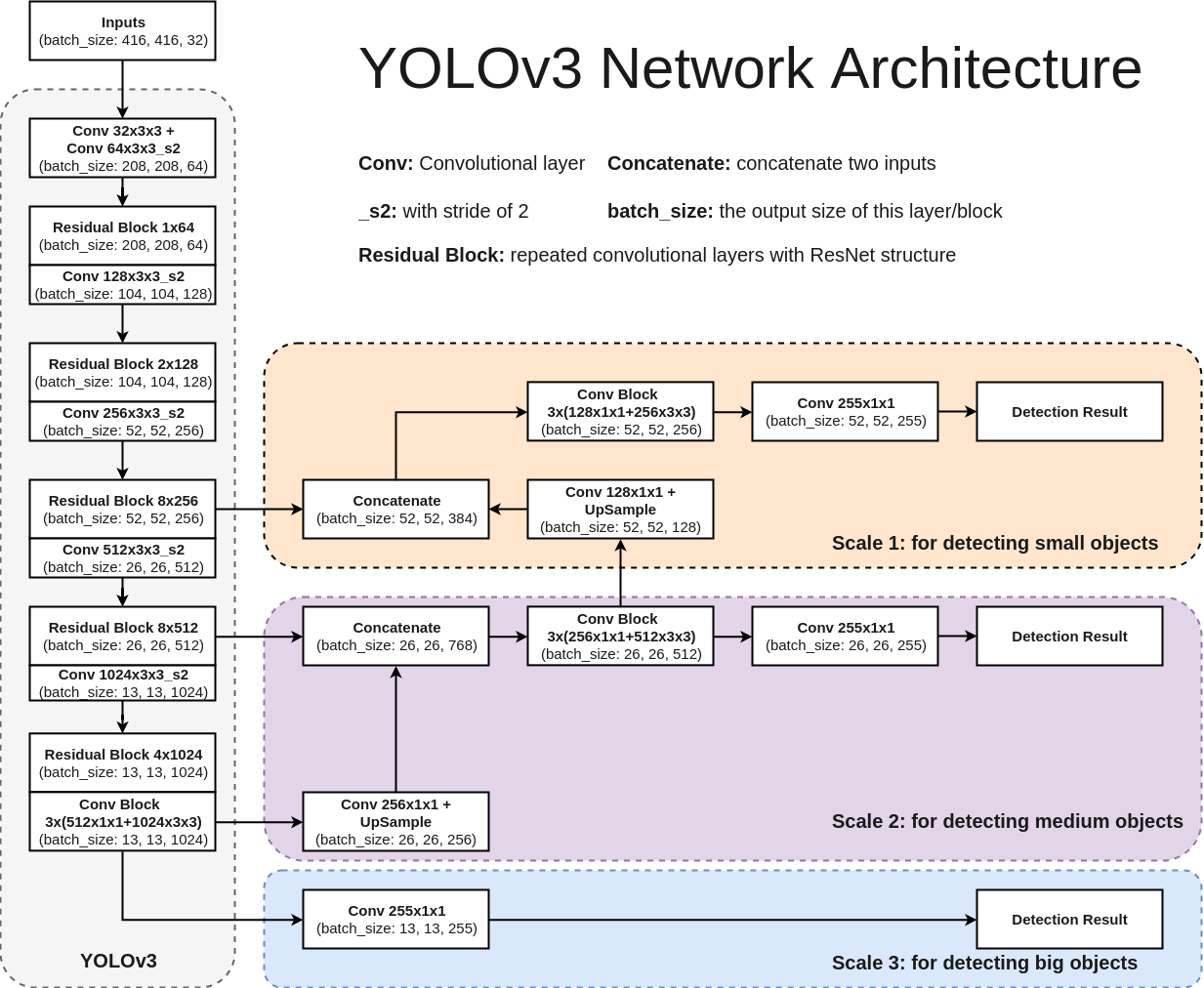
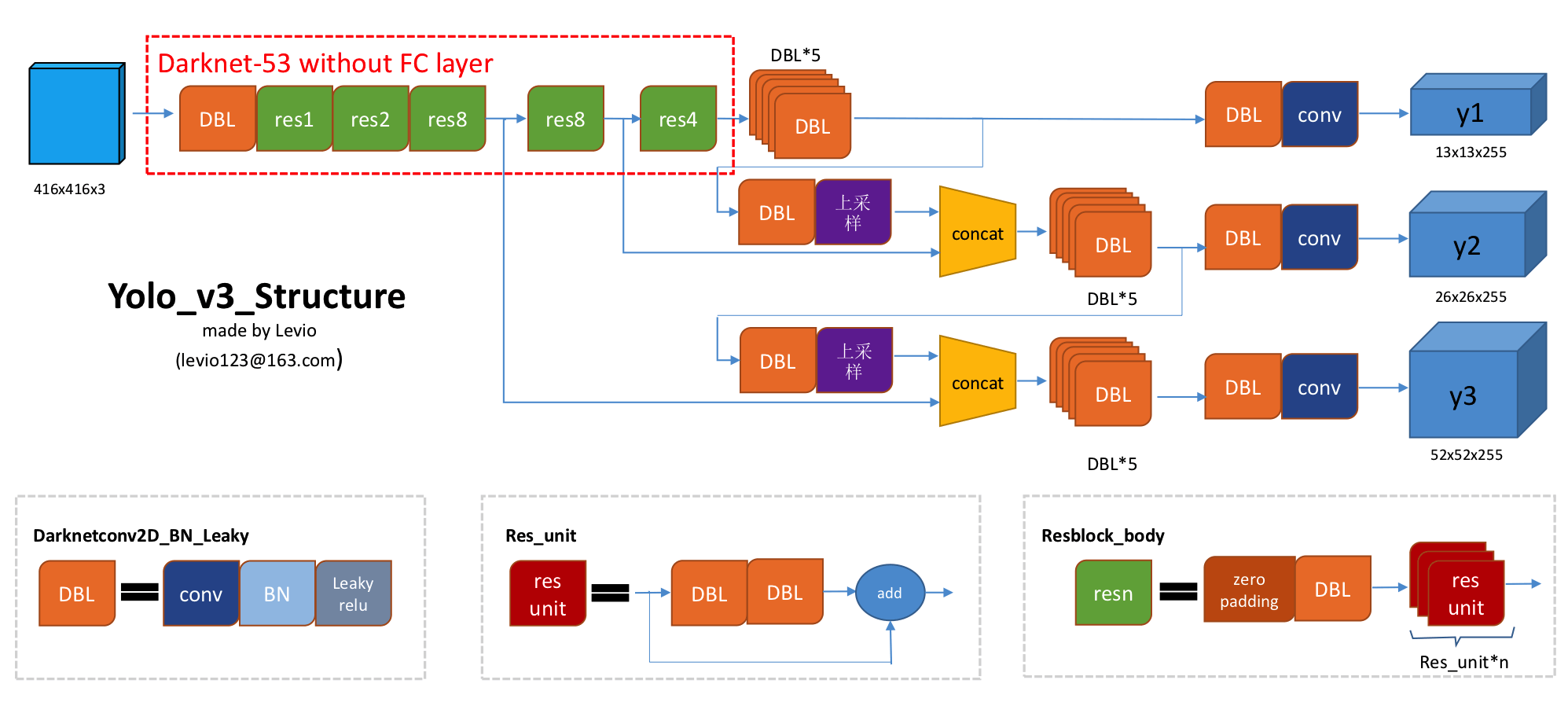
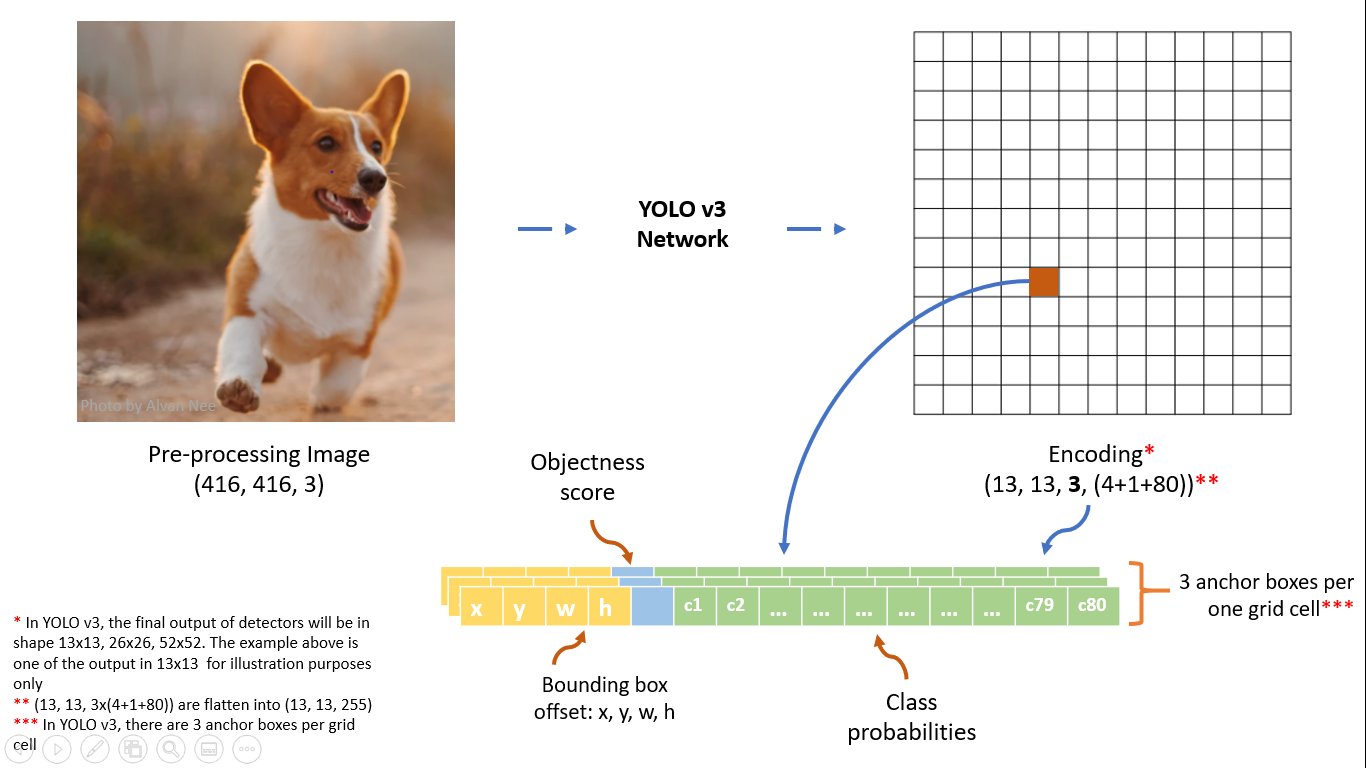
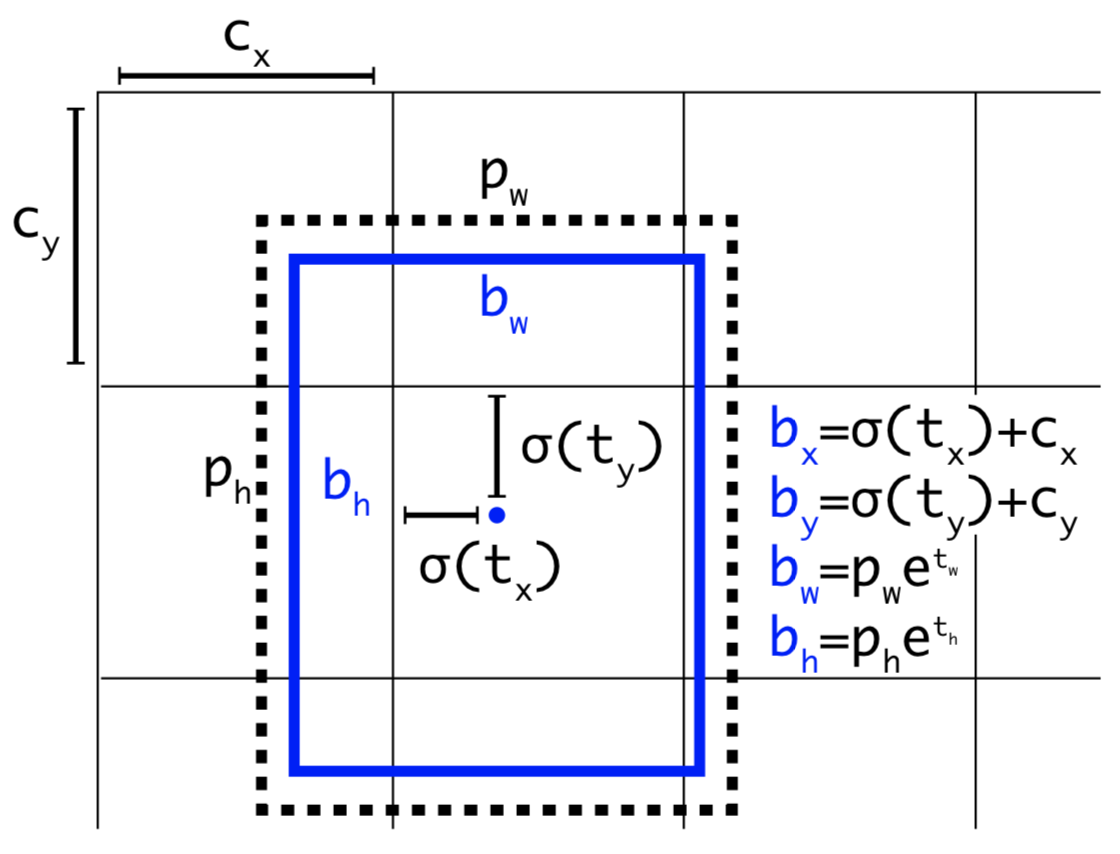
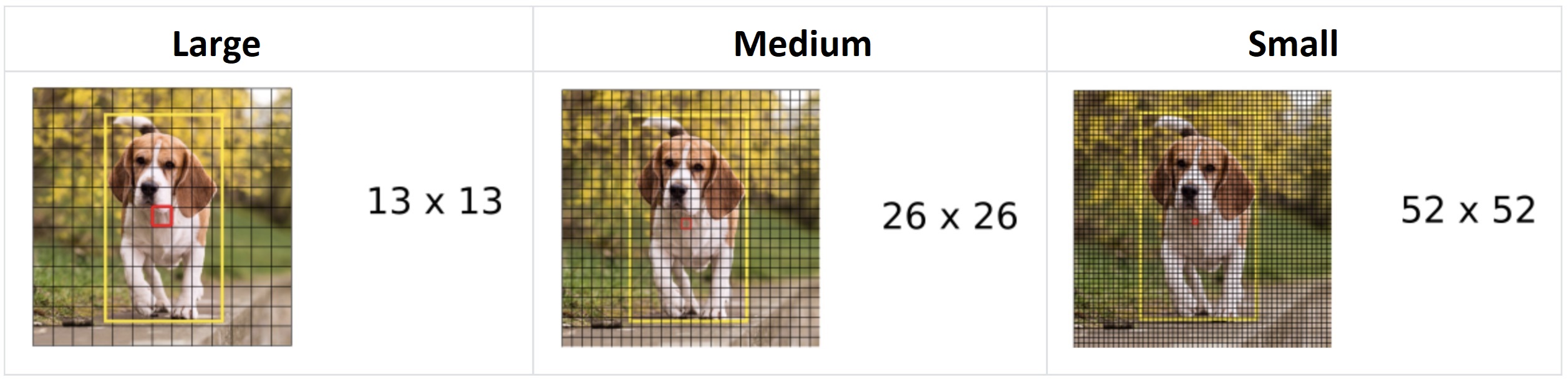
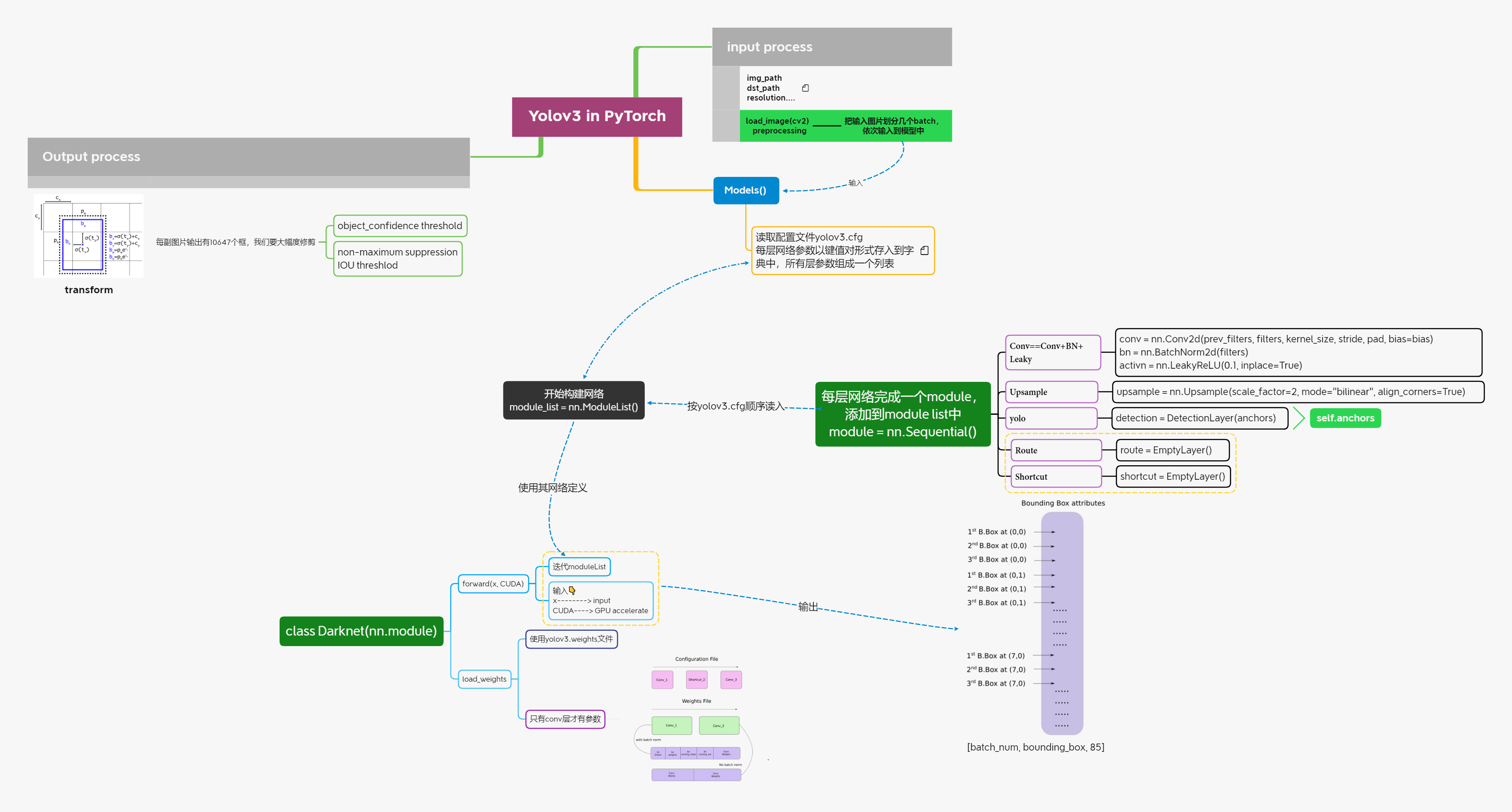
    <content type="html"><![CDATA[<h1 id="Intro"><a href="#Intro" class="headerlink" title="Intro"></a>Intro</h1><blockquote><p><code>YOLO</code>, aka “You Only Look Once”—&gt; 名字是不是很酷</p><p>YOLO是<code>object detection</code>领域非常出名的算法，它以速度快同时兼顾性能著称。</p></blockquote><h2 id="1-Net-Architecture"><a href="#1-Net-Architecture" class="headerlink" title="1 Net Architecture"></a>1 Net Architecture</h2><p><img src="https://leeberty.uk/imgcdn/img/20201225/3crM6aHe8hd1.png" alt="Figure1 YOLOv3 Network Architecture"></p><p><img src="https://leeberty.uk/imgcdn/img/20201225/OyauoNS5dlmi.png" alt="Figure2 Yolo_v3_Structure"></p><ul><li><code>concatenate层</code>在Yolo里面叫做<code>route</code>层</li><li><code>res_unit层</code>在Yolo里面叫做<code>shortcut</code>层</li><li><code>detection层</code>在Yolo里面叫做<code>yolo</code>层</li></ul><h2 id="2-Details"><a href="#2-Details" class="headerlink" title="2 Details"></a>2 Details</h2><p><img src="https://leeberty.uk/imgcdn/img/20201225/Fewd3cB5ftsc.png" alt="Figure3 Yolov3 anchor box"></p><ol><li><p>输入层:<code>416*416*3</code></p></li><li><p>将输入划分为$S * S$ grid, 每个格子有三个预先设定好长($p_w$)和宽($p_h$)的anchor box；如果物体的中心落在哪个grid, 那个grid就负责探测该物体。</p><p><img src="https://leeberty.uk/imgcdn/img/20201225/msBsRFJ838Rv.png" alt="coordinate transform"></p></li><li><p>每个anchor box有85个数据[$t_x, t_y, t_w, t_h, objectscore, c1, c2…]$，分别代表：</p><ul><li>预测框中心点坐标：网络实际输出的是$t_x 和 t_y$, 为了让该cell预测的物体中心一定落在该cell上，加了个sigmoid函数。</li><li>预测框长和宽: 防止梯度下降不稳定，所以进行了对数空间变换，网络给出$t_x, t_h$, 真实的长和宽由👆公式计算。</li><li>是否有物体的概率: 如果没有物体，后续类别的置信分数将没有作用</li><li>一共预测80个类别，每个类别的置信分数。</li></ul></li></ol><p><img src="https://leeberty.uk/imgcdn/img/20201225/OEr4juQiwsBl.jpg" alt="scale output"></p><ol><li><p>有三种scale的输出层，分别为：<code>13 * 13 * 85；26 * 26 * 85；52 * 52 * 85</code>；</p><p>每个cell有三个anchor box;所以每个输入一共有$(13\times13+26\times26+52\times52)\times3=10647$个预测框</p></li><li><p>这么多输出框肯定绝大部分是重复预测或者不正确的预测，需要剔除不好的框</p><ul><li>设置<code>object score</code>阈值，比如低于0.6的去除</li><li>设置<code>IOU</code>阈值，进行<code>Non-maximum Suppression</code></li></ul></li></ol><h1 id="Implementation-in-PyTorch"><a href="#Implementation-in-PyTorch" class="headerlink" title="Implementation in PyTorch"></a>Implementation in PyTorch</h1><p><img src="https://leeberty.uk/imgcdn/img/20201225/hGvI8gvYywrx.png" alt="mark"></p><h1 id="Reference"><a href="#Reference" class="headerlink" title="Reference"></a>Reference</h1><ol><li><a href="https://blog.paperspace.com/how-to-implement-a-yolo-object-detector-in-pytorch/">how-to-implement-a-yolo-object-detector-in-pytorch</a></li><li><a href="https://arxiv.org/pdf/1506.02640.pdf">YOLO V1: You Only Look Once: Unified, Real-Time Object Detection</a></li><li><a href="https://arxiv.org/pdf/1612.08242.pdf">YOLO V2: YOLO9000: Better, Faster, Stronger</a></li><li><a href="https://pjreddie.com/media/files/papers/YOLOv3.pdf">YOLO V3: An Incremental Improvement</a></li><li><a href="https://www.youtube.com/watch?v=DNEm4fJ-rto">IOU</a></li><li><a href="https://arxiv.org/pdf/1311.2524.pdf">Bounding Box Regression (Appendix C)</a></li><li><a href="https://www.youtube.com/watch?v=A46HZGR5fMw">Non maximum suppresion</a></li><li><a href="http://pytorch.org/tutorials/beginner/deep_learning_60min_blitz.html">PyTorch Official Tutorial</a></li></ol>]]></content>


    <summary type="html">&lt;h1 id=&quot;Intro&quot;&gt;&lt;a href=&quot;#Intro&quot; class=&quot;headerlink&quot; title=&quot;Intro&quot;&gt;&lt;/a&gt;Intro&lt;/h1&gt;&lt;blockquote&gt;
&lt;p&gt;&lt;code&gt;YOLO&lt;/code&gt;, aka “You Only Look Once”—&amp;</summary>


    <category term="CS" scheme="https://www.beenli.cn/categories/CS/"/>
    
    <category term="Programming" scheme="https://www.beenli.cn/categories/CS/Programming/"/>
    
    <category term="ML" scheme="https://www.beenli.cn/categories/CS/Programming/ML/"/>
    
    
    <category term="python" scheme="https://www.beenli.cn/tags/python/"/>
    
    <category term="PyTorch" scheme="https://www.beenli.cn/tags/PyTorch/"/>
    
  </entry>
  
  <entry>
    <title>Python x CV</title>
    <link href="https://www.beenli.cn/posts/f67fb0fb/"/>
    <id>https://www.beenli.cn/posts/f67fb0fb/</id>
    <published>2020-12-24T08:27:02.000Z</published>
    <updated>2020-12-24T13:06:22.472Z</updated>
    
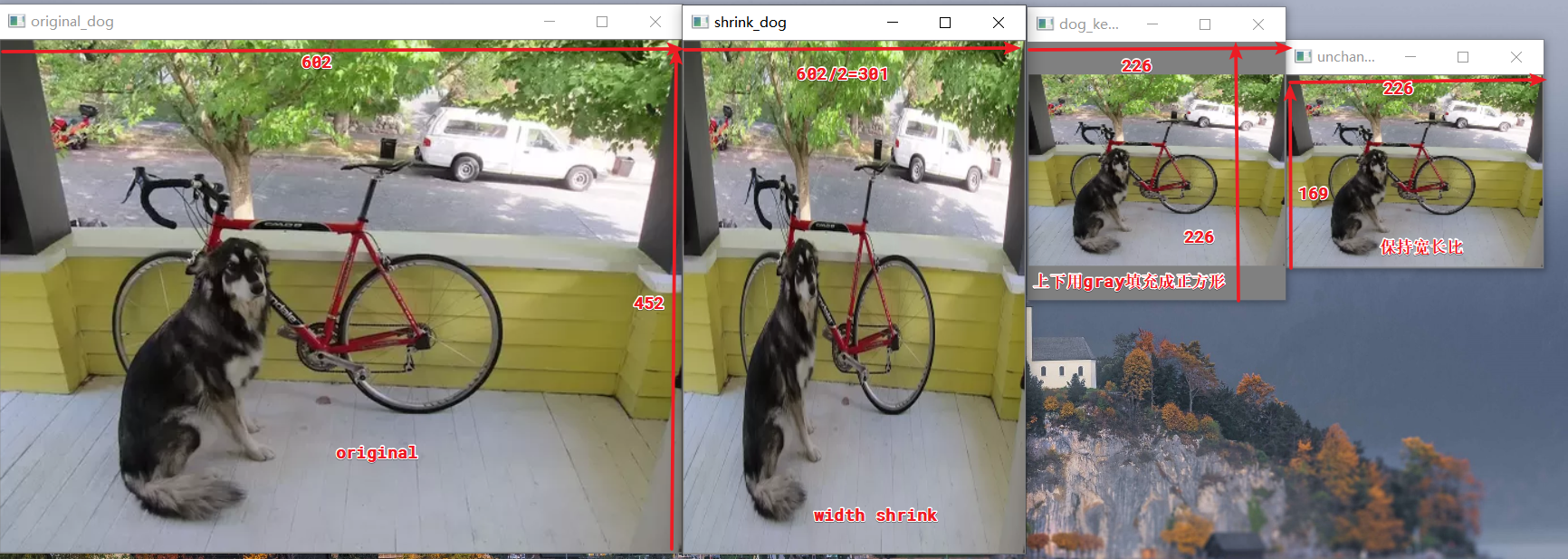
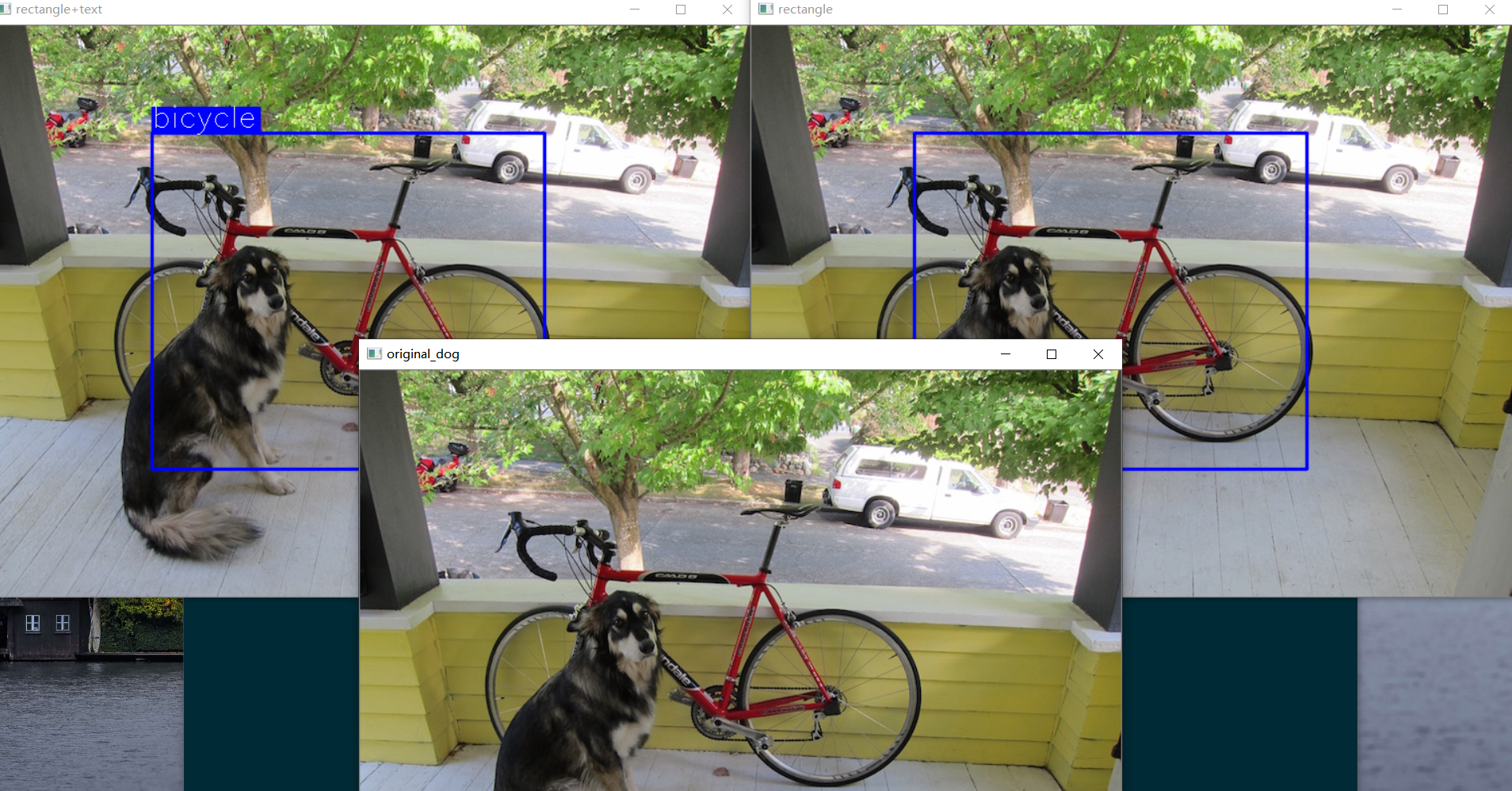
    <content type="html"><![CDATA[<h2 id="Installation"><a href="#Installation" class="headerlink" title="Installation"></a>Installation</h2><blockquote><p><code>python opencv</code> 包的官方网址: <a href="https://pypi.org/project/opencv-python/">https://pypi.org/project/opencv-python/</a></p><p><code>opencv</code>官网网址 : <a href="https://docs.opencv.org/master/">https://docs.opencv.org/master/</a></p></blockquote><ul><li><p>直接通过pip安装(有图形界面的PC)</p><ul><li>选择1：包含主要的模块: <code>pip install opencv-python</code></li><li>选择2: 全部安装(有些额外的模块) : <code>pip install opencv-contrib-python</code></li></ul></li><li><p>没有图形界面的服务器上(与👆对应)</p><ul><li><code>pip install opencv-python-headless</code></li><li><code>pip install opencv-contrib-python-headless</code></li></ul></li><li><p>尝试用<code>conda install open-cv</code>,但是找不到包</p></li></ul><h2 id="Common-Usage"><a href="#Common-Usage" class="headerlink" title="Common Usage"></a>Common Usage</h2><blockquote><p>导入的包为<code>cv2</code></p></blockquote><h3 id="1-读取图像"><a href="#1-读取图像" class="headerlink" title="1. 读取图像"></a>1. 读取图像</h3>   <figure class="highlight python"><table><tbody><tr><td class="gutter"><pre><span class="line">1</span><br><span class="line">2</span><br></pre></td><td class="code"><pre><code class="hljs python"><span class="hljs-keyword">import</span> cv2<br>cv2.imread(<span class="hljs-string">"dog.png"</span>)<br></code></pre></td></tr></tbody></table></figure><blockquote><p>返回值: 像素矩阵<code>[height, width, channel]</code></p><p>类型: <code>numpy.ndarray</code>；</p><p>数据类型: <code>unit8</code>; </p><p>通道: <code>BGR</code>, 不是RGB; 可以通过<code>src[:,:,::]</code>转换</p></blockquote><p>   注意：每个像素的数据类型一定要<code>uint8</code>；否则会出现</p><blockquote><p><font color="red">error:</font>  (-215:Assertion failed) src_depth != CV_16F &amp;&amp; src_depth != CV_32S in function ‘convertToShow’</p></blockquote><p>   解决办法: np.uint8(image)</p><h3 id="2-显示图像"><a href="#2-显示图像" class="headerlink" title="2. 显示图像"></a>2. 显示图像</h3><figure class="highlight python"><table><tbody><tr><td class="gutter"><pre><span class="line">1</span><br></pre></td><td class="code"><pre><code class="hljs python">cv2.imshow(<span class="hljs-string">"winname"</span>, image)<br></code></pre></td></tr></tbody></table></figure><h3 id="3-缩放图像"><a href="#3-缩放图像" class="headerlink" title="3. 缩放图像"></a>3. 缩放图像</h3>   <figure class="highlight"><table><tbody><tr><td class="gutter"><pre><span class="line">1</span><br></pre></td><td class="code"><pre><code class="hljs python">cv2.resize(src, dsize[, dst[, fx[, fy[, interpolation]]]]) --&gt; dst<br></code></pre></td></tr></tbody></table></figure><p>   参数说明:</p><ul><li>src: 读入的图像, [height, width, channel]</li><li>dsize: 变换后的宽和高(width, height) —&gt; (int, int)</li><li>dst: 与src相对应, 即变换完的各点像素矩阵</li><li>fx: x方向(即width方向) 缩放倍数</li><li>fy: y方向(即height方向)缩放倍数</li><li>interpolation: 插值方法</li><li><font color="red">notes:</font> 转换后的尺寸要么由<code>dsize</code>要么由<code>fx,fy</code>来决定</li></ul><div class="table-container"><table><thead><tr><th style="text-align:center">插值方法</th><th style="text-align:center">解释如下</th></tr></thead><tbody><tr><td style="text-align:center">INTER_NEAREST</td><td style="text-align:center">最近邻插值(0)</td></tr><tr><td style="text-align:center">INTER_LINEAR</td><td style="text-align:center">双线性插值（默认设置）(1)</td></tr><tr><td style="text-align:center">INTER_AREA</td><td style="text-align:center">使用像素区域关系进行重采样（最适合shrink)</td></tr><tr><td style="text-align:center">INTER_CUBIC</td><td style="text-align:center">4x4像素邻域的双三次插值 (2)</td></tr><tr><td style="text-align:center">INTER_LANCZOS4</td><td style="text-align:center">8x8像素邻域的Lanczos插值(3)</td></tr></tbody></table></div><center>👆标号0,1,2,3代表上采样方法越来越复杂, 图像过度越平滑,质量越好,但是速度越慢</center><ul><li><p>如果你已经创建了dst(转换后的尺寸由dst来决定)</p><figure class="highlight python"><table><tbody><tr><td class="gutter"><pre><span class="line">1</span><br></pre></td><td class="code"><pre><code class="hljs python">resize(src, dst.size(), dst)<br></code></pre></td></tr></tbody></table></figure></li><li><p>修改图片尺寸</p><figure class="highlight python"><table><tbody><tr><td class="gutter"><pre><span class="line">1</span><br><span class="line">2</span><br><span class="line">3</span><br><span class="line">4</span><br><span class="line">5</span><br><span class="line">6</span><br><span class="line">7</span><br><span class="line">8</span><br><span class="line">9</span><br><span class="line">10</span><br><span class="line">11</span><br><span class="line">12</span><br><span class="line">13</span><br><span class="line">14</span><br><span class="line">15</span><br><span class="line">16</span><br><span class="line">17</span><br><span class="line">18</span><br><span class="line">19</span><br><span class="line">20</span><br><span class="line">21</span><br><span class="line">22</span><br><span class="line">23</span><br><span class="line">24</span><br><span class="line">25</span><br><span class="line">26</span><br><span class="line">27</span><br><span class="line">28</span><br><span class="line">29</span><br><span class="line">30</span><br><span class="line">31</span><br><span class="line">32</span><br><span class="line">33</span><br><span class="line">34</span><br></pre></td><td class="code"><pre><code class="hljs python"><span class="hljs-keyword">import</span> cv2<br><span class="hljs-keyword">import</span> numpy <span class="hljs-keyword">as</span> np<br><br><br><span class="hljs-function"><span class="hljs-keyword">def</span> <span class="hljs-title">letterbox_image</span>(<span class="hljs-params">img, inp_dim</span>):</span><br>    <span class="hljs-string">"""resize image with unchanged aspect ratio using padding</span><br><span class="hljs-string">    img: input image</span><br><span class="hljs-string">    inp_dim: </span><br><span class="hljs-string">    """</span><br>    img_w, img_h = img.shape[<span class="hljs-number">1</span>], img.shape[<span class="hljs-number">0</span>] <span class="hljs-comment"># img:[height, width, channel]</span><br>    w, h = inp_dim<br>    scale = <span class="hljs-built_in">min</span>(w / img_w, h / img_h)   <span class="hljs-comment"># keep aspect ratio</span><br>    new_w = <span class="hljs-built_in">int</span>(img_w * scale)   <span class="hljs-comment"># multiply the same number</span><br>    new_h = <span class="hljs-built_in">int</span>(img_h * scale)<br>    <span class="hljs-comment"># 表示大小时用的是(width,height) --&gt; 返回的是[height, width, channel]</span><br>    resized_image = cv2.resize(img, (new_w, new_h), interpolation=cv2.INTER_CUBIC) <span class="hljs-comment"># cubic</span><br>    cv2.imshow(<span class="hljs-string">"unchanged aspect ratio"</span>, resized_image)<br>    canvas = np.full((h, w, <span class="hljs-number">3</span>), <span class="hljs-number">128</span>)          <span class="hljs-comment"># create a numpy array having shape of [width, height, c]</span><br><br>    <span class="hljs-comment"># padding with (128,128,128) gray</span><br>    canvas[(h - new_h) // <span class="hljs-number">2</span>: (h - new_h) // <span class="hljs-number">2</span> + new_h, (w - new_w) // <span class="hljs-number">2</span>:(w - new_w) // <span class="hljs-number">2</span> + new_w, :] = resized_image<br><br>    <span class="hljs-keyword">return</span> canvas<br><br><span class="hljs-keyword">if</span> __name__ == <span class="hljs-string">"__main__"</span>:<br>    filename = <span class="hljs-string">"dog-cycle-car.png"</span><br>    dog = cv2.imread(filename)<br>    cv2.imshow(<span class="hljs-string">"original_dog"</span>, dog)<br>    shrink_dog = cv2.resize(dog, <span class="hljs-literal">None</span>, fx=<span class="hljs-number">0.5</span>, fy=<span class="hljs-number">1</span>, interpolation=cv2.INTER_CUBIC)<br>    dog_keep_ratio_padding = np.uint8(letterbox_image(dog, (dog.shape[<span class="hljs-number">0</span>] // <span class="hljs-number">2</span>, dog.shape[<span class="hljs-number">0</span>] // <span class="hljs-number">2</span>))) <span class="hljs-comment"># height/2</span><br>    cv2.imshow(<span class="hljs-string">"dog_keep_ratio_padding"</span>, dog_keep_ratio_padding)<br>    cv2.imshow(<span class="hljs-string">"shrink_dog"</span>, shrink_dog)<br>    cv2.waitKey(<span class="hljs-number">0</span>)<br>    cv2.destroyAllWindows()<br></code></pre></td></tr></tbody></table></figure><blockquote><ul><li>一定要使用<code>cv2.waitKey(0)</code>，否则显示不了图片:（正数为等待的时间,单位毫秒)</li><li>使用cv2.destroyWindows(“winname”),可以主动关闭窗口(图片)</li></ul></blockquote><p><img src="https://leeberty.uk/imgcdn/img/20201224/JfARdC8VMOQt.png" alt="mark"></p></li></ul><h3 id="4-在图像上画矩形"><a href="#4-在图像上画矩形" class="headerlink" title="4. 在图像上画矩形)"></a>4. <a href="https://docs.opencv.org/2.4/modules/core/doc/drawing_functions.html#void%20line(Mat&amp;%20img,%20Point%20pt1,%20Point%20pt2,%20const%20Scalar&amp;%20color,%20int%20thickness,%20int%20lineType,%20int%20shift">在图像上画矩形</a>)</h3>   <figure class="highlight"><table><tbody><tr><td class="gutter"><pre><span class="line">1</span><br></pre></td><td class="code"><pre><code class="hljs python">cv2.rectangle(img, pt1, pt2, color[, thickness[, lineType[, shift]]]) -&gt; img<br></code></pre></td></tr></tbody></table></figure><blockquote><p>The function cv::rectangle draws a rectangle outline or a filled rectangle whose two opposite corners</p><p>are pt1 and pt2</p></blockquote><p>   <code>pt1</code>,<code>pt2</code>: 两个对角的坐标</p><p>   <code>color</code>: tuple(R,G,B)</p><p>   <code>thickness</code>: int 如果为负数,比如-1,那么会填充整个矩形</p><p>   <code>lineType</code>: 8(默认)：8连接；4：4连接线；CV_AA:锯齿线</p><p>   注:对于整数坐标的非反锯齿线，使用8连接或4连接的Bresenham算法。粗线以圆角结尾绘制。反锯齿线是用高斯滤波绘制的</p><p>   <code>shift</code>: 点坐标中的小数位数</p><h3 id="5-在图像上写字"><a href="#5-在图像上写字" class="headerlink" title="5.在图像上写字"></a>5.在图像上写字</h3><figure class="highlight python"><table><tbody><tr><td class="gutter"><pre><span class="line">1</span><br></pre></td><td class="code"><pre><code class="hljs python">cv2.putText(img, text, org, fontFace, fontScale, color[, thickness[, lineType[, bottomLeftOrigin]]])<br></code></pre></td></tr></tbody></table></figure><blockquote><p>对于不能渲染的symbol，使用？标记</p></blockquote><p><code>text</code>: String to be drawn</p><p><code>org</code>: Tuple(x,y) Bottom-left corner of the text string in the image(文本的左下角坐标)</p><p><code>fontFace</code>: 字体</p><p><code>fontScale</code>: 字体大小</p><p><code>color</code>, <code>thickness</code>, <code>lineType</code>: 同👆</p><p><code>bottomLeftOrigin</code>: 当其为真时，图像原点在左下角，否则在左上角(opencv默认为左上)【如果为True，字翻转$180^o$】</p><figure class="highlight awk"><table><tbody><tr><td class="gutter"><pre><span class="line">1</span><br><span class="line">2</span><br><span class="line">3</span><br><span class="line">4</span><br><span class="line">5</span><br><span class="line">6</span><br><span class="line">7</span><br><span class="line">8</span><br><span class="line">9</span><br><span class="line">10</span><br><span class="line">11</span><br></pre></td><td class="code"><pre><code class="hljs awk">enum HersheyFonts {<br>    FONT_HERSHEY_SIMPLEX        = <span class="hljs-number">0</span>, <span class="hljs-regexp">//</span>!&lt; normal size sans-serif font<br>    FONT_HERSHEY_PLAIN          = <span class="hljs-number">1</span>, <span class="hljs-regexp">//</span>!&lt; small size sans-serif font<br>    FONT_HERSHEY_DUPLEX         = <span class="hljs-number">2</span>, <span class="hljs-regexp">//</span>!&lt; normal size sans-serif font (more complex than FONT_HERSHEY_SIMPLEX)<br>    FONT_HERSHEY_COMPLEX        = <span class="hljs-number">3</span>, <span class="hljs-regexp">//</span>!&lt; normal size serif font<br>    FONT_HERSHEY_TRIPLEX        = <span class="hljs-number">4</span>, <span class="hljs-regexp">//</span>!&lt; normal size serif font (more complex than FONT_HERSHEY_COMPLEX)<br>    FONT_HERSHEY_COMPLEX_SMALL  = <span class="hljs-number">5</span>, <span class="hljs-regexp">//</span>!&lt; smaller version of FONT_HERSHEY_COMPLEX<br>    FONT_HERSHEY_SCRIPT_SIMPLEX = <span class="hljs-number">6</span>, <span class="hljs-regexp">//</span>!&lt; hand-writing style font<br>    FONT_HERSHEY_SCRIPT_COMPLEX = <span class="hljs-number">7</span>, <span class="hljs-regexp">//</span>!&lt; more complex variant of FONT_HERSHEY_SCRIPT_SIMPLEX<br>    FONT_ITALIC                 = <span class="hljs-number">16</span> <span class="hljs-regexp">//</span>!&lt; flag <span class="hljs-keyword">for</span> italic font<br>};<br></code></pre></td></tr></tbody></table></figure><center>字体👆</center><h3 id="6-示例"><a href="#6-示例" class="headerlink" title="6 示例"></a>6 示例</h3><figure class="highlight python"><table><tbody><tr><td class="gutter"><pre><span class="line">1</span><br><span class="line">2</span><br><span class="line">3</span><br><span class="line">4</span><br><span class="line">5</span><br><span class="line">6</span><br><span class="line">7</span><br><span class="line">8</span><br><span class="line">9</span><br><span class="line">10</span><br><span class="line">11</span><br><span class="line">12</span><br><span class="line">13</span><br><span class="line">14</span><br><span class="line">15</span><br><span class="line">16</span><br><span class="line">17</span><br><span class="line">18</span><br><span class="line">19</span><br><span class="line">20</span><br><span class="line">21</span><br><span class="line">22</span><br><span class="line">23</span><br></pre></td><td class="code"><pre><code class="hljs python"><span class="hljs-keyword">import</span> cv2<br><br><br><span class="hljs-keyword">if</span> __name__ == <span class="hljs-string">"__main__"</span>:<br>    filename = <span class="hljs-string">"imgs\\dog.jpg"</span><br>    dog = cv2.imread(filename)<br>    cv2.imshow(<span class="hljs-string">"original_dog"</span>, dog)<br>    c1 = (<span class="hljs-number">164</span>, <span class="hljs-number">108</span>)<br>    c2 = (<span class="hljs-number">560</span>, <span class="hljs-number">447</span>)<br>    color = (<span class="hljs-number">255</span>, <span class="hljs-number">0</span>, <span class="hljs-number">0</span>) <span class="hljs-comment"># red</span><br>    cv2.rectangle(dog, c1, c2, color, <span class="hljs-number">2</span>, lineType=cv2.LINE_AA)<br>    cv2.imshow(<span class="hljs-string">"rectangle"</span>, dog)<br>    label = <span class="hljs-string">"bicycle"</span><br>    <span class="hljs-comment"># (text,fontFace,fontScale,thickness)</span><br>    t_size = cv2.getTextSize(label, cv2.FONT_HERSHEY_SIMPLEX, <span class="hljs-number">1</span>, <span class="hljs-number">1</span>)[<span class="hljs-number">0</span>] <span class="hljs-comment"># </span><br>    c2 = c1[<span class="hljs-number">0</span>] + t_size[<span class="hljs-number">0</span>] + <span class="hljs-number">3</span>, c1[<span class="hljs-number">1</span>] - t_size[<span class="hljs-number">1</span>] - <span class="hljs-number">4</span> <span class="hljs-comment"># c2 at the right-top of original rectangle's top-left corner</span><br>    <span class="hljs-comment"># (width:x, height:y)</span><br>    cv2.rectangle(dog, c1, c2, color, -<span class="hljs-number">1</span>, lineType=cv2.LINE_AA) <span class="hljs-comment"># -1 fill the rectangle</span><br>    cv2.putText(dog, label, (c1[<span class="hljs-number">0</span>], c1[<span class="hljs-number">1</span>]-<span class="hljs-number">6</span>), cv2.FONT_HERSHEY_SIMPLEX, <span class="hljs-number">1</span>, [<span class="hljs-number">225</span>, <span class="hljs-number">255</span>, <span class="hljs-number">255</span>], <span class="hljs-number">1</span>)<br>    cv2.imshow(<span class="hljs-string">"rectangle+text"</span>, dog)<br>    cv2.waitKey(<span class="hljs-number">0</span>)<br>    cv2.destroyAllWindows()<br><br></code></pre></td></tr></tbody></table></figure><p><img src="https://leeberty.uk/imgcdn/img/20201224/ml4IQnTHooSV.png" alt="mark"></p>]]></content>


    <summary type="html">&lt;h2 id=&quot;Installation&quot;&gt;&lt;a href=&quot;#Installation&quot; class=&quot;headerlink&quot; title=&quot;Installation&quot;&gt;&lt;/a&gt;Installation&lt;/h2&gt;&lt;blockquote&gt;
&lt;p&gt;&lt;code&gt;python open</summary>


    <category term="CS" scheme="https://www.beenli.cn/categories/CS/"/>
    
    <category term="Programming" scheme="https://www.beenli.cn/categories/CS/Programming/"/>
    
    <category term="ML" scheme="https://www.beenli.cn/categories/CS/Programming/ML/"/>
    
    
    <category term="CV" scheme="https://www.beenli.cn/tags/CV/"/>
    
    <category term="python" scheme="https://www.beenli.cn/tags/python/"/>
    
  </entry>
  
  <entry>
    <title>manage project dependencies with SBT</title>
    <link href="https://www.beenli.cn/posts/f1ee3abb/"/>
    <id>https://www.beenli.cn/posts/f1ee3abb/</id>
    <published>2020-12-03T12:29:14.000Z</published>
    <updated>2020-12-03T14:20:46.829Z</updated>
    
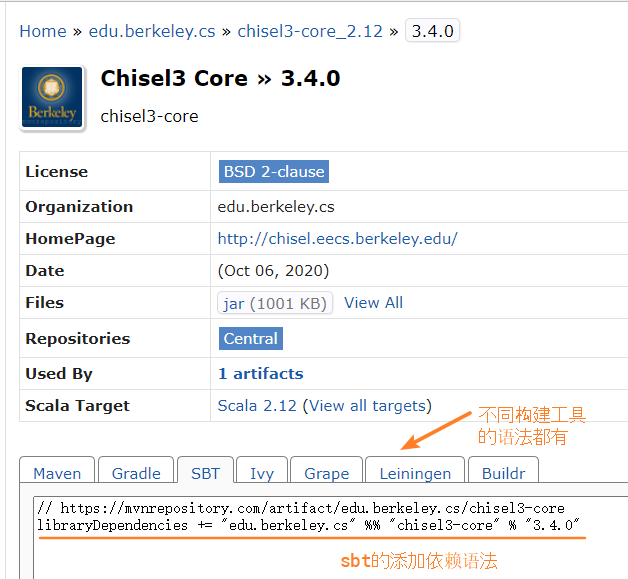
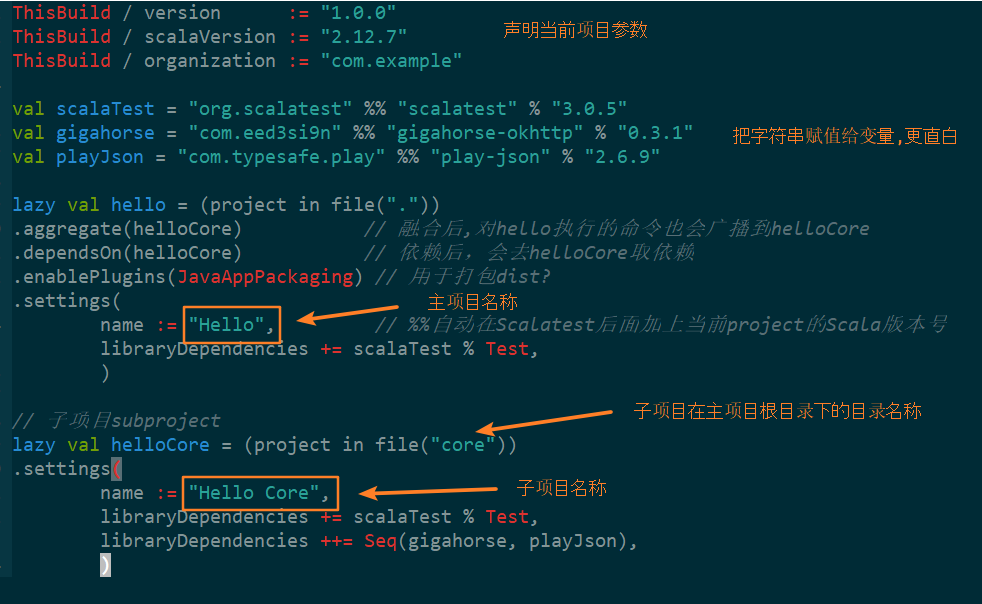
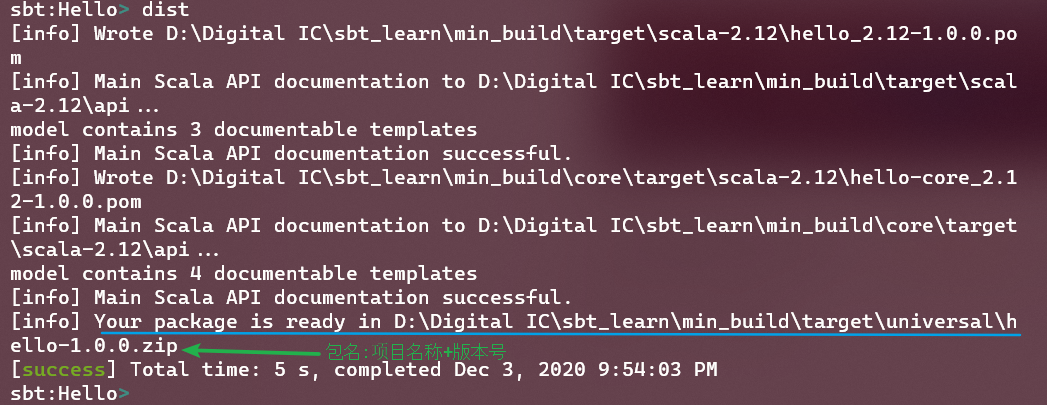
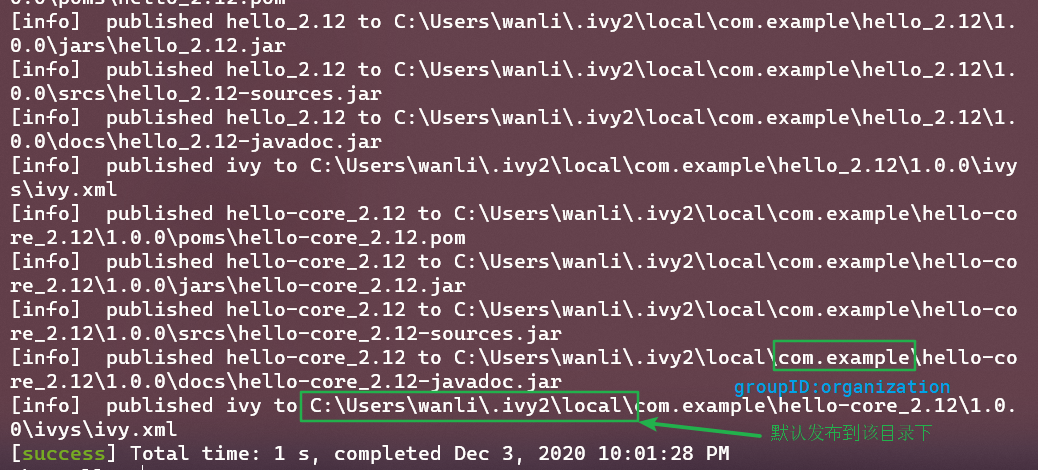
    <content type="html"><![CDATA[<h2 id="Dependency"><a href="#Dependency" class="headerlink" title="Dependency"></a>Dependency</h2><blockquote><p>依赖分为：托管依赖「managed」和非托管依赖「unmanaged」</p></blockquote><h2 id="Unmanaged"><a href="#Unmanaged" class="headerlink" title="Unmanaged"></a>Unmanaged</h2><p>非托管依赖：比如<code>JAR包</code></p><p>使用方法：</p><ul><li>把需要的JAR包拷贝到项目根目录的<code>lib</code>文件夹 下。</li><li>如果该JAR包还依赖其它JAR包，你也要下载其它JAR并把其同样拷贝到lib目录中</li></ul><p>缺点：</p><ul><li>要自己解决包依赖关系，一旦项目变大了，靠手工维护基本不可能</li></ul><h2 id="Managed-key"><a href="#Managed-key" class="headerlink" title="Managed(key)"></a>Managed(key)</h2><p>托管依赖：通过给定项目一些属性，由构建工具(如sbt)自动去默认仓库下载。</p><h3 id="Single-lib"><a href="#Single-lib" class="headerlink" title="Single lib"></a>Single lib</h3><p><code>基本语法:</code> 写在项目的「build.sbt」文件中</p><figure class="highlight scala"><table><tbody><tr><td class="gutter"><pre><span class="line">1</span><br></pre></td><td class="code"><pre><code class="hljs Scala">libraryDependencies += groupID % artifactID % revision % configuration<br></code></pre></td></tr></tbody></table></figure><p><code>最小完整的文件:</code></p><figure class="highlight scala"><table><tbody><tr><td class="gutter"><pre><span class="line">1</span><br><span class="line">2</span><br><span class="line">3</span><br><span class="line">4</span><br><span class="line">5</span><br><span class="line">6</span><br><span class="line">7</span><br></pre></td><td class="code"><pre><code class="hljs scala">name := <span class="hljs-string">"BasicProjectWithScalaTest"</span>  <span class="hljs-comment">// 项目名称</span><br><br>version := <span class="hljs-string">"1.0"</span>                     <span class="hljs-comment">// 项目版本</span><br><br>scalaVersion := <span class="hljs-string">"2.10.0"</span>             <span class="hljs-comment">// 项目Scala版本</span><br><br>libraryDependencies += <span class="hljs-string">"org.scalatest"</span> %% <span class="hljs-string">"scalatest"</span> % <span class="hljs-string">"1.9.1"</span> % <span class="hljs-string">"test"</span><br></code></pre></td></tr></tbody></table></figure><ul><li>👆方法说明：</li></ul><div class="table-container"><table><thead><tr><th>Method</th><th>Description</th></tr></thead><tbody><tr><td>+=</td><td>键值对;用+=表示给键(libraryDependencies)附加值</td></tr><tr><td>%</td><td>用于从你提供的字符串中构建<code>Ivy module ID</code></td></tr><tr><td>%%</td><td>当其在<code>groupID</code>后使用时,自动把你项目Scala版本号添加到工件名字末尾</td></tr></tbody></table></div><p>example：👇两个等效</p><figure class="highlight scala"><table><tbody><tr><td class="gutter"><pre><span class="line">1</span><br><span class="line">2</span><br></pre></td><td class="code"><pre><code class="hljs scala">libraryDependencies += <span class="hljs-string">"org.scalatest"</span> % <span class="hljs-string">"scalatest_2.10"</span> % <span class="hljs-string">"1.9.1"</span> % <span class="hljs-string">"test"</span><br>libraryDependencies += <span class="hljs-string">"org.scalatest"</span> %% <span class="hljs-string">"scalatest"</span> % <span class="hljs-string">"1.9.1"</span> % <span class="hljs-string">"test"</span><br></code></pre></td></tr></tbody></table></figure><p><code>libraryDependencies</code>可以在<a href="https://mvnrepository.com/">sbt默认远程仓库</a>中找到</p><p><img src="https://leeberty.uk/imgcdn/img/20201203/lG49276bcmsi.png" alt="mark"></p><p><code>notes:</code></p><ul><li>假设你添加一个依赖，但是这个工件依赖其它的工件，那么sbt会自动帮你下载依赖，这是非托管无法比拟的</li><li>工件的版本很总要;一定要与自己项目中Scala版本兼容</li><li>SBT使用<code>Apache Ivy</code>作为自己的依赖管理器，而Ivy也被<code>Ant</code>和<code>Maven</code>使用，因此能在Scala项目中很容易使用多年来创建的丰富Java库。</li><li>SBT使用<a href="https://mvnrepository.com/">standard Maven repository</a>作为默认仓库(索引的工件数截至2020/12/03已经是18.4M); 如果你需要的库没有发布到改标准库中，你必须告诉SBT去哪里寻找，这个过程通过添加一个<code>resolver</code>解决</li></ul><h3 id="Multiple-lib"><a href="#Multiple-lib" class="headerlink" title="Multiple lib"></a>Multiple lib</h3><ul><li><p>使用<code>Seq</code>方法（注意是<code>++=</code>）</p><figure class="highlight scala"><table><tbody><tr><td class="gutter"><pre><span class="line">1</span><br><span class="line">2</span><br><span class="line">3</span><br><span class="line">4</span><br><span class="line">5</span><br></pre></td><td class="code"><pre><code class="hljs scala">libraryDependencies ++= <span class="hljs-type">Seq</span>(<br>    <span class="hljs-string">"net.sourceforge.htmlcleaner"</span> % <span class="hljs-string">"htmlcleaner"</span> % <span class="hljs-string">"2.4"</span>,<br>    <span class="hljs-string">"org.scalatest"</span> % <span class="hljs-string">"scalatest_2.10"</span> % <span class="hljs-string">"1.9.1"</span> % <span class="hljs-string">"test"</span>,<br>    <span class="hljs-string">"org.foobar"</span> %% <span class="hljs-string">"foobar"</span> % <span class="hljs-string">"1.8"</span><br>)<br></code></pre></td></tr></tbody></table></figure><h3 id="Multiple-project"><a href="#Multiple-project" class="headerlink" title="Multiple project"></a>Multiple project</h3></li><li><p>使用<code>lazy</code>：构建多个项目</p><p><img src="https://leeberty.uk/imgcdn/img/20201203/o9IVGTWnnADF.png" alt="mark"></p></li><li><p>使用<code>projects</code>：查看项目结构</p></li></ul><p><img src="https://leeberty.uk/imgcdn/img/20201203/4I3Oo4actGgg.png" alt="mark"></p><ul><li><p>使用<code>.dependsOn</code>:主项目依赖可以移到子项目中，然后显示指明</p><figure class="highlight scala"><table><tbody><tr><td class="gutter"><pre><span class="line">1</span><br></pre></td><td class="code"><pre><code class="hljs Scala">.dependsOn(helloCore)    <span class="hljs-comment">// 表示依赖子项目</span><br></code></pre></td></tr></tbody></table></figure></li><li><p>使用<code>dist</code>：生成通用jar包</p><ul><li><p>在~/project/plugins.sbt添加插件     『~代表项目根目录』</p><figure class="highlight scala"><table><tbody><tr><td class="gutter"><pre><span class="line">1</span><br></pre></td><td class="code"><pre><code class="hljs scala">addSbtPlugin(<span class="hljs-string">"com.typesafe.sbt"</span> % <span class="hljs-string">"sbt-native-packager"</span> % <span class="hljs-string">"1.3.4"</span>)  <span class="hljs-comment">// 添加sbt-native-packager插件,用于打包universal package</span><br></code></pre></td></tr></tbody></table></figure></li><li><p>在build.sbt中添加<code>JavaAppPackaging</code></p><figure class="highlight scala"><table><tbody><tr><td class="gutter"><pre><span class="line">1</span><br></pre></td><td class="code"><pre><code class="hljs scala">.enablePlugins(<span class="hljs-type">JavaAppPackaging</span>) <span class="hljs-comment">// 用于打包dist? </span><br></code></pre></td></tr></tbody></table></figure><p><img src="https://leeberty.uk/imgcdn/img/20201203/rookW5HWO63t.png" alt="mark"></p></li></ul></li><li><p>使用<code>publishlocal</code>: 把包发布到本地</p><ul><li><p>默认是在~\.ivy2\local\文件夹下</p></li><li><p>严格按照上述<code>groupID % artifactID % revision % configuration</code>来组织</p><p><img src="https://leeberty.uk/imgcdn/img/20201203/nY14vTt0xhSh.png" alt="mark"></p></li></ul><figure class="highlight haml"><table><tbody><tr><td class="gutter"><pre><span class="line">1</span><br><span class="line">2</span><br><span class="line">3</span><br><span class="line">4</span><br><span class="line">5</span><br><span class="line">6</span><br><span class="line">7</span><br><span class="line">8</span><br><span class="line">9</span><br><span class="line">10</span><br><span class="line">11</span><br><span class="line">12</span><br><span class="line">13</span><br><span class="line">14</span><br><span class="line">15</span><br><span class="line">16</span><br><span class="line">17</span><br><span class="line">18</span><br><span class="line">19</span><br><span class="line">20</span><br><span class="line">21</span><br></pre></td><td class="code"><pre><code class="hljs haml">-<span class="ruby">com.example        /<span class="hljs-regexp">/ groupID</span></span><br><span class="ruby">- hello_2.<span class="hljs-number">12</span>    /<span class="hljs-regexp">/ artifactID</span></span><br><span class="ruby">- <span class="hljs-number">1.0</span>.<span class="hljs-number">0</span>     /<span class="hljs-regexp">/ revision</span></span><br><span class="ruby">            - docs</span><br><span class="ruby">            - ivys</span><br><span class="ruby">            - jars</span><br><span class="ruby">            - proms</span><br><span class="ruby">            - scrs</span><br><span class="ruby">    - hello-core_2.<span class="hljs-number">12</span> /<span class="hljs-regexp">/ 子项目生成的工件</span></span><br><span class="ruby">    - <span class="hljs-number">1.0</span>.<span class="hljs-number">0</span></span><br><span class="ruby">        - docs</span><br><span class="ruby">            - ivys</span><br><span class="ruby">            - jars</span><br><span class="ruby">            - proms</span><br><span class="ruby">            - scrs</span><br><span class="ruby">    - <span class="hljs-number">0.1</span>.<span class="hljs-number">0</span>-SNAPSHOT(这是自前发布的)</span><br><span class="ruby">        - docs</span><br><span class="ruby">            - ivys</span><br><span class="ruby">            - jars</span><br><span class="ruby">            - proms</span><br><span class="ruby">            - scrs</span><br></code></pre></td></tr></tbody></table></figure></li><li>使用<code>Docker/publishLocal</code>:生成镜像</li></ul><h2 id="References"><a href="#References" class="headerlink" title="References"></a>References</h2><p>[1] <a href="https://www.scala-sbt.org/1.x/docs/sbt-by-example.html">sbt-by-example</a></p><p>[2] <a href="https://alvinalexander.com/scala/sbt-how-to-manage-project-dependencies-in-scala/">sbt-how-to-manage-project-dependencies-in-scala</a></p><p>[3] <a href="https://mvnrepository.com/artifact/edu.berkeley.cs/chisel3-core_2.12/3.4.0">mvnrepo-chisel3-core</a></p><p>[4] <a href="https://yintianyu.github.io/2019/01/21/post-sbt-dependencies/">Sbt 依赖配置</a></p>]]></content>


    <summary type="html">&lt;h2 id=&quot;Dependency&quot;&gt;&lt;a href=&quot;#Dependency&quot; class=&quot;headerlink&quot; title=&quot;Dependency&quot;&gt;&lt;/a&gt;Dependency&lt;/h2&gt;&lt;blockquote&gt;
&lt;p&gt;依赖分为：托管依赖「managed」和非托管依赖「</summary>


    <category term="CS" scheme="https://www.beenli.cn/categories/CS/"/>
    
    <category term="Programming" scheme="https://www.beenli.cn/categories/CS/Programming/"/>
    
    <category term="env_problems" scheme="https://www.beenli.cn/categories/CS/Programming/env-problems/"/>
    
    
    <category term="Scala" scheme="https://www.beenli.cn/tags/Scala/"/>
    
  </entry>
  
  <entry>
    <title>The most used Scala Build Tools(SBT)</title>
    <link href="https://www.beenli.cn/posts/67dea116/"/>
    <id>https://www.beenli.cn/posts/67dea116/</id>
    <published>2020-12-03T01:19:39.000Z</published>
    <updated>2020-12-03T03:50:29.538Z</updated>
    
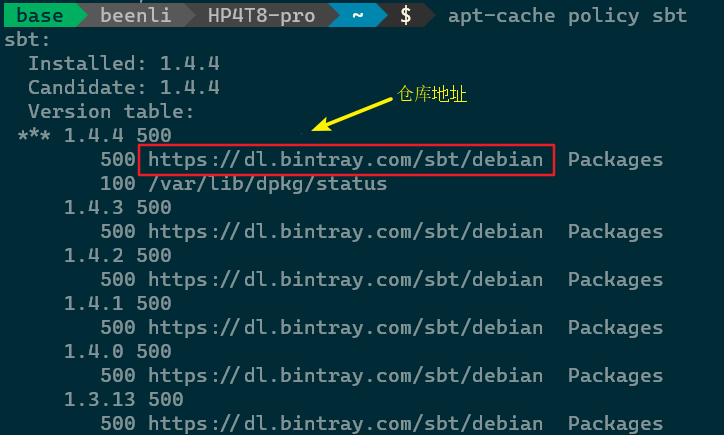
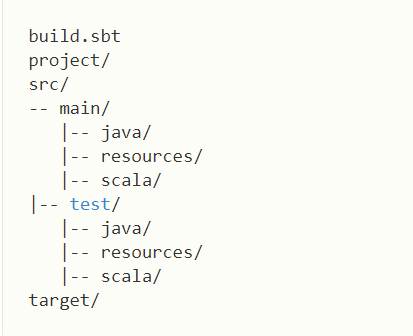
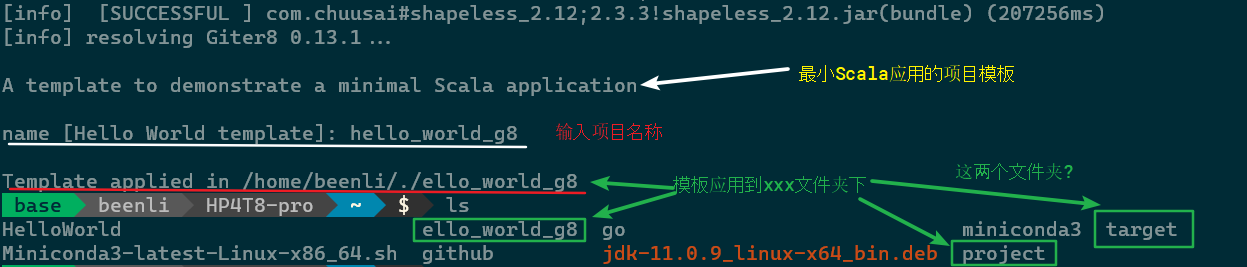
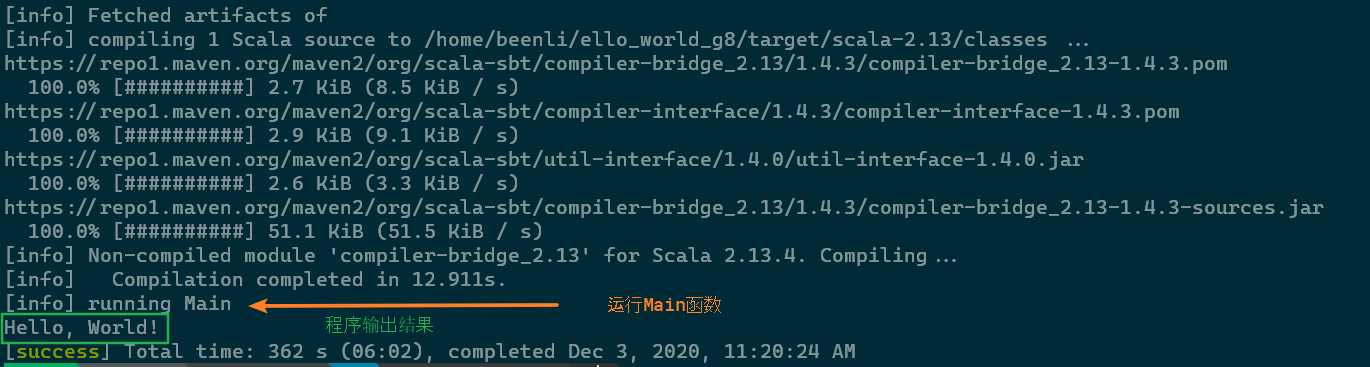
    <content type="html"><![CDATA[<blockquote><p>有很多构建工具，比如 Ant, Maven, Gradle等等，但是 <a href="http://www.scala-sbt.org/">sbt</a>是专门为Scala设计的。它前些日子还被Scala创始人<a href="https://twitter.com/odersky">Martin Odersky</a>联合创办的<a href="https://www.lightbend.com/">Lightbend</a>公司支持。</p></blockquote><h2 id="What-is-sbt"><a href="#What-is-sbt" class="headerlink" title="What is sbt"></a>What is sbt</h2><blockquote><p>sbt 是一个交互式构建工具:你可以在Scala project中定义你的task，然后从交互式sbt shell 并行的运行它们。</p></blockquote><h2 id="Why-sbt"><a href="#Why-sbt" class="headerlink" title="Why sbt"></a>Why sbt</h2><ul><li>专为Scala和Java设计：它能使用多个Scala版本交叉编译你的项目。</li><li>类型安全和并行的<code>build.sbt</code>：一个基于Scala的DSL(domain specific language)，用于表示<code>并行任务处理图谱</code>。任何打字错误都会引发编译错误。</li><li>快速迭代：使用Zinc 增量编译器和文件监视器，使得<code>编辑-编译-测试</code>循环达到快速并且递增</li><li>可扩展性：我们只用在<code>build.sbt</code>中写入相应代码，就可以增加对新的任务或平台(比如Scala.js)的支持。</li><li>Join <a href="https://www.scala-sbt.org/1.x/docs/Community-Plugins.html">100+ community-maintained plugins</a> to share and reuse sbt tasks</li></ul><h2 id="Install-sbt-1-4-4"><a href="#Install-sbt-1-4-4" class="headerlink" title="Install sbt(1.4.4)"></a>Install sbt(1.4.4)</h2><ul><li><p>for windows</p><ul><li><a href="https://github.com/sbt/sbt/releases/download/v1.4.4/sbt-1.4.4.msi">windows installer</a></li><li><a href="https://github.com/sbt/sbt/releases/download/v1.4.4/sbt-1.4.4.zip">universal package</a></li><li>使用<a href="https://chocolatey.org/">Chocolatey</a>「Windows 平台包管理器」：&gt; choco install sbt</li></ul></li><li><p><a href="https://www.scala-sbt.org/1.x/docs/Installing-sbt-on-Linux.html">for linux</a></p><ul><li><p>推荐把sbt软件包发布的apt仓库加入到源列表</p><p><img src="https://leeberty.uk/imgcdn/img/20201203/bWG3g3NThAzf.png" alt="mark"></p></li></ul></li></ul><h2 id="The-sbt-directory-structure"><a href="#The-sbt-directory-structure" class="headerlink" title="The sbt directory structure"></a>The sbt directory structure</h2><ul><li><p>手动创建项目目录</p><figure class="highlight bash"><table><tbody><tr><td class="gutter"><pre><span class="line">1</span><br><span class="line">2</span><br><span class="line">3</span><br><span class="line">4</span><br></pre></td><td class="code"><pre><code class="hljs bash">mkdir HelloWorld<br><span class="hljs-built_in">cd</span> HelloWorld<br>mkdir -p src/{main,<span class="hljs-built_in">test</span>}/{java,resources,scala}<br>mkdir project target<br></code></pre></td></tr></tbody></table></figure></li></ul><p><img src="https://leeberty.uk/imgcdn/img/20201203/JzI5IeQHXDQw.png" alt="mark"></p><center>项目主目录下的基本文件结构图</center><ul><li><p>​    使用sbt命令行工具</p><figure class="highlight bash"><table><tbody><tr><td class="gutter"><pre><span class="line">1</span><br></pre></td><td class="code"><pre><code class="hljs bash">sbt new scala/hello-world.g8    // 从Github仓库上拉下来项目模板<br></code></pre></td></tr></tbody></table></figure><p><img src="https://leeberty.uk/imgcdn/img/20201203/a5Q3j5v83kgy.png" alt="mark"></p></li></ul><p><img src="https://leeberty.uk/imgcdn/img/20201203/u63YK3DEd2WU.png" alt="mark"></p><center>目录结构和👆大同小异</center><figure class="highlight mipsasm"><table><tbody><tr><td class="gutter"><pre><span class="line">1</span><br><span class="line">2</span><br><span class="line">3</span><br><span class="line">4</span><br><span class="line">5</span><br><span class="line">6</span><br><span class="line">7</span><br><span class="line">8</span><br></pre></td><td class="code"><pre><code class="hljs mipsasm">- hello-world<br>    - project (<span class="hljs-keyword">sbt </span>uses this to <span class="hljs-keyword">install </span><span class="hljs-keyword">and </span>manage plugins <span class="hljs-keyword">and </span>dependencies)<br>        - <span class="hljs-keyword">build.properties</span><br><span class="hljs-keyword"> </span>   - src<br>        - main<br>            - <span class="hljs-keyword">scala </span>(All of your <span class="hljs-keyword">scala </span>code goes here)<br>                - Main.<span class="hljs-keyword">scala </span>(Entry point of program) &lt;-- this is all we need for now<br>    - <span class="hljs-keyword">build.sbt </span>(<span class="hljs-keyword">sbt's </span><span class="hljs-keyword">build </span>definition file)<br></code></pre></td></tr></tbody></table></figure><h2 id="Running-the-project"><a href="#Running-the-project" class="headerlink" title="Running the project"></a>Running the project</h2><figure class="highlight bash"><table><tbody><tr><td class="gutter"><pre><span class="line">1</span><br></pre></td><td class="code"><pre><code class="hljs bash">sbt run<br></code></pre></td></tr></tbody></table></figure><p><img src="https://leeberty.uk/imgcdn/img/20201203/Uz6oUqxI95y7.png" alt="mark"></p><h2 id="Project-management"><a href="#Project-management" class="headerlink" title="Project management"></a>Project management</h2><blockquote><p><code>build.sbt</code>文件非常重要，你项目的Scala版本，依赖项全在里面有说明。</p><p>添加依赖后，你才可以在你的程序里面正常import；</p><p>发布的包可以在<a href="https://index.scala-lang.org/">这里</a>查看</p></blockquote><p><img src="https://leeberty.uk/imgcdn/img/20201203/h1WcOX3aQUIa.png" alt="mark"></p><p>更多内容请见下一篇文章：【build.sbt 详解】<span class="github-emoji" style="display:inline;vertical-align:middle"><span>😸</span><img src="https://github.githubassets.com/images/icons/emoji/unicode/1f638.png?v8" aria-hidden="true" onerror="this.parent.classList.add('github-emoji-fallback')"></span></p><hr><h2 id="References"><a href="#References" class="headerlink" title="References"></a>References</h2><p>[1] <a href="https://docs.scala-lang.org/overviews/scala-book/scala-build-tool-sbt.html">Scala book</a></p><p>[2] <a href="https://docs.scala-lang.org/getting-started/sbt-track/getting-started-with-scala-and-sbt-on-the-command-line.html">GETTING STARTED WITH SCALA</a></p><p>[3] <a href="https://www.scala-sbt.org/1.x/docs/Hello.html">sbt reference</a></p>]]></content>


    <summary type="html">&lt;blockquote&gt;
&lt;p&gt;有很多构建工具，比如 Ant, Maven, Gradle等等，但是 &lt;a href=&quot;http://www.scala-sbt.org/&quot;&gt;sbt&lt;/a&gt;是专门为Scala设计的。它前些日子还被Scala创始人&lt;a href=&quot;https://t</summary>


    <category term="CS" scheme="https://www.beenli.cn/categories/CS/"/>
    
    <category term="Programming" scheme="https://www.beenli.cn/categories/CS/Programming/"/>
    
    <category term="env_problems" scheme="https://www.beenli.cn/categories/CS/Programming/env-problems/"/>
    
    
    <category term="Scala" scheme="https://www.beenli.cn/tags/Scala/"/>
    
  </entry>
  
  <entry>
    <title>batch file(1) -- for statement</title>
    <link href="https://www.beenli.cn/posts/c8d1a621/"/>
    <id>https://www.beenli.cn/posts/c8d1a621/</id>
    <published>2020-12-02T13:09:50.000Z</published>
    <updated>2020-12-03T00:46:22.889Z</updated>
    
    <content type="html"><![CDATA[<h1 id="1-official-explanation"><a href="#1-official-explanation" class="headerlink" title="1 official explanation"></a>1 official explanation</h1><blockquote><p>type <code>for /?</code> in your cmd.exe prompt</p></blockquote><p><img src="https://leeberty.uk/imgcdn/img/20201202/w4qud1SIjXWb.png" alt="mark"></p><h1 id="2-common-usage1"><a href="#2-common-usage1" class="headerlink" title="2 common usage1"></a>2 common usage<sup id="fnref:1"><a href="#fn:1" rel="footnote">1</a></sup></h1><blockquote><p>跟python里面迭代器发「iterator」很像，对一个集合的数据做相同的操作。</p><font color="red">note:</font><ul><li>如果是在命令行,那么使用<code>%G</code>;在脚本文件中使用<code>%%G</code></li><li>如果迭代器每次产生一个值,那正好赋值为%%G</li><li>如果迭代器每次产生多个值,那么系统隐式定义几个变量来保存值，默认是按字母顺序:<code>%%H</code> <code>%%I</code> <code>%%J</code>…</li><li>如果迭代器产生文件，可以使用扩展符来提取文件名称/路径/日期/大小等</li></ul></blockquote><h2 id="1-for"><a href="#1-for" class="headerlink" title="1 for"></a>1 for</h2><blockquote><figure class="highlight"><table><tbody><tr><td class="gutter"><pre><span class="line">1</span><br></pre></td><td class="code"><pre><code class="hljs basic">FOR %%parameter IN (set) DO command <br></code></pre></td></tr></tbody></table></figure><ul><li>把一系列文件拷贝到备份</li></ul></blockquote>  <figure class="highlight"><table><tbody><tr><td class="gutter"><pre><span class="line">1</span><br></pre></td><td class="code"><pre><code class="hljs basic">FOR %%G IN ("C:\demo files\file1.txt" "C:\demo files\File2.txt") DO copy %%G d:\backups\<br></code></pre></td></tr></tbody></table></figure><h2 id="2-for-R"><a href="#2-for-R" class="headerlink" title="2 for /R"></a>2 for /R</h2><blockquote><figure class="highlight"><table><tbody><tr><td class="gutter"><pre><span class="line">1</span><br></pre></td><td class="code"><pre><code class="hljs basic">FOR /R [[drive:]path] %%parameter IN (set) DO command<br></code></pre></td></tr></tbody></table></figure><ul><li><p>如果省略[[drive:]path] 那么用当前的代替</p></li><li><p>set必须使用通配符<code>?</code>和<code>.</code></p></li><li><p>如果(set)为(.), 那么便利每个文件夹，不遍历文件<sup><a href="#fn_test" id="reffn_test">test</a></sup></p></li></ul></blockquote><ol><li><p>列出从C:\temp\开始的每个子文件夹中的每个.bak文件</p><figure class="highlight"><table><tbody><tr><td class="gutter"><pre><span class="line">1</span><br></pre></td><td class="code"><pre><code class="hljs basic">For /R C:\temp\ %%G IN (*.bak) do Echo "%%G"<br></code></pre></td></tr></tbody></table></figure></li><li><p>将’demo’文件夹和所有子文件夹中的.LOG文件重命名为.TXT:</p><figure class="highlight"><table><tbody><tr><td class="gutter"><pre><span class="line">1</span><br></pre></td><td class="code"><pre><code class="hljs basic">For /R C:\demo\ %%G in (*.LOG) do Echo REN "%%G" "%%~nG.TXT"<br></code></pre></td></tr></tbody></table></figure></li><li><p>依次将目录更改为当前文件夹下的每个子文件夹(包含自己所在文件夹)<sup id="fnref:2"><a href="#fn:2" rel="footnote">2</a></sup></p><figure class="highlight dos"><table><tbody><tr><td class="gutter"><pre><span class="line">1</span><br><span class="line">2</span><br><span class="line">3</span><br><span class="line">4</span><br><span class="line">5</span><br></pre></td><td class="code"><pre><code class="hljs dos"><span class="hljs-keyword">FOR</span> /R  <span class="hljs-variable">%%G</span> <span class="hljs-keyword">in</span> (.) <span class="hljs-keyword">DO</span> (<br> <span class="hljs-built_in">Pushd</span> <span class="hljs-variable">%%G</span><br> <span class="hljs-built_in">Echo</span> now <span class="hljs-keyword">in</span> <span class="hljs-variable">%%G</span><br> <span class="hljs-built_in">Popd</span> )<br><span class="hljs-built_in">Echo</span> "back home"<br></code></pre></td></tr></tbody></table></figure></li></ol><p>   <img src="https://leeberty.uk/imgcdn/img/20201202/dJ8iLSFzbna0.png" alt="mark"></p><h2 id="3-for-D"><a href="#3-for-D" class="headerlink" title="3 for /D"></a>3 for /D</h2><blockquote><figure class="highlight jboss-cli"><table><tbody><tr><td class="gutter"><pre><span class="line">1</span><br></pre></td><td class="code"><pre><code class="hljs jboss-cli">FOR <span class="hljs-string">/D</span> [<span class="hljs-string">/r</span>] %%parameter IN <span class="hljs-params">(folder_set)</span> DO <span class="hljs-keyword">command</span><br></code></pre></td></tr></tbody></table></figure><p>在几个目录/文件夹上有条件地执行一个命令。</p><p>/r  递归的进入子文件夹</p></blockquote><ul><li><p>列出名称以“Users”开头的文件夹C:\Work\下面的每个子文件夹</p><figure class="highlight dos"><table><tbody><tr><td class="gutter"><pre><span class="line">1</span><br><span class="line">2</span><br><span class="line">3</span><br></pre></td><td class="code"><pre><code class="hljs dos">@<span class="hljs-built_in">Echo</span> Off<br><span class="hljs-built_in">CD</span> \Work<br><span class="hljs-keyword">FOR</span> /D /r <span class="hljs-variable">%%G</span> <span class="hljs-keyword">in</span> ("User*") <span class="hljs-keyword">DO</span> <span class="hljs-built_in">Echo</span> We found <span class="hljs-variable">%%~</span>nxG<br></code></pre></td></tr></tbody></table></figure><h2 id="4-for-L"><a href="#4-for-L" class="headerlink" title="4 for /L"></a>4 for /L</h2></li></ul><blockquote><figure class="highlight livecodeserver"><table><tbody><tr><td class="gutter"><pre><span class="line">1</span><br></pre></td><td class="code"><pre><code class="hljs livecodeserver">FOR /L %%parameter IN (<span class="hljs-built_in">start</span>,step,<span class="hljs-keyword">end</span>) DO <span class="hljs-keyword">command</span> <br></code></pre></td></tr></tbody></table></figure><p>有条件地对一组数字执行命令。</p></blockquote><ul><li><p>从1数到5</p><figure class="highlight dos"><table><tbody><tr><td class="gutter"><pre><span class="line">1</span><br></pre></td><td class="code"><pre><code class="hljs dos"><span class="hljs-keyword">FOR</span> /L <span class="hljs-variable">%%G</span> <span class="hljs-keyword">IN</span> (<span class="hljs-number">1</span>,<span class="hljs-number">1</span>,<span class="hljs-number">5</span>) <span class="hljs-keyword">DO</span> <span class="hljs-built_in">echo</span> <span class="hljs-variable">%%G</span><br></code></pre></td></tr></tbody></table></figure></li><li><p>非数值列表可以使用标准的for命令</p><figure class="highlight dos"><table><tbody><tr><td class="gutter"><pre><span class="line">1</span><br></pre></td><td class="code"><pre><code class="hljs dos"><span class="hljs-keyword">FOR</span> <span class="hljs-variable">%%G</span> <span class="hljs-keyword">IN</span> (Sun Mon Tue Wed Thur Fri Sat) <span class="hljs-keyword">DO</span> <span class="hljs-built_in">echo</span> <span class="hljs-variable">%%G</span><br></code></pre></td></tr></tbody></table></figure></li><li><p>给文件创建1000个副本</p><figure class="highlight dos"><table><tbody><tr><td class="gutter"><pre><span class="line">1</span><br></pre></td><td class="code"><pre><code class="hljs dos"><span class="hljs-keyword">FOR</span> /l <span class="hljs-variable">%%G</span> <span class="hljs-keyword">in</span> (<span class="hljs-number">1</span>,<span class="hljs-number">1</span>,<span class="hljs-number">1000</span>) <span class="hljs-keyword">DO</span> <span class="hljs-built_in">copy</span> SourceFile.txt NewFile<span class="hljs-variable">%%G</span>.txt<br></code></pre></td></tr></tbody></table></figure><h2 id="5-for-F"><a href="#5-for-F" class="headerlink" title="5 for /F"></a>5 for /F</h2></li></ul><blockquote><figure class="highlight cos"><table><tbody><tr><td class="gutter"><pre><span class="line">1</span><br><span class="line">2</span><br><span class="line">3</span><br></pre></td><td class="code"><pre><code class="hljs cos"><span class="hljs-keyword">FOR</span> /F [<span class="hljs-string">"options"</span>] %<span class="hljs-built_in">%parameter</span> IN (filenameset) <span class="hljs-keyword">DO</span> command <br><br><span class="hljs-keyword">FOR</span> /F [<span class="hljs-string">"options"</span>] %<span class="hljs-built_in">%parameter</span> IN (<span class="hljs-string">"Text string to process"</span>) <span class="hljs-keyword">DO</span> command<br></code></pre></td></tr></tbody></table></figure><p>针对文件里面的字符处理</p><p><code>options:</code>(优先级：usebackq &gt; skip &gt; delims &gt; eol &gt; tokens)</p><ol><li><p>delims=xxx(分隔符, 默认为空格)</p></li><li><p>skip=n （文件开头要跳过的一些行,默认为0)</p></li><li><p>eol=;  (每行开头指示注释的字符，默认为分号;)</p></li><li><p>tokens=n (指定要从每行读取哪些编号的项,默认为1)</p></li><li><p>usebackq (使用交替引用的风格)</p><p><img src="https://leeberty.uk/imgcdn/img/20201203/IGenal079Kft.png" alt="mark"></p></li></ol></blockquote><ol><li>如果”delims=”,那么把一行都视为第一个token</li><li>“eol=&amp;” 一般把eol设置为不容易碰到的字符，避免把本该解释的行注释掉</li><li>“skip=3” 去掉前面三个空行</li><li>tokens用法:<code>2,4,6</code>, <code>2-6</code>(2到6),<code>*</code>(所有), <code>3*</code>(第4个起后面的)</li></ol><hr><ul><li><p>复制文本文件中列出的文件到新的目的地:</p><figure class="highlight vim"><table><tbody><tr><td class="gutter"><pre><span class="line">1</span><br><span class="line">2</span><br></pre></td><td class="code"><pre><code class="hljs vim">假设<span class="hljs-keyword">files</span>.txt每行包含一个文件名<br>FOR /<span class="hljs-keyword">f</span> <span class="hljs-string">"delims="</span> %%G in (<span class="hljs-keyword">files</span>.txt) DO <span class="hljs-keyword">copy</span> <span class="hljs-string">"\\source\folder\%%G"</span> <span class="hljs-string">"H:\destination\%%G"</span><br></code></pre></td></tr></tbody></table></figure></li><li><p>从包含字符和逗号的文本文件中提取数据</p><p>文件如下：</p><p>January,Snowy,02<br>February,Rainy,15<br>March,Sunny,25</p><figure class="highlight cos"><table><tbody><tr><td class="gutter"><pre><span class="line">1</span><br></pre></td><td class="code"><pre><code class="hljs cos"><span class="hljs-keyword">FOR</span> /F <span class="hljs-string">"tokens=1,3 delims=,"</span> %<span class="hljs-built_in">%G</span> IN (weather.txt) <span class="hljs-keyword">DO</span> @echo %<span class="hljs-built_in">%G</span> %<span class="hljs-built_in">%H</span><br></code></pre></td></tr></tbody></table></figure><p>结果如下：</p><p>January 02<br>February 15<br>March 25</p></li><li><p>解析一段字符串</p><figure class="highlight cos"><table><tbody><tr><td class="gutter"><pre><span class="line">1</span><br></pre></td><td class="code"><pre><code class="hljs cos"><span class="hljs-keyword">FOR</span> /F <span class="hljs-string">"tokens=4 delims=,"</span> %<span class="hljs-built_in">%G</span> IN (<span class="hljs-string">"deposit,$4500,123.4,12-AUG-09"</span>) <span class="hljs-keyword">DO</span> @echo Date paid %<span class="hljs-built_in">%G</span><br></code></pre></td></tr></tbody></table></figure><p>输出：Date paid 12-AUG-09</p></li></ul><h2 id="6-for-F"><a href="#6-for-F" class="headerlink" title="6 for /F"></a>6 for /F</h2><blockquote><figure class="highlight vhdl"><table><tbody><tr><td class="gutter"><pre><span class="line">1</span><br></pre></td><td class="code"><pre><code class="hljs vhdl"><span class="hljs-keyword">FOR</span> /F [<span class="hljs-string">"options"</span>] %%<span class="hljs-keyword">parameter</span> <span class="hljs-keyword">IN</span> (<span class="hljs-symbol">'command</span> <span class="hljs-keyword">to</span> <span class="hljs-keyword">process</span>') DO command<br></code></pre></td></tr></tbody></table></figure><p>命令解析：对命令的处理包括每次读取一行命令的输出，然后将该行分解为单个的数据项或“tokens”。然后执行DO命令，并将参数设置为找到的tokens。</p><p>使用场景：你想执行一些命令，把命令指令的结果提取出来并赋予变量，然后对该变量进行一系列操作</p></blockquote><ul><li><p>只打印环境变量，不打印其值</p><figure class="highlight cos"><table><tbody><tr><td class="gutter"><pre><span class="line">1</span><br></pre></td><td class="code"><pre><code class="hljs cos"><span class="hljs-keyword">FOR</span> /F <span class="hljs-string">"delims=="</span> <span class="hljs-built_in">%G</span> IN ('<span class="hljs-keyword">SET</span>') <span class="hljs-keyword">DO</span> @Echo <span class="hljs-built_in">%G</span><br></code></pre></td></tr></tbody></table></figure></li><li><p>把Windows版本设置为环境变量</p><figure class="highlight routeros"><table><tbody><tr><td class="gutter"><pre><span class="line">1</span><br></pre></td><td class="code"><pre><code class="hljs routeros"><span class="hljs-keyword">FOR</span> /F <span class="hljs-string">"tokens=4*"</span> %%G <span class="hljs-keyword">IN</span> (<span class="hljs-string">'ver'</span>) <span class="hljs-keyword">DO</span> <span class="hljs-builtin-name">SET</span> <span class="hljs-attribute">_version</span>=%%G <br></code></pre></td></tr></tbody></table></figure><p>输出结果：</p><p>SET _version=10.0.19042.630]</p><p>（其中命令env输出:Microsoft Windows [Version 10.0.19042.630])</p></li><li><p>列出一个文件夹中的所有文本文件，包括完整路径</p><figure class="highlight cos"><table><tbody><tr><td class="gutter"><pre><span class="line">1</span><br></pre></td><td class="code"><pre><code class="hljs cos"><span class="hljs-keyword">FOR</span> /F <span class="hljs-string">"tokens=*"</span> %<span class="hljs-built_in">%G</span> IN ('dir/b /<span class="hljs-keyword">s</span> ^<span class="hljs-string">"c:\program files\*.txt^"</span>') <span class="hljs-keyword">DO</span> echo %<span class="hljs-built_in">%G</span><br></code></pre></td></tr></tbody></table></figure></li></ul><h1 id="References"><a href="#References" class="headerlink" title="References"></a>References</h1><div id="footnotes"><hr><div id="footnotelist"><ol style="list-style:none; padding-left: 0;"><li id="fn:1"><span style="display: inline-block; vertical-align: top; padding-right: 10px;">1.</span><span style="display: inline-block; vertical-align: top;"><a href="https://ss64.com/nt/for.html">For - Looping commands - Windows CMD</a></span><a href="#fnref:1" rev="footnote"> ↩</a></li><li id="fn:2"><span style="display: inline-block; vertical-align: top; padding-right: 10px;">2.</span><span style="display: inline-block; vertical-align: top;"><a href="https://docs.microsoft.com/en-us/windows-server/administration/windows-commands/pushd">windows-commands pushd</a></span><a href="#fnref:2" rev="footnote"> ↩</a></li></ol></div></div>]]></content>


    <summary type="html">&lt;h1 id=&quot;1-official-explanation&quot;&gt;&lt;a href=&quot;#1-official-explanation&quot; class=&quot;headerlink&quot; title=&quot;1 official explanation&quot;&gt;&lt;/a&gt;1 official explanati</summary>


    <category term="CS" scheme="https://www.beenli.cn/categories/CS/"/>
    
    <category term="Programming" scheme="https://www.beenli.cn/categories/CS/Programming/"/>
    
    <category term="Scripts" scheme="https://www.beenli.cn/categories/CS/Programming/Scripts/"/>
    
    
    <category term="Batch" scheme="https://www.beenli.cn/tags/Batch/"/>
    
  </entry>
  
  <entry>
    <title>Install Scala</title>
    <link href="https://www.beenli.cn/posts/74349f7/"/>
    <id>https://www.beenli.cn/posts/74349f7/</id>
    <published>2020-12-02T07:39:04.000Z</published>
    <updated>2020-12-03T00:54:33.211Z</updated>
    
    <content type="html"><![CDATA[<h2 id="1-Install-what1"><a href="#1-Install-what1" class="headerlink" title="1 Install what1"></a>1 Install what<sup id="fnref:1"><a href="#fn:1" rel="footnote">1</a></sup></h2><blockquote><p>安装Install意味着安装各种命令行工具「Scala compiler, coursier, sbt…」和构建工具「build tools」</p></blockquote><h2 id="2-how-to-install"><a href="#2-how-to-install" class="headerlink" title="2 how to install"></a>2 how to install</h2><blockquote><p>有两种办法：</p><ol><li>Scala Installer tool：自动安装所有依赖</li><li>手动安装</li></ol></blockquote><h3 id="①-Scala-Installer"><a href="#①-Scala-Installer" class="headerlink" title="① Scala Installer"></a>① Scala Installer</h3><p>Windows msi：<a href="https://downloads.lightbend.com/scala/2.13.4/scala-2.13.4.msi">获取安装包Scala-2.13.4</a>(这种方法最简便, 跟Windows其它软件包安装方式一样)</p><hr><p>或者下载<a href="https://github.com/coursier/coursier">coursier</a>(Scala工件「artifact」获取器)</p><p><img src="https://leeberty.uk/imgcdn/img/20201202/S0bzdtb75Nf2.png" alt="mark"></p><blockquote><p>👇三种方法任选其一</p></blockquote><ol><li><p>下载源代码(自己编译,打包成jar包)</p></li><li><p>下载脚本+jar包</p></li><li><p>下载二进制文件</p></li></ol><blockquote><p>方法二详解:</p></blockquote><ul><li><p>确保你有Java（运行Java —version)</p><p><img src="https://leeberty.uk/imgcdn/img/20201202/tJcHxloH4grk.png" alt="mark"></p></li><li><p>确保环境变量设置正确✔(set <code>JAVA_HOME</code>=<code>/path/to/java/installation</code>)</p><p><font color="red">notes: </font>比如你java.exe在D:\app\jdk\bin\java.exe; 那就设置JAVA_HOME=D:\app\jdk即可,不要再加\</p><p><img src="https://leeberty.uk/imgcdn/img/20201202/8TnE1UtiERJ9.png" alt="coursier"></p><blockquote><p>脚本自动检测你电脑上的Java环境, 如果没有自动下载</p><p>自动下载标准Scala应用程序到~\AppData\Local\Coursier\data\bin</p></blockquote></li></ul><div class="table-container"><table><thead><tr><th><a href="https://ammonite.io/">ammonite</a></th><th>improved Scala REPL(相当于ipython)</th></tr></thead><tbody><tr><td>cs</td><td>coursier</td></tr><tr><td>scala</td><td>Scala REPL</td></tr><tr><td>scalac</td><td>scala compiler</td></tr><tr><td>sbt</td><td>Scala构建工具</td></tr></tbody></table></div><h3 id="②-manually"><a href="#②-manually" class="headerlink" title="② manually"></a>② manually</h3><ul><li>下载<a href="https://www.oracle.com/java/technologies/javase-downloads.html">Oracle Java 8\11</a></li><li>下载<a href="https://www.scala-sbt.org/download.html">sbt</a><ul><li>👆coursier可以看成它的插件，用于解决包依赖问题</li><li>为自己项目选定特定Scala版本，相应的包版本;sbt会帮你自动解决</li></ul></li></ul><h2 id="3-check"><a href="#3-check" class="headerlink" title="3 check"></a>3 check</h2><ol><li><p>如果你用的msi安装包,默认安装在<code>c/Program Files (x86)/scala/bin/</code>下</p></li><li><p>如果使用cs，那么在~/AppData/Local/Coursier/data/bin 下</p><p><img src="https://leeberty.uk/imgcdn/img/20201202/O5ls0QiHBrPn.png" alt="mark"></p></li></ol><h2 id="References"><a href="#References" class="headerlink" title="References"></a>References</h2><div id="footnotes"><hr><div id="footnotelist"><ol style="list-style:none; padding-left: 0;"><li id="fn:1"><span style="display: inline-block; vertical-align: top; padding-right: 10px;">1.</span><span style="display: inline-block; vertical-align: top;"><a href="https://docs.scala-lang.org/getting-started.html">Getting started with scala</a></span><a href="#fnref:1" rev="footnote"> ↩</a></li></ol></div></div>]]></content>


    <summary type="html">&lt;h2 id=&quot;1-Install-what1&quot;&gt;&lt;a href=&quot;#1-Install-what1&quot; class=&quot;headerlink&quot; title=&quot;1 Install what1&quot;&gt;&lt;/a&gt;1 Install what&lt;sup id=&quot;fnref:1&quot;&gt;&lt;a href=&quot;</summary>


    <category term="CS" scheme="https://www.beenli.cn/categories/CS/"/>
    
    <category term="Programming" scheme="https://www.beenli.cn/categories/CS/Programming/"/>
    
    <category term="env_problems" scheme="https://www.beenli.cn/categories/CS/Programming/env-problems/"/>
    
    
    <category term="Scala" scheme="https://www.beenli.cn/tags/Scala/"/>
    
  </entry>
  
  <entry>
    <title>Generate constructs</title>
    <link href="https://www.beenli.cn/posts/7a9bb3ef/"/>
    <id>https://www.beenli.cn/posts/7a9bb3ef/</id>
    <published>2020-11-10T10:55:31.000Z</published>
    <updated>2020-11-10T12:28:34.126Z</updated>
    
    <content type="html"><![CDATA[<h2 id="Preface"><a href="#Preface" class="headerlink" title="Preface"></a>Preface</h2><blockquote><p>Generate constructs are used to either conditionally or multiply instantiate generate blocks into a model</p><p><code>生成结构</code>用于要么有条件地或成倍地实例化生成块到一个模型中。</p></blockquote><p>有两种生成结构：<code>loops</code>和<code>conditionals</code></p><p>loops: 用于实例生成块多次</p><p>conditionals: 包括if-generate和case-generate结构;最多从一系列<code>generate blocks</code>中选择一个.</p><hr><blockquote><p><code>Generate schemes</code> are evaluated during elaboration of the model.</p><p>生成方法：决定哪个生成块被实例化或多少生成块被实例化的方法。</p><p>Elaboration occurs after parsing the HDL and before simulation(生成发生在解析HDL之后仿真之前);包括如下五个过程：</p><ul><li>expanding module instantiations</li><li>computing parameter values</li><li>resolving hierarchical names</li><li>establishing net connectivity</li><li>preparing the model for simulation</li></ul></blockquote><h2 id="Loop-generate-constructs"><a href="#Loop-generate-constructs" class="headerlink" title="Loop generate constructs"></a>Loop generate constructs</h2><blockquote><p><code>loop生成结构</code>运行使用类似for loop 的语法把一个生成块实例多次。循环索引变量应该在使用前用<code>genvar</code>声明；genvar只在elaboration时有用，所以你不能在生成块任何地方引用它。</p></blockquote><ol><li><p>参数化</p><figure class="highlight verilog"><table><tbody><tr><td class="gutter"><pre><span class="line">1</span><br><span class="line">2</span><br><span class="line">3</span><br><span class="line">4</span><br><span class="line">5</span><br><span class="line">6</span><br><span class="line">7</span><br><span class="line">8</span><br><span class="line">9</span><br><span class="line">10</span><br><span class="line">11</span><br><span class="line">12</span><br><span class="line">13</span><br><span class="line">14</span><br><span class="line">15</span><br></pre></td><td class="code"><pre><code class="hljs verilog"><span class="hljs-keyword">module</span>  gray2bin1 (bin, gray); <br>   <span class="hljs-keyword">parameter</span>  SIZE = <span class="hljs-number">8</span>;      <span class="hljs-comment">// this module is parameterizable </span><br>   <span class="hljs-keyword">output</span>  [SIZE-<span class="hljs-number">1</span>:<span class="hljs-number">0</span>] bin; <br>   <span class="hljs-keyword">input</span>   [SIZE-<span class="hljs-number">1</span>:<span class="hljs-number">0</span>] gray; <br>  <br>   <span class="hljs-keyword">genvar</span>  i; <br>   <span class="hljs-keyword">generate</span>  <br>     <span class="hljs-keyword">for</span>  (i=<span class="hljs-number">0</span>; i&lt;SIZE; i=i+<span class="hljs-number">1</span>)  <span class="hljs-keyword">begin</span> :<span class="hljs-keyword">bit</span><br>       <span class="hljs-keyword">assign</span>  bin[i] = ^gray[SIZE-<span class="hljs-number">1</span>:i]; <br>            <span class="hljs-comment">// i refers to the implicitly defined localparam whose</span><br>            <span class="hljs-comment">// value in each instance of the generate block is</span><br>            <span class="hljs-comment">// the value of the genvar when it was elaborated.</span><br>     <span class="hljs-keyword">end</span> <br>   <span class="hljs-keyword">endgenerate</span><br><span class="hljs-keyword">endmodule</span><br></code></pre></td></tr></tbody></table></figure></li><li><p>使用二维net把生成的实例连接起来</p><figure class="highlight verilog"><table><tbody><tr><td class="gutter"><pre><span class="line">1</span><br><span class="line">2</span><br><span class="line">3</span><br><span class="line">4</span><br><span class="line">5</span><br><span class="line">6</span><br><span class="line">7</span><br><span class="line">8</span><br><span class="line">9</span><br><span class="line">10</span><br><span class="line">11</span><br><span class="line">12</span><br><span class="line">13</span><br><span class="line">14</span><br><span class="line">15</span><br><span class="line">16</span><br><span class="line">17</span><br><span class="line">18</span><br><span class="line">19</span><br><span class="line">20</span><br><span class="line">21</span><br><span class="line">22</span><br><span class="line">23</span><br><span class="line">24</span><br><span class="line">25</span><br><span class="line">26</span><br><span class="line">27</span><br><span class="line">28</span><br><span class="line">29</span><br><span class="line">30</span><br><span class="line">31</span><br><span class="line">32</span><br></pre></td><td class="code"><pre><code class="hljs Verilog"><span class="hljs-keyword">module</span>  addergen1 (co, sum, a, b, ci); <br>   <span class="hljs-keyword">parameter</span>  SIZE = <span class="hljs-number">4</span>; <br>   <span class="hljs-keyword">output</span>  [SIZE-<span class="hljs-number">1</span>:<span class="hljs-number">0</span>] sum; <br>   <span class="hljs-keyword">output</span>             co; <br>   <span class="hljs-keyword">input</span>   [SIZE-<span class="hljs-number">1</span>:<span class="hljs-number">0</span>] a, b; <br>   <span class="hljs-keyword">input</span>              ci; <br>   <span class="hljs-keyword">wire</span>    [SIZE  :<span class="hljs-number">0</span>] c; <br>   <span class="hljs-keyword">wire</span>    [SIZE-<span class="hljs-number">1</span>:<span class="hljs-number">0</span>] t [<span class="hljs-number">1</span>:<span class="hljs-number">3</span>]; <br>   <span class="hljs-keyword">genvar</span>             i; <br>  <br>   <span class="hljs-keyword">assign</span>  c[<span class="hljs-number">0</span>] = ci; <br>  <br>  <span class="hljs-comment">// Hierarchical gate instance names are: </span><br>  <span class="hljs-comment">// xor gates: bit[0].g1 bit[1].g1 bit[2].g1 bit[3].g1</span><br>  <span class="hljs-comment">//            bit[0].g2 bit[1].g2 bit[2].g2 bit[3].g2</span><br>  <span class="hljs-comment">// and gates: bit[0].g3 bit[1].g3 bit[2].g3 bit[3].g3</span><br>  <span class="hljs-comment">//            bit[0].g4 bit[1].g4 bit[2].g4 bit[3].g4</span><br>  <span class="hljs-comment">// or  gates: bit[0].g5 bit[1].g5 bit[2].g5 bit[3].g5 </span><br>  <span class="hljs-comment">// Generated instances are connected with </span><br>  <span class="hljs-comment">// multidimensional nets t[1][3:0] t[2][3:0] t[3][3:0] </span><br>  <span class="hljs-comment">// (12 nets total) </span><br>   <br>     <span class="hljs-keyword">for</span> (i=<span class="hljs-number">0</span>; i&lt;SIZE; i=i+<span class="hljs-number">1</span>)  <span class="hljs-keyword">begin</span> :<span class="hljs-keyword">bit</span><br>       <span class="hljs-keyword">xor</span>  g1 ( t[<span class="hljs-number">1</span>][i],    a[i],    b[i]); <br>       <span class="hljs-keyword">xor</span>  g2 (  sum[i], t[<span class="hljs-number">1</span>][i],    c[i]); <br>       <span class="hljs-keyword">and</span>  g3 ( t[<span class="hljs-number">2</span>][i],    a[i],    b[i]); <br>       <span class="hljs-keyword">and</span>  g4 ( t[<span class="hljs-number">3</span>][i], t[<span class="hljs-number">1</span>][i],    c[i]); <br>       <span class="hljs-keyword">or</span>   g5 (  c[i+<span class="hljs-number">1</span>], t[<span class="hljs-number">2</span>][i], t[<span class="hljs-number">3</span>][i]); <br>     <span class="hljs-keyword">end</span>  <br>  <br>   <span class="hljs-keyword">assign</span>  co = c[SIZE]; <br><span class="hljs-keyword">endmodule</span><br></code></pre></td></tr></tbody></table></figure></li><li><p>multilevel generate loop</p><figure class="highlight verilog"><table><tbody><tr><td class="gutter"><pre><span class="line">1</span><br><span class="line">2</span><br><span class="line">3</span><br><span class="line">4</span><br><span class="line">5</span><br><span class="line">6</span><br><span class="line">7</span><br><span class="line">8</span><br><span class="line">9</span><br><span class="line">10</span><br><span class="line">11</span><br><span class="line">12</span><br><span class="line">13</span><br><span class="line">14</span><br><span class="line">15</span><br><span class="line">16</span><br><span class="line">17</span><br><span class="line">18</span><br><span class="line">19</span><br><span class="line">20</span><br><span class="line">21</span><br><span class="line">22</span><br><span class="line">23</span><br><span class="line">24</span><br></pre></td><td class="code"><pre><code class="hljs verilog"><span class="hljs-keyword">parameter</span>  SIZE = <span class="hljs-number">2</span>; <br><span class="hljs-keyword">genvar</span>  i, j, k, m; <br><span class="hljs-keyword">generate</span>  <br>   <span class="hljs-keyword">for</span>  (i=<span class="hljs-number">0</span>; i&lt;SIZE; i=i+<span class="hljs-number">1</span>)  <span class="hljs-keyword">begin</span> :B1     <span class="hljs-comment">// scope B1[i] </span><br>    M1 N1();                   <span class="hljs-comment">// instantiates B1[i].N1</span><br>     <span class="hljs-keyword">for</span>  (j=<span class="hljs-number">0</span>; j&lt;SIZE; j=j+<span class="hljs-number">1</span>)  <span class="hljs-keyword">begin</span> :B2   <span class="hljs-comment">// scope B1[i].B2[j]</span><br>      M2 N2();                 <span class="hljs-comment">// instantiates B1[i].B2[j].N2 </span><br>       <span class="hljs-keyword">for</span>  (k=<span class="hljs-number">0</span>; k&lt;SIZE; k=k+<span class="hljs-number">1</span>)  <span class="hljs-keyword">begin</span> :B3 <span class="hljs-comment">// scope B1[i].B2[j].B3[k] </span><br>        M3 N3();               <span class="hljs-comment">// instantiates B1[i].B2[j].B3[k].N3</span><br>       <span class="hljs-keyword">end</span>  <br>     <span class="hljs-keyword">end</span>  <br>     <span class="hljs-keyword">if</span>  (i&gt;<span class="hljs-number">0</span>)  <span class="hljs-keyword">begin</span> :B4                   <span class="hljs-comment">// scope B1[i].B4</span><br>       <span class="hljs-keyword">for</span>  (m=<span class="hljs-number">0</span>; m&lt;SIZE; m=m+<span class="hljs-number">1</span>)  <span class="hljs-keyword">begin</span> :B5 <span class="hljs-comment">// scope B1[i].B4.B5[m] </span><br>        M4 N4();               <span class="hljs-comment">// instantiates B1[i].B4.B5[m].N4 </span><br>       <span class="hljs-keyword">end</span>  <br>     <span class="hljs-keyword">end</span><br>   <span class="hljs-keyword">end</span>  <br><span class="hljs-keyword">endgenerate</span>  <br>  <span class="hljs-comment">// Some examples of hierarchical names for the module instances: </span><br>  <span class="hljs-comment">// B1[0].N1              B1[1].N1</span><br>  <span class="hljs-comment">// B1[0].B2[0].N2        B1[0].B2[1].N2</span><br>  <span class="hljs-comment">// B1[0].B2[0].B3[0].N3  B1[0].B2[0].B3[1].N3</span><br>  <span class="hljs-comment">// B1[0].B2[1].B3[0].N3</span><br>  <span class="hljs-comment">// B1[1].B4.B5[0].N4     B1[1].B4.B5[1].N4</span><br></code></pre></td></tr></tbody></table></figure><h2 id="Conditional-generate-constructs"><a href="#Conditional-generate-constructs" class="headerlink" title="Conditional generate constructs"></a>Conditional generate constructs</h2></li></ol><blockquote><p><code>条件生成结构</code>只能选择一个生成块</p></blockquote><figure class="highlight verilog"><table><tbody><tr><td class="gutter"><pre><span class="line">1</span><br><span class="line">2</span><br><span class="line">3</span><br><span class="line">4</span><br><span class="line">5</span><br><span class="line">6</span><br><span class="line">7</span><br><span class="line">8</span><br><span class="line">9</span><br><span class="line">10</span><br><span class="line">11</span><br><span class="line">12</span><br><span class="line">13</span><br><span class="line">14</span><br><span class="line">15</span><br><span class="line">16</span><br><span class="line">17</span><br><span class="line">18</span><br><span class="line">19</span><br><span class="line">20</span><br><span class="line">21</span><br><span class="line">22</span><br><span class="line">23</span><br><span class="line">24</span><br><span class="line">25</span><br><span class="line">26</span><br><span class="line">27</span><br><span class="line">28</span><br><span class="line">29</span><br><span class="line">30</span><br><span class="line">31</span><br><span class="line">32</span><br></pre></td><td class="code"><pre><code class="hljs Verilog"><span class="hljs-keyword">module</span>  test;<br><span class="hljs-keyword">parameter</span>  p = <span class="hljs-number">0</span>, q = <span class="hljs-number">0</span>;<br><span class="hljs-keyword">wire</span>  a, b, c;<br><span class="hljs-comment">//---------------------------------------------------------</span><br><span class="hljs-comment">// Code to either generate a u1.g1 instance or no instance.</span><br><span class="hljs-comment">// The u1.g1 instance of one of the following gates:</span><br><span class="hljs-comment">// (and, or, xor, xnor) is generated if</span><br><span class="hljs-comment">// {p,q} == {1,0}, {1,2}, {2,0}, {2,1}, {2,2}, {2, default}</span><br><span class="hljs-comment">//---------------------------------------------------------</span><br><span class="hljs-keyword">if</span>  (p == <span class="hljs-number">1</span>)<br>   <span class="hljs-keyword">if</span>  (q == <span class="hljs-number">0</span>)<br>     <span class="hljs-keyword">begin</span>  : u1          <span class="hljs-comment">// If p==1 and q==0, then instantiate</span><br>       <span class="hljs-keyword">and</span>  g1(a, b, c); <span class="hljs-comment">// AND with hierarchical name test.u1.g1</span><br>     <span class="hljs-keyword">end</span><br>   <span class="hljs-keyword">else</span>   <span class="hljs-keyword">if</span>  (q == <span class="hljs-number">2</span>)<br>     <span class="hljs-keyword">begin</span>  : u1          <span class="hljs-comment">// If p==1 and q==2, then instantiate</span><br>       <span class="hljs-keyword">or</span>   g1(a, b, c); <span class="hljs-comment">// OR with hierarchical name test.u1.g1</span><br>     <span class="hljs-keyword">end</span><br>                   <span class="hljs-comment">// "else" added to end "if (q == 2)" statement</span><br>   <span class="hljs-keyword">else</span> ;                                   <span class="hljs-comment">// If p==1 and q!=0 or 2, then no instantiation</span><br><span class="hljs-keyword">else</span>   <span class="hljs-keyword">if</span>  (p == <span class="hljs-number">2</span>)<br>   <span class="hljs-keyword">case</span>  (q)<br>  <span class="hljs-number">0</span>, <span class="hljs-number">1</span>, <span class="hljs-number">2</span>:<br>     <span class="hljs-keyword">begin</span>  : u1         <span class="hljs-comment">// If p==2 and q==0,1, or 2, then instantiate</span><br>            <span class="hljs-keyword">xor</span>  g1(a, b, c);<span class="hljs-comment">// XOR with hierarchical name test.u1.g1</span><br>          <span class="hljs-keyword">end</span><br>   <span class="hljs-keyword">default</span> :<br>     <span class="hljs-keyword">begin</span>  : u1          <span class="hljs-comment">// If p==2 and q!=0,1, or 2, then instantiate</span><br>       <span class="hljs-keyword">xnor</span>  g1(a, b, c);<span class="hljs-comment">// XNOR with hierarchical name test.u1.g1</span><br>     <span class="hljs-keyword">end</span><br>   <span class="hljs-keyword">endcase</span><br><span class="hljs-keyword">endmodule</span><br></code></pre></td></tr></tbody></table></figure><h2 id="External-names-for-unnamed"><a href="#External-names-for-unnamed" class="headerlink" title="External names for unnamed"></a>External names for unnamed</h2><blockquote><p>尽管一个没有名字的生成块没有可以被使用的阶级名字(hierarchical name)，但是它需要一个名字让外部接口可以访问它。因此出于该目的将会给他们分配名字。</p><p>所有没名字的生成块将被给予<code>genblk&lt;n&gt;</code>名字,其中<n>是被分配到它包括的生成结构的次数。（从1开始计数）；如果有冲突,在<n>前面加0直到不冲突为止</n></n></p></blockquote><figure class="highlight verilog"><table><tbody><tr><td class="gutter"><pre><span class="line">1</span><br><span class="line">2</span><br><span class="line">3</span><br><span class="line">4</span><br><span class="line">5</span><br><span class="line">6</span><br><span class="line">7</span><br><span class="line">8</span><br><span class="line">9</span><br><span class="line">10</span><br><span class="line">11</span><br><span class="line">12</span><br><span class="line">13</span><br><span class="line">14</span><br><span class="line">15</span><br><span class="line">16</span><br><span class="line">17</span><br><span class="line">18</span><br><span class="line">19</span><br><span class="line">20</span><br><span class="line">21</span><br><span class="line">22</span><br><span class="line">23</span><br><span class="line">24</span><br><span class="line">25</span><br><span class="line">26</span><br><span class="line">27</span><br><span class="line">28</span><br><span class="line">29</span><br></pre></td><td class="code"><pre><code class="hljs Verilog"><span class="hljs-keyword">module</span>  top;<br>   <span class="hljs-keyword">parameter</span>  genblk2 = <span class="hljs-number">0</span>;<br>   <span class="hljs-keyword">genvar</span>  i;<br>  <span class="hljs-comment">// The following generate block is implicitly named genblk1</span><br>   <span class="hljs-keyword">if</span>  (genblk2)  <span class="hljs-keyword">reg</span>  a;  <span class="hljs-comment">// top.genblk1.a</span><br>   <span class="hljs-keyword">else</span>                    <span class="hljs-keyword">reg</span>  b;  <span class="hljs-comment">// top.genblk1.b</span><br>  <span class="hljs-comment">// The following generate block is implicitly named genblk02</span><br>  <span class="hljs-comment">// as genblk2 is already a declared identifier</span><br>   <span class="hljs-keyword">if</span>  (genblk2)  <span class="hljs-keyword">reg</span>  a;  <span class="hljs-comment">// top.genblk02.a</span><br>   <span class="hljs-keyword">else</span>                    <span class="hljs-keyword">reg</span>  b;  <span class="hljs-comment">// top.genblk02.b</span><br>  <span class="hljs-comment">// The following generate block would have been named genblk3 </span><br>  <span class="hljs-comment">// but is explicitly named g1</span><br>   <span class="hljs-keyword">for</span>  (i = <span class="hljs-number">0</span>; i &lt; <span class="hljs-number">1</span>; i = i + <span class="hljs-number">1</span>)  <span class="hljs-keyword">begin</span>  : g1    <span class="hljs-comment">// block name</span><br>    <span class="hljs-comment">// The following generate block is implicitly named genblk1 </span><br>    <span class="hljs-comment">// as the first nested scope inside of g1</span><br>     <span class="hljs-keyword">if</span>  (<span class="hljs-number">1</span>)      <span class="hljs-keyword">reg</span>  a;  <span class="hljs-comment">// top.g1[0].genblk1.a</span><br>   <span class="hljs-keyword">end</span><br>  <span class="hljs-comment">// The following generate block is implicitly named genblk4 since </span><br>  <span class="hljs-comment">// it belongs to the fourth generate construct in scope "top". </span><br>  <span class="hljs-comment">// The previous generate block would have been </span><br>  <span class="hljs-comment">// named genblk3 if it had not been explicitly named g1</span><br>   <span class="hljs-keyword">for</span>  (i = <span class="hljs-number">0</span>; i &lt; <span class="hljs-number">1</span>; i = i + <span class="hljs-number">1</span>)<br>    <span class="hljs-comment">// The following generate block is implicitly named genblk1 </span><br>    <span class="hljs-comment">// as the first nested generate block in genblk4</span><br>     <span class="hljs-keyword">if</span>  (<span class="hljs-number">1</span>)      <span class="hljs-keyword">reg</span>  a;  <span class="hljs-comment">// top.genblk4[0].genblk1.a</span><br>  <br>  <span class="hljs-comment">// The following generate block is implicitly named genblk5</span><br>   <span class="hljs-keyword">if</span>  (<span class="hljs-number">1</span>)        <span class="hljs-keyword">reg</span>  a;  <span class="hljs-comment">// top.genblk5.a</span><br><span class="hljs-keyword">endmodule</span><br></code></pre></td></tr></tbody></table></figure>]]></content>


    <summary type="html">&lt;h2 id=&quot;Preface&quot;&gt;&lt;a href=&quot;#Preface&quot; class=&quot;headerlink&quot; title=&quot;Preface&quot;&gt;&lt;/a&gt;Preface&lt;/h2&gt;&lt;blockquote&gt;
&lt;p&gt;Generate constructs are used to eithe</summary>


    <category term="Digital IC" scheme="https://www.beenli.cn/categories/Digital-IC/"/>
    
    <category term="verilog" scheme="https://www.beenli.cn/categories/Digital-IC/verilog/"/>
    
    
    <category term="specification" scheme="https://www.beenli.cn/tags/specification/"/>
    
  </entry>
  
  <entry>
    <title>jupyterlab environment</title>
    <link href="https://www.beenli.cn/posts/e121429a/"/>
    <id>https://www.beenli.cn/posts/e121429a/</id>
    <published>2020-10-21T12:44:31.000Z</published>
    <updated>2020-10-21T14:10:01.843Z</updated>
    
    <content type="html"><![CDATA[<blockquote><p>The blog is derived from the transition of <a href="https://jupyterlab.readthedocs.io/en/stable/index.html">JupyterLab document</a></p></blockquote><h1 id="Preface"><a href="#Preface" class="headerlink" title="Preface"></a>Preface</h1><blockquote><p>JupyterLab is the next-generation web-based user interface for Project Jupyter.</p><p>JupyterLab enables you to work with documents and activities such as <a href="https://jupyterlab.readthedocs.io/en/stable/user/notebook.html#notebook">Jupyter notebooks</a>, text editors, terminals, and custom components in a flexible, integrated, and extensible manner.</p><p>jupyterlab是下一代基于web的Jupyter项目用户界面；它能让你以灵活、集成和可扩展的方式与文档和活动一起工作，比如notebook，文本编辑器，终端还有自定义组件。</p></blockquote><h1 id="Installation"><a href="#Installation" class="headerlink" title="Installation"></a>Installation</h1><ol><li><p>prerequisite</p><p>安装notebook</p><figure class="highlight shell"><table><tbody><tr><td class="gutter"><pre><span class="line">1</span><br></pre></td><td class="code"><pre><code class="hljs shell">conda install -c conda-forge notebook<br></code></pre></td></tr></tbody></table></figure></li><li><p>安装jupyterlab</p><figure class="highlight shell"><table><tbody><tr><td class="gutter"><pre><span class="line">1</span><br></pre></td><td class="code"><pre><code class="hljs shell">conda install -c conda-forge jupyterlab<br></code></pre></td></tr></tbody></table></figure><h1 id="Start"><a href="#Start" class="headerlink" title="Start"></a>Start</h1></li><li><p>在conda prompt中敲如下命令</p><figure class="highlight ebnf"><table><tbody><tr><td class="gutter"><pre><span class="line">1</span><br></pre></td><td class="code"><pre><code class="hljs ebnf"><span class="hljs-attribute">jupyter lab</span><br></code></pre></td></tr></tbody></table></figure></li><li><p>jupyter lab会自动在浏览器中打开</p> <figure class="highlight elixir"><table><tbody><tr><td class="gutter"><pre><span class="line">1</span><br></pre></td><td class="code"><pre><code class="hljs elixir">http(s)<span class="hljs-symbol">://&lt;server</span><span class="hljs-symbol">:port&gt;/&lt;lab-location&gt;/lab</span><br></code></pre></td></tr></tbody></table></figure><p> 因为JupyterLab是<code>jupyter notebook</code>一个服务器扩展，所以你也能够通过调用<code>jupyter notebook</code>并访问/lab URL来登录JupyterLab。</p></li><li><p>如果👆有问题,多半是kernel有问题;</p><p> 首先尝试建立一个干净的jupyter环境</p> <figure class="highlight sh"><table><tbody><tr><td class="gutter"><pre><span class="line">1</span><br><span class="line">2</span><br><span class="line">3</span><br></pre></td><td class="code"><pre><code class="hljs sh">conda create -n jlab-test --override-channels --strict-channel-priority -c conda-forge -c anaconda jupyterlab// 创建一个新的环境<br>conda activate jlab-test// 切换到该环境<br>jupyter lab   // 启动jupyterlab<br></code></pre></td></tr></tbody></table></figure></li></ol>]]></content>


    <summary type="html">&lt;blockquote&gt;
&lt;p&gt;The blog is derived from the transition of &lt;a href=&quot;https://jupyterlab.readthedocs.io/en/stable/index.html&quot;&gt;JupyterLab docum</summary>


    <category term="Software" scheme="https://www.beenli.cn/categories/Software/"/>
    
    <category term="jupyter" scheme="https://www.beenli.cn/categories/Software/jupyter/"/>
    
    
    <category term="python" scheme="https://www.beenli.cn/tags/python/"/>
    
    <category term="toolkits" scheme="https://www.beenli.cn/tags/toolkits/"/>
    
  </entry>
  
  <entry>
    <title>Conda environment</title>
    <link href="https://www.beenli.cn/posts/ac51cf39/"/>
    <id>https://www.beenli.cn/posts/ac51cf39/</id>
    <published>2020-10-21T05:20:57.000Z</published>
    <updated>2020-12-20T13:56:31.303Z</updated>
    
    <content type="html"><![CDATA[<blockquote><p>The blog is derived from the transilation of conda document: <a href="https://docs.conda.io/projects/conda/en/latest/">https://docs.conda.io/projects/conda/en/latest/</a></p></blockquote><h1 id="Preface"><a href="#Preface" class="headerlink" title="Preface"></a>Preface</h1><blockquote><p><em>Package, dependency and environment management for any language—-Python, R, Ruby, Lua, Scala, Java, JavaScript, C/ C++, FORTRAN</em> </p><p>对python, R等语言其包，依赖和环境的管理</p></blockquote><h2 id="1、基本功能"><a href="#1、基本功能" class="headerlink" title="1、基本功能"></a>1、基本功能</h2><ul><li>Conda是一个开源包管理系统和环境管理系统,可以运行在Windows, MacOS, Linux上.</li><li>Conda能够快速安装,运行,升级包和包的依赖.</li><li>Conda能轻易地在本地创建,保存和切换环境.</li><li>conda起初是为<code>Python</code>程序创建,但它能打包和发布(package and distribute)其它语言的软件.</li></ul><h2 id="2、应用场景"><a href="#2、应用场景" class="headerlink" title="2、应用场景"></a>2、应用场景</h2><ol><li>Conda作为包管理器，帮助你找到并安装你需要的包。如果您需要一个需要不同版本Python的包，你不需要切换到另一个环境管理器，因为conda也是一个环境管理器(environment manager)。只需要一些命令，你就能建立一个完全独立的环境去运行不同版本的python，同时在正常环境中继续运行您通常版本的Python</li><li>在conda默认的配置中，conda能够在repo.anaconda.com安装和管理超过7500个包;这些包被Anaconda®构建、评审和维护.</li><li>Conda可以与Travis CI和AppVeyor等持续集成系统相结合，为代码提供频繁的自动化测试。</li></ol><h2 id="3、获取Conda"><a href="#3、获取Conda" class="headerlink" title="3、获取Conda"></a>3、获取Conda</h2><ol><li>通过下载<a href="https://docs.conda.io/projects/conda/en/latest/glossary.html#anaconda-glossary">Anaconda</a>®, <a href="https://docs.conda.io/projects/conda/en/latest/glossary.html#miniconda-glossary">Miniconda</a>, and <a href="https://docs.continuum.io/anaconda-repository/">Anaconda Repository</a></li><li>通过<a href="https://www.anaconda.com/enterprise/">Anaconda Enterprise</a>(收费)</li><li>Conda is also available on <a href="https://anaconda.org/conda-forge/conda">conda-forge</a>, a community channel</li><li>You may also get conda on <a href="https://pypi.org/">PyPI</a>, but that approach may not be as up to date.</li></ol><h2 id="4、Anaconda"><a href="#4、Anaconda" class="headerlink" title="4、Anaconda"></a>4、Anaconda</h2><blockquote><p>anaconda is a graphical user interface that lets you use conda in a web-like interface without having to enter manual commands</p><p>anaconda有图形界面，对用户更加友好,但内核还是conda</p></blockquote><h1 id="Getting-stated"><a href="#Getting-stated" class="headerlink" title="Getting stated"></a>Getting stated</h1><h2 id="1、打开命令行"><a href="#1、打开命令行" class="headerlink" title="1、打开命令行"></a>1、打开命令行</h2><p>如果是Windows,最好用<code>anaconda prompt</code>,貌似cmd也可;Linux就直接在terminal输命令即可.</p><ol><li><p>如果不是最新的，建议更新到最新</p><figure class="highlight bash"><table><tbody><tr><td class="gutter"><pre><span class="line">1</span><br><span class="line">2</span><br><span class="line">3</span><br></pre></td><td class="code"><pre><code class="hljs bash">conda --veriosn<br>4.9.0<br>conda updata conda<br></code></pre></td></tr></tbody></table></figure><p>如果👆不起作用：出现了RemoveError 使用如下命令：</p><figure class="highlight bash"><table><tbody><tr><td class="gutter"><pre><span class="line">1</span><br></pre></td><td class="code"><pre><code class="hljs bash">conda update --force-reinstall conda(重新安装)<br></code></pre></td></tr></tbody></table></figure><h2 id="2、创建一个环境"><a href="#2、创建一个环境" class="headerlink" title="2、创建一个环境"></a>2、创建一个环境</h2><blockquote><p>Conda允许您创建包含文件、包及其不与其他环境交互的依赖项的独立环境。</p><p>当你开始使用conda，就已经有一个默认的环境<code>base</code>;但是,您不希望将程序放到基本环境中。创建单独的环境，使您的程序彼此隔离。</p></blockquote><ul><li><p>创建一个新的环境,并在其中安装一个包.</p><figure class="highlight bash"><table><tbody><tr><td class="gutter"><pre><span class="line">1</span><br></pre></td><td class="code"><pre><code class="hljs bash">conda create --name snowflakes numpy<br></code></pre></td></tr></tbody></table></figure><p>conda随后会检查是否有额外的包(“dependencies”)是<code>numpy</code>所需,并问你是否要继续:</p><figure class="highlight bash"><table><tbody><tr><td class="gutter"><pre><span class="line">1</span><br></pre></td><td class="code"><pre><code class="hljs bash">Proceed ([y]/n)? y<br></code></pre></td></tr></tbody></table></figure><p>输入”y”并按Enter继续.</p><p><img src="https://leeberty.uk/imgcdn/img/20201021/LizlMfu7T998.png" alt="mark"></p></li><li><p>切换到刚刚创建的环境</p><figure class="highlight bash"><table><tbody><tr><td class="gutter"><pre><span class="line">1</span><br><span class="line">2</span><br><span class="line">3</span><br><span class="line">4</span><br><span class="line">5</span><br><span class="line">6</span><br></pre></td><td class="code"><pre><code class="hljs bash">conda info --envs [-e]  // 查看已有的环境列表(带*表示当前环境)<br><span class="hljs-comment"># conda environments:</span><br><span class="hljs-comment">#</span><br>base                     D:\APP\miniconda<br>py38                     D:\APP\miniconda\envs\py38<br>snowflakes            *  D:\APP\miniconda\envs\snowflakes<br></code></pre></td></tr></tbody></table></figure><figure class="highlight bash"><table><tbody><tr><td class="gutter"><pre><span class="line">1</span><br></pre></td><td class="code"><pre><code class="hljs bash">conda activate snowflakes  // 切换到环境snowflakes<br></code></pre></td></tr></tbody></table></figure></li></ul></li></ol><ul><li><p>修改刚刚创建的环境的名字</p><figure class="highlight bash"><table><tbody><tr><td class="gutter"><pre><span class="line">1</span><br><span class="line">2</span><br></pre></td><td class="code"><pre><code class="hljs bash">conda create -n new_name --<span class="hljs-built_in">clone</span> old_name<br>conda remove -n old_name --all<br></code></pre></td></tr></tbody></table></figure></li></ul><h2 id="3、管理包"><a href="#3、管理包" class="headerlink" title="3、管理包"></a>3、管理包</h2><blockquote><p>在这部分，你将学会检查你安装了哪些包, 检查哪些包是可以得到的，并查找一个特定的包并安装它。</p></blockquote><ul><li><p>激活一个环境</p></li><li><p>检查你没有安装的”beautifulsoup4”是否在Anaconda repository中存在.(你必须联网)</p><figure class="highlight apache"><table><tbody><tr><td class="gutter"><pre><span class="line">1</span><br></pre></td><td class="code"><pre><code class="hljs apache"><span class="hljs-attribute">conda</span> search beautifulsoup<span class="hljs-number">4</span><br></code></pre></td></tr></tbody></table></figure><p>conda会列出包含那个包名的所有包,这样你就知道它们是可以得到的。</p></li><li><p>安装此包到当前环境中</p><figure class="highlight apache"><table><tbody><tr><td class="gutter"><pre><span class="line">1</span><br></pre></td><td class="code"><pre><code class="hljs apache"><span class="hljs-attribute">conda</span> install beautifulsoup<span class="hljs-number">4</span>=<span class="hljs-number">4</span>.<span class="hljs-number">9</span>.<span class="hljs-number">1</span><br></code></pre></td></tr></tbody></table></figure></li><li><p>检查新安装的程序是否在这个环境中:</p><figure class="highlight bash"><table><tbody><tr><td class="gutter"><pre><span class="line">1</span><br></pre></td><td class="code"><pre><code class="hljs bash">conda list<br></code></pre></td></tr></tbody></table></figure><p><img src="https://leeberty.uk/imgcdn/img/20201021/4T9f3Ow0M7ug.png" alt="mark"></p></li></ul><hr><blockquote><p>关于使用conda的最重要信息的单页摘要。</p><p><a href="https://docs.conda.io/projects/conda/en/latest/_downloads/843d9e0198f2a193a3484886fa28163c/conda-cheatsheet.pdf">conda cheat sheet</a> PDF (1 MB) </p></blockquote><h1 id="Installation"><a href="#Installation" class="headerlink" title="Installation"></a>Installation</h1><blockquote><p>最快的安装方法是:安装<a href="https://docs.conda.io/projects/conda/en/latest/glossary.html#miniconda-glossary">Miniconda</a>(400MB)</p><ul><li><p>它是免费的conda最小安装包</p></li><li><p>仅仅包含<code>conda</code>，<code>Python</code>，<code>packages they depend on</code>，还有一些非常有用的包(包括pip, zlib等等).</p></li><li><p>需要使用<code>conda install</code>命令从Anaconda repository安装额外的7500+包(anaconda直接安装好)</p></li><li><p>Miniconda是一个Python发行版，它可以使安装Python变得又快又容易，甚至对新用户也是如此。</p><p><img src="https://leeberty.uk/imgcdn/img/20201021/NLArkcWLrsJE.png" alt="mark"></p></li></ul></blockquote><p><font color="red">note：</font>你没有必要为了使用conda去卸载掉你系统中原先的python和相应的包.</p><p>我们只需要正常安装miniconda,并让安装程序将conda installation of Python添加到PATH环境变量中.没有必要设置<code>PYTHONPATH</code>环境变量。</p><blockquote><ul><li><p>for windos:</p><p>安装包下载地址:<a href="https://docs.conda.io/en/latest/miniconda.html#windows-installers">https://docs.conda.io/en/latest/miniconda.html#windows-installers</a></p></li><li><p>for linux</p><ul><li>使用脚本</li></ul><figure class="highlight bash"><table><tbody><tr><td class="gutter"><pre><span class="line">1</span><br><span class="line">2</span><br><span class="line">3</span><br><span class="line">4</span><br><span class="line">5</span><br></pre></td><td class="code"><pre><code class="hljs bash">wget https://repo.anaconda.com/miniconda/Miniconda3-latest-Linux-x86_64.sh  // 获取安装脚本<br><span class="hljs-built_in">echo</span> <span class="hljs-string">"&lt;sha-hash&gt; *filename"</span> | shasum -a 256 -c     // 检测文件完整性<br><span class="hljs-built_in">echo</span> <span class="hljs-string">"879457af6a0bf5b34b48c12de31d4df0ee2f06a8e68768e5758c3293b2daf688 *Miniconda3-latest-Linux-x86_64.sh"</span> | sha256sum -c<br>Miniconda3-latest-Linux-x86_64.sh: OK              // 完整性正常<br>bash Miniconda3-latest-Linux-x86_64.sh             // 安装脚本<br></code></pre></td></tr></tbody></table></figure><ul><li><a href="https://docs.conda.io/projects/conda/en/latest/user-guide/install/rpm-debian.html">使用包管理器(apt或者npm)</a></li></ul></li></ul></blockquote><h1 id="Managing-channels"><a href="#Managing-channels" class="headerlink" title="Managing channels"></a>Managing channels</h1><blockquote><p>Conda channels are the locations where packages are stored. They serve as the base for hosting and managing packages. Conda packages are downloaded from remote channels, which are URLs to directories containing conda packages. The conda command searches a default set of channels and packages are automatically downloaded and updated from <a href="https://repo.anaconda.com/pkgs/">https://repo.anaconda.com/pkgs/</a></p><p>Conda通道是存放包的位置；不同的通道可以有相同的包，所以conda必须处理这些通道冲突。</p></blockquote><p>Conda列出从所有通道收集到的具有相同名称的包，并按照如下方式处理它们:</p><ul><li>按通道优先级排序</li><li>再按版本号排序;</li><li>再按构建号排序；</li><li>安装排序列表中满足安装规范的第一个包。</li><li>channelA::numpy-1.13_1 &gt; channelA::numpy-1.12.1_1 &gt; channelA::numpy-1.12.1_0 &gt; channelB::numpy-1.13_1(如果打开了严格通道排序，那么channelB的包就不会在此列表中)</li></ul><figure class="highlight bash"><table><tbody><tr><td class="gutter"><pre><span class="line">1</span><br><span class="line">2</span><br><span class="line">3</span><br><span class="line">4</span><br></pre></td><td class="code"><pre><code class="hljs bash">conda config --prepend/add channels new_channel // 优先级最高<br>conda config --append channels new_channel      // 优先级末尾<br>conda config --<span class="hljs-built_in">set</span> channel_priority <span class="hljs-literal">false</span>       // 优先级关闭,那么每次安装最新版本<br>或者把`channel_priority: <span class="hljs-literal">false</span>`添加到`.condarc`文件中<br></code></pre></td></tr></tbody></table></figure><p>添加清华的channel(将下面代码复制到.condarc文件中):</p><figure class="highlight yaml"><table><tbody><tr><td class="gutter"><pre><span class="line">1</span><br><span class="line">2</span><br><span class="line">3</span><br><span class="line">4</span><br><span class="line">5</span><br><span class="line">6</span><br><span class="line">7</span><br><span class="line">8</span><br><span class="line">9</span><br><span class="line">10</span><br><span class="line">11</span><br><span class="line">12</span><br><span class="line">13</span><br><span class="line">14</span><br><span class="line">15</span><br><span class="line">16</span><br><span class="line">17</span><br></pre></td><td class="code"><pre><code class="hljs yaml"><span class="hljs-attr">channels:</span><br>  <span class="hljs-bullet">-</span> <span class="hljs-string">defaults</span><br><span class="hljs-attr">show_channel_urls:</span> <span class="hljs-literal">true</span><br><span class="hljs-attr">channel_alias:</span> <span class="hljs-string">https://mirrors.tuna.tsinghua.edu.cn/anaconda</span>  <br><span class="hljs-attr">default_channels:</span><br>  <span class="hljs-bullet">-</span> <span class="hljs-string">https://mirrors.tuna.tsinghua.edu.cn/anaconda/pkgs/main</span><br>  <span class="hljs-bullet">-</span> <span class="hljs-string">https://mirrors.tuna.tsinghua.edu.cn/anaconda/pkgs/free</span><br>  <span class="hljs-bullet">-</span> <span class="hljs-string">https://mirrors.tuna.tsinghua.edu.cn/anaconda/pkgs/r</span><br>  <span class="hljs-bullet">-</span> <span class="hljs-string">https://mirrors.tuna.tsinghua.edu.cn/anaconda/pkgs/pro</span><br>  <span class="hljs-bullet">-</span> <span class="hljs-string">https://mirrors.tuna.tsinghua.edu.cn/anaconda/pkgs/msys2</span><br><span class="hljs-attr">custom_channels:</span><br>  <span class="hljs-attr">conda-forge:</span> <span class="hljs-string">https://mirrors.tuna.tsinghua.edu.cn/anaconda/cloud</span><br>  <span class="hljs-attr">msys2:</span> <span class="hljs-string">https://mirrors.tuna.tsinghua.edu.cn/anaconda/cloud</span><br>  <span class="hljs-attr">bioconda:</span> <span class="hljs-string">https://mirrors.tuna.tsinghua.edu.cn/anaconda/cloud</span><br>  <span class="hljs-attr">menpo:</span> <span class="hljs-string">https://mirrors.tuna.tsinghua.edu.cn/anaconda/cloud</span><br>  <span class="hljs-attr">pytorch:</span> <span class="hljs-string">https://mirrors.tuna.tsinghua.edu.cn/anaconda/cloud</span><br>  <span class="hljs-attr">simpleitk:</span> <span class="hljs-string">https://mirrors.tuna.tsinghua.edu.cn/anaconda/cloud</span><br></code></pre></td></tr></tbody></table></figure><ul><li><p>默认<code>channel_alias</code>为:<a href="https://repo.anaconda.com/pkgs/">https://repo.anaconda.com/pkgs/</a></p></li><li><p>通常,<code>default_channels</code>指向repo.anaconda.com存储库中的几个通道，但是如果定义了default_channels，它将设置默认通道的新列表。这对airgapped和企业安装非常有用。</p></li><li><p>为了确保所有的用户从内部部署的仓库拉取包，管理员可以设置👆两个参数。</p></li><li><p><code>channel_alias</code>: 在以后你指定channel不是<code>url</code>时,会加上这个前缀</p></li><li><p>如果要下载的包清华源没有，在anoconda的存储库中，可以在<code>custom_channel</code>加上相应的通道</p><figure class="highlight c"><table><tbody><tr><td class="gutter"><pre><span class="line">1</span><br><span class="line">2</span><br><span class="line">3</span><br><span class="line">4</span><br><span class="line">5</span><br><span class="line">6</span><br><span class="line">7</span><br></pre></td><td class="code"><pre><code class="hljs c">  peterjc123: https:<span class="hljs-comment">//conda.anaconda.org</span><br>  <span class="hljs-comment">// 简写为</span><br>  conda install -c peterjc123 vc vs2017_runtime<br>  <span class="hljs-comment">// 否则要写全</span><br>  conda install --channel https:<span class="hljs-comment">//conda.anaconda.org/peterjc123 vc vs2017_runtime</span><br>  <span class="hljs-comment">// 也可以写成</span><br>conda install -c defaults https:<span class="hljs-comment">//conda.anaconda.org/peterjc123 vc vs2017_runtime</span><br></code></pre></td></tr></tbody></table></figure><p><img src="https://leeberty.uk/imgcdn/img/20201220/2MiTl9GzQdC4.jpg" alt="mark"></p></li></ul>]]></content>


    <summary type="html">&lt;blockquote&gt;
&lt;p&gt;The blog is derived from the transilation of conda document: &lt;a href=&quot;https://docs.conda.io/projects/conda/en/latest/&quot;&gt;https</summary>


    <category term="Software" scheme="https://www.beenli.cn/categories/Software/"/>
    
    <category term="jupyter" scheme="https://www.beenli.cn/categories/Software/jupyter/"/>
    
    
    <category term="python" scheme="https://www.beenli.cn/tags/python/"/>
    
    <category term="toolkits" scheme="https://www.beenli.cn/tags/toolkits/"/>
    
  </entry>
  
  <entry>
    <title>AMBA AHB spec(2)--bus interface</title>
    <link href="https://www.beenli.cn/posts/d1f5324a/"/>
    <id>https://www.beenli.cn/posts/d1f5324a/</id>
    <published>2020-10-09T11:16:03.000Z</published>
    <updated>2020-10-09T11:28:44.625Z</updated>
    
    <content type="html"><![CDATA[<blockquote><p>The blog is derived from the translation of <code>ARM IHI 0011A</code> AHB specification   Copyright © 1999 ARM Limited</p><p>文档链接：<a href="https://pan.baidu.com/s/19fG2h8Jw4k29AjWfRBliFw">https://pan.baidu.com/s/19fG2h8Jw4k29AjWfRBliFw</a> 提取码：mmme </p></blockquote><h1 id="0-Convention"><a href="#0-Convention" class="headerlink" title="0 Convention"></a>0 Convention</h1><h2 id="0-1-timing-parameters"><a href="#0-1-timing-parameters" class="headerlink" title="0.1 timing parameters"></a>0.1 timing parameters</h2><blockquote><p>generic timing parameters that are required to analyze an AMBA design</p><p>• <strong>Tis</strong> - input setup time</p><p>• <strong>Tih</strong> - input hold time</p><p>• <strong>Tov</strong> - output valid time</p><p>• <strong>Toh</strong> - output hold time.</p></blockquote><h2 id="0-2-timing-diagrams"><a href="#0-2-timing-diagrams" class="headerlink" title="0.2 timing diagrams"></a>0.2 timing diagrams</h2><p><img src="https://leeberty.uk/imgcdn/img/20201009/TFbsAcJR31hk.png" alt="mark"></p><blockquote><font color="blue">Notes：</font><ul><li>总线和信号中的阴影区域是未定义的，所以可以假定他们在这个区域的值是任意的。它们实际的值不重要，不影响正常的操作。</li><li>单比特信号有时在同一时刻被显示为<code>HIGH</code>和<code>LOW</code>，它们和<code>总线变化</code>(👆Bus change)相似。如果单比特信号像这样显示，意味着它的值不影响附带的描述(accompanying description)</li></ul></blockquote><h1 id="1-Slave"><a href="#1-Slave" class="headerlink" title="1 Slave"></a>1 Slave</h1><blockquote><p>slave对系统内master发起的传输做出响应。slave使用解码器传来的<code>HSELx</code>信号来决定合适对传输做出响应。所有其它被传输需要的信号，例如地址和控制信号，都有master产生。</p></blockquote><h2 id="17-1-Interface-diagram"><a href="#17-1-Interface-diagram" class="headerlink" title="17.1 Interface diagram"></a>17.1 Interface diagram</h2><p><img src="https://leeberty.uk/imgcdn/img/20201008/qyvxmE48Sr2g.png" alt="mark"></p><h2 id="17-2-Timing-diagrams"><a href="#17-2-Timing-diagrams" class="headerlink" title="17.2 Timing diagrams"></a>17.2 Timing diagrams</h2><h3 id="17-2-1-Reset"><a href="#17-2-1-Reset" class="headerlink" title="17.2.1 Reset"></a>17.2.1 Reset</h3><p><img src="https://leeberty.uk/imgcdn/img/20201009/EA3CJd2Uw70d.png" alt="mark"></p><ul><li><p><strong>Tihrst</strong>：reset输入信号保持时间[在时钟边沿后还得保持一段时间保证被采样到] (ih=input hold time; rst=HRESETn)</p></li><li><p><strong>Tisrst</strong>：reset输入信号建立时间[在时钟边沿之前维持valid一段必要的时间，让主触发器能够采样到✔的值]</p></li></ul><h3 id="17-2-2-Normal-signals"><a href="#17-2-2-Normal-signals" class="headerlink" title="17.2.2 Normal signals"></a>17.2.2 Normal signals</h3><hr><p>  <img src="https://leeberty.uk/imgcdn/img/20201009/U6kJ4KxjPY3w.png" alt="mark"></p><ul><li><strong>Tovrdy</strong>：输出信号HREADY的有效时间</li></ul><h3 id="17-2-3-Additional-signals"><a href="#17-2-3-Additional-signals" class="headerlink" title="17.2.3 Additional signals"></a>17.2.3 Additional signals</h3><p><img src="https://leeberty.uk/imgcdn/img/20201009/sIpc22HODUqP.png" alt="mark"></p><h1 id="2-Master"><a href="#2-Master" class="headerlink" title="2 Master"></a>2 Master</h1><blockquote><p>在AMBA系统中，master有最复杂的总线接口。通常来说，一个AMBA系统设计者会使用预先设计好的master(可能是处理器核，协处理器等)，因此没必要担心master接口的细节。</p></blockquote><h2 id="2-1-Interface-diagram"><a href="#2-1-Interface-diagram" class="headerlink" title="2.1 Interface diagram"></a>2.1 Interface diagram</h2><p><img src="https://leeberty.uk/imgcdn/img/20201009/HtNGaKLwi8H5.png" alt="mark"></p><h1 id="3-Arbiter"><a href="#3-Arbiter" class="headerlink" title="3 Arbiter"></a>3 Arbiter</h1><blockquote><p>在AMBA系统中仲裁器的角色：控制哪个master有权访问总线。每个master有一个通向仲裁器的<code>REQUESET/GRANT</code>接口，仲裁器使用一个优先级策略决定当前请求总线的所有master中哪个优先级最高。</p><p>每个master也会产生一个<code>HLOCKx</code>信号，用来向master指示我需要对总线独占访问。(exclusive access to the bus)</p><p>优先级别策略的细节没有规定，而是每个应用自己决定。对于仲裁器使用其它的信号(例如AMBA或non-AMBA)去影响正在使用的优先级策略是可以接受的。</p></blockquote><h2 id="3-1-Interface-diagram"><a href="#3-1-Interface-diagram" class="headerlink" title="3.1 Interface diagram"></a>3.1 Interface diagram</h2><p><img src="https://leeberty.uk/imgcdn/img/20201009/Le7fV3wAczDf.png" alt="mark"></p><h1 id="4-Decoder"><a href="#4-Decoder" class="headerlink" title="4 Decoder"></a>4 Decoder</h1><blockquote><p>AMBA系统中的<code>decoder</code>用于完成一个中心化地址译码的功能，通过使它们独立于系统内存映射(system memory map)来提高外设可移植性。</p></blockquote><p><img src="https://leeberty.uk/imgcdn/img/20201009/XynQ4f67E9KN.png" alt="mark"></p>]]></content>


    <summary type="html">&lt;blockquote&gt;
&lt;p&gt;The blog is derived from the translation of &lt;code&gt;ARM IHI 0011A&lt;/code&gt; AHB specification   Copyright © 1999 ARM Limited&lt;/p&gt;
</summary>


    <category term="RISC-V" scheme="https://www.beenli.cn/categories/RISC-V/"/>
    
    <category term="spec" scheme="https://www.beenli.cn/categories/RISC-V/spec/"/>
    
    
    <category term="specification" scheme="https://www.beenli.cn/tags/specification/"/>
    
  </entry>
  
  <entry>
    <title>AMBA AHB spec(1)--bus scheme</title>
    <link href="https://www.beenli.cn/posts/d26415ba/"/>
    <id>https://www.beenli.cn/posts/d26415ba/</id>
    <published>2020-10-09T10:25:09.000Z</published>
    <updated>2020-10-09T11:28:41.027Z</updated>
    
    <content type="html"><![CDATA[<blockquote><p>The blog is derived from the translation of <code>ARM IHI 0011A</code> AHB specification   Copyright © 1999 ARM Limited</p><p>文档链接：<a href="https://pan.baidu.com/s/19fG2h8Jw4k29AjWfRBliFw">https://pan.baidu.com/s/19fG2h8Jw4k29AjWfRBliFw</a> 提取码：mmme </p></blockquote><h1 id="0-Overall-framwork"><a href="#0-Overall-framwork" class="headerlink" title="0 Overall framwork"></a>0 Overall framwork</h1><p><img src="https://leeberty.uk/imgcdn/img/20201009/UXpaBaxtcInK.jpg" alt="mark"></p><h1 id="1-Bus-interconnection"><a href="#1-Bus-interconnection" class="headerlink" title="1 Bus interconnection"></a>1 Bus interconnection</h1><blockquote><p>AHB总线协议被设计成带有一个中心选择器(central multiplexor)的互连方案。</p><ul><li>主设备驱动地址和控制信号，信号指示它们想要执行的传输。</li><li>并且仲裁器决定哪个主设备能够把他们的信号路由给所有的从设备；</li><li>还需要一个中心译码器控制读数据(read data)和回应信号(response signal)多选器，它从涉及这次传输的从设备中选择合适的信号。</li></ul><p><img src="https://leeberty.uk/imgcdn/img/20201009/fekjU3fX5vOK.jpg" alt="mark"></p></blockquote><h1 id="2-Overview-of-operation"><a href="#2-Overview-of-operation" class="headerlink" title="2 Overview of operation"></a>2 Overview of operation</h1><blockquote><p>在一次传输开始(commence)之前，master必须被授予访问总线(granted access to the bus)。这个过程由master向仲裁器发起一个请求信号开始(assert a request signal)。然后仲裁器指示何时将授予master总线使用权。</p><p>得到授予的master通过驱动地址和控制信号开始一次AHB transfer。这些信号提供了关于<code>地址</code>，<code>方向</code>，<code>传输宽度</code>和<code>这次传输是否是burst的一部分的指示信号(indiction)</code>。两种不同形式的burst transfer都被允许：</p><ul><li>递增的突发(incrementing burst)，它不包装在地址边界</li><li>包装的突发(wrapping burst)，包裹在特殊的地址边界</li></ul><p>写数据总线把数据从master搬运到slave；但读数据总线把数据从Slave搬运到master。</p><p>每次传输都包括如下两个部分：</p><ul><li>一个地址和控制周期(an address and control cycle)</li><li>一个或多个数据周期(one or more cycle for the data)</li></ul></blockquote><p>由于地址不能被扩展(extended)，所有所有的从设备必须在此期间取样地址。但是数据可以用<code>HREADY</code>信号扩展。当该信号为低时导致<code>等待状态</code>(wait states)被塞进这次传输里面；因此允许slave有额外的时间取提供或者采样数据。</p><p>在传输中，slave通过<code>response signal</code>传达状态信息，<code>HRESP[1:0]</code>：</p><ul><li><strong>OkAY</strong>：指示传输进展正常，当HREADY变高时，该信号指示传输成功完成(complete successfully)</li><li><strong>ERROR</strong>：指示传输❌发生，传输失败</li><li><strong>RETRY and SPLIT</strong>：两者都表示传输不能立刻完成，但是master应该继续尝试传输。</li></ul><p><font color="blue">notes:</font>在正常操作中，允许master在仲裁器授予其它master访问总线前完成一次burst的所有传输。但是，为了避免过多的(excessive)仲裁延迟，有可能仲裁器会打断一次burst，在这种情况下，master必须重新向仲裁器申请总线以完成burst中剩余的传输。</p><h1 id="3-Basic-transfer"><a href="#3-Basic-transfer" class="headerlink" title="3 Basic transfer"></a>3 Basic transfer</h1><h2 id="3-1-simple-without-wait"><a href="#3-1-simple-without-wait" class="headerlink" title="3.1 simple without wait"></a>3.1 simple without wait</h2><blockquote><p>一次AHB传输包含两个不同的部分(two distinct sections)：</p><ul><li>The address phase, which lasts only a single cycle</li><li>The data phase, which may require several cycles. This is achieved using the HREADY signal.</li></ul><p><img src="https://leeberty.uk/imgcdn/img/20201009/ilQdeYFuyKhz.jpg" alt="mark"></p><center><strong>👆没有等待状态的简单传输</strong></center><ul><li>master在<code>HCLK</code>上升沿把地址和控制信号驱动到bus上</li><li>slave在下一个上升沿采样地址和控制信号</li><li>在slave采样完成之后，它开始驱动合适的回应信号，然后response被master在三个上升沿采样。</li></ul></blockquote><hr><p><font color="blue">notes:</font> 事实上，任何传输的地址相与前一个传输的数据相发生在同一时期。正是因为这种重叠，它们构成了总线流水特性，为高性能操作提供契机，同时为slave对接收的数据做出反应提供了足够的时间。</p><h2 id="3-2-simple-with-wait"><a href="#3-2-simple-with-wait" class="headerlink" title="3.2 simple with wait"></a>3.2 <a name="extend">simple with wait</a></h2><p><img src="https://leeberty.uk/imgcdn/img/20201009/LaEzji7jaCvB.jpg" alt="mark"></p><p><font color="gree">notes:</font> Ⅰ、对于写操作，master需要在扩展周期一直保持稳定的数据；Ⅱ、对于读操作，slave不需要一直提供有效数据，直到传输将要完成。</p><h2 id="3-3-multiple-transfers"><a href="#3-3-multiple-transfers" class="headerlink" title="3.3 multiple transfers"></a>3.3 multiple transfers</h2><center><strong>扩展对下次传输的地址相的side-effect</strong></center><p><img src="https://leeberty.uk/imgcdn/img/20201009/vaC3e2oTfz4L.jpg" alt="mark"></p><ul><li>地址A和地址C的传输没有等待状态</li><li>地址B的传输有一个等待状态</li><li>地址B传输中的数据phase扩展对地址C传输的地址phase扩展有影响。</li></ul><h1 id="4-Transfer-type"><a href="#4-Transfer-type" class="headerlink" title="4 Transfer type"></a>4 Transfer type</h1><blockquote><p>每一种传输都可以被归类为以下四种中的一种，用<code>HTRANS[1:0]</code>信号指示</p></blockquote><div class="table-container"><table><thead><tr><th>HTRANS[1:0]</th><th>Type</th><th>Description</th></tr></thead><tbody><tr><td>00</td><td>IDLE</td><td>①没有数据传输请求。IDLE用在master获得授权，但不想开始数据传输时。②slave必须总是对这种传输提供一个没有等待状态的<code>OKAY</code>响应，并且该传输应该被slave忽略掉</td></tr><tr><td>01</td><td>BUSY</td><td>①该状态允许master在burst中间插入<code>IDLE</code>周期；该状态表明master正在继续一次burst；但是下一个传输不能立即发生。⭐当master使用该类型时，地址和控制信号一定反应(reflect)burst的下一次传输。②传输应该被slave忽视，slave一定总是提供零等待状态的<code>OKAY</code>回应，跟IDLE同样的方式</td></tr><tr><td>10</td><td>NONSEQ</td><td>①指示burst的第一次传输或者一个单次传输；地址和控制信号与上次传输没有关系。②总线上单一传输(single transfer)与burst传输中的第一个传输同样对待，因此传输类型为<code>NONSEQUENTIAL</code></td></tr><tr><td>11</td><td>SEQ</td><td>①busrt中除了第一次传输剩余的所有传输都是<code>SEQENTIAL</code>;并且地址与上次传输有关。控制信息与上次传输相同，地址信息=上次地址信息+数据大小(in byte)。②在wrapping中，<a href="#boundry">地址包裹在地址边界(warps at the address boundry)</a>，地址边界=beats的数量(4,8或者16)*<a href="#size">数据大小(in byte)</a></td></tr></tbody></table></div><p><img src="https://leeberty.uk/imgcdn/img/20201009/k5ITwMzdBWxc.jpg" alt="mark"></p><h1 id="5-Burst-operation"><a href="#5-Burst-operation" class="headerlink" title="5 Burst operation"></a>5 Burst operation</h1><blockquote><p>4，8，16节拍的bursts在AHB协议中有定义，除此之外还有没有定义长度的bursts和单个的传输；递增和包裹的阵发传输都被支持：</p><ul><li>递增的阵发访问顺序的位置，突发中的每个传输的地址只是先前地址的一个增量。</li><li>对于封装阵发，如果传输的起始地址没有对齐阵发的总字节数(size * beats)，那么传输地址将包裹当达到边界时(trap when the boundary is reached)。例如，一个4-beat的包裹阵发以字(4-byte)访问将封装在16-byte的边界。因此如果传输的起始地址为Ox34，那么它由四次传输组成，每次地址为Ox34, Ox38, Ox3C, Ox30</li></ul></blockquote><p align="right"><strong>Table 4-1 Burst signal encoding</strong></p><div class="table-container"><table><thead><tr><th>HBURS[2:0]</th><th>Type</th><th>Description</th></tr></thead><tbody><tr><td>000</td><td>SINGLE</td><td>Single transfer</td></tr><tr><td>001</td><td>INCR</td><td>没有指定长度的递增阵发</td></tr><tr><td>010</td><td>WRAP4</td><td>4-beat wrapping burst</td></tr><tr><td>011</td><td>INCR4</td><td>4-beat incrementing burst</td></tr><tr><td>100</td><td>WRAP8</td><td>8-beat wrapping burst</td></tr><tr><td>101</td><td>INCR8</td><td>8-beat incrementing burst</td></tr><tr><td>110</td><td>WRAP16</td><td>16-beat wrapping burst</td></tr><tr><td>111</td><td>INCR16</td><td>16-beat incrementing burst</td></tr></tbody></table></div><ul><li>阵发不能跨越1KB的地址边界(即A[9:0]=0)。因此对于master不要尝试开始一个固定长度递增阵发，让这个界限被跨越。</li><li>使用没有指定长度的阵发，并且只有一个长度为1的阵法来代替single transfers。</li><li>一个递增阵发可以是任何长度,但是上限被1KB设定</li></ul><p><font color="blue">notes:</font> ①阵发的大小是每个阵发节拍的数量，不是传送的字节数。一个burst传送的总的数据量=节拍数*每个节拍数据量(HSIZE[2:0])②：<a name="boundary">在一次burst中的所有传输必须对齐地址边界</a>，（边界等于传输的大小)；例如，字传输必须对齐字地址边界(A[1:0]=00字地址的地两位为0；即表示地址是4的倍数)，半字传输必须对齐半字地址边界( A[0] = 0(地址的最后一位为0;即表示地址是2的倍数))。</p><h2 id="5-1-early-termination"><a href="#5-1-early-termination" class="headerlink" title="5.1 early termination"></a>5.1 early termination</h2><blockquote><p>有很多情形，阵发不能完成；因此对于slave的设计中，充分利用阵发信息在阵发提前终止时采取正确的行动很重要。slave可以通过监视<code>HTRANS</code>信号确定阵发何时提前终止，确保阵发开始后的每一个传输都被贴上<code>SEQUENTIAL</code>或者<code>BUSY</code>标签。如果带有<code>NONSEQUENTIAL</code>或者<code>IDLE</code>的传输出现，那表明新的阵发开始并且之前的阵发一定被终止了。</p><p>如果master不能完成一个阵发，因为它失去了总线拥有权，那么它必须在它下次获得权限时合适地重新建立阵发。例如，如果一个master仅仅完成了4-beat阵发中的一个beat，那么它下次必须使用<code>undefined-length</code>阵发来完成剩余的三个阵发。</p></blockquote><h2 id="5-2-4-beat"><a href="#5-2-4-beat" class="headerlink" title="5.2 4-beat"></a>5.2 4-beat</h2><p><img src="https://leeberty.uk/imgcdn/img/20201009/qnnwUkLNDIRe.png" alt="mark"></p><p><img src="https://leeberty.uk/imgcdn/img/20201009/XCK6FrNsexKT.png" alt="mark"></p><p><font color="red">notes:</font> 因为是传送大小4-byte的4-beat阵发；①for warping：地址要封装在16-byte的边界内；因此地址为Ox3C的传输后紧跟的是地址为Ox30的传输。②：for increment: 它可以跨越16-byte边界。</p><hr><h2 id="5-3-8-beat"><a href="#5-3-8-beat" class="headerlink" title="5.3 8-beat"></a>5.3 8-beat</h2><p><img src="https://leeberty.uk/imgcdn/img/20201009/Gdcib8auNtiX.png" alt="mark"></p><blockquote><p>可以看到地址边界为：8*4=32；那么整个地址空间被分割成很多包含32个字节的块；00-1F; 20-3F; 40-5F….；由于起始地址为OX34——&gt;被封装在<code>Ox20-3F</code>这块里面；</p></blockquote><p><img src="https://leeberty.uk/imgcdn/img/20201009/IcKa2VOByjNm.png" alt="mark"></p><hr><h2 id="5-4-xx-beat"><a href="#5-4-xx-beat" class="headerlink" title="5.4 xx-beat"></a>5.4 xx-beat</h2><center><strong>Undefined-length bursts</strong></center><p><img src="https://leeberty.uk/imgcdn/img/20201009/pztUIO5T2M9B.png" alt="mark"></p><ul><li>两个半字传输从地址Ox20开始，地址每次增加2</li><li>三个字传输从地址Ox5C开始，地址传输增加4</li></ul><h1 id="6-Control-signals"><a href="#6-Control-signals" class="headerlink" title="6 Control signals"></a>6 Control signals</h1><blockquote><p>和传输类型和阵发类型一样，每次传输都有许多控制信号，这些信号提供了传输的额外信息。这些控制信号有着和地址总线完全相同的时序。但是，它们必须在整个阵发期间保持恒定.(remain constant)</p></blockquote><h2 id="6-1-Transfer-direction"><a href="#6-1-Transfer-direction" class="headerlink" title="6.1 Transfer direction"></a>6.1 Transfer direction</h2><blockquote><p>当<code>HWRITE</code>为高，信号指示一个写传送，并且master在写数据总线上广播数据(<code>HWDATA[31:0]</code>)。当其为低时，一个读传送将执行，slave必须在读数据总线上生成数据(<code>HRDATA[31:0]</code>)。</p></blockquote><h2 id="6-2-Transfer-size"><a href="#6-2-Transfer-size" class="headerlink" title="6.2 Transfer size"></a>6.2 <a name="size">Transfer size</a></h2><p><code>Hsize[2:0]</code>指示传送的大小。</p><p><img src="https://leeberty.uk/imgcdn/img/20201009/PIOE3teyQpGn.png" alt="mark"></p><blockquote><p>这个大小(transfer size)用于和<code>HBURST[2:0]</code>信号联结起来决定wrapping bursts的地址边界</p></blockquote><h2 id="6-3-Protection-control"><a href="#6-3-Protection-control" class="headerlink" title="6.3 Protection control"></a>6.3 Protection control</h2><blockquote><p>控制保护信号<code>HPROT[3:0]</code>，提供了关于总线访问的额外信息，主要是为了想要实现某种保护的模块使用。</p><p>这个信号指示这次传输为：</p><ul><li>取操作码\ 数据访问</li><li>特权模式访问\ 用户模式访问</li></ul><p>对于带有内存管理单元的master，这些信号还可以指示当前的访问是否可缓存(cacheable or bufferable)</p></blockquote><p><img src="https://leeberty.uk/imgcdn/img/20201009/lB70hNmFcAKN.png" alt="mark"></p><p><font color="blue">notes:</font> 并不是所有的master都有能力生成正确保护信息，因此推荐slave不要使用<code>HPROT</code>信号的信息，除非严格需要(strictly necessary)。</p><h1 id="7-Address-decoding❓"><a href="#7-Address-decoding❓" class="headerlink" title="7 Address decoding❓"></a>7 Address decoding❓</h1><blockquote><p>中心化的地址译码器(central address decoder)为总线上每一个slave提供一个选择信号，<code>HSELx</code>。选择信号是高阶地址信号的组合译码，简单地址译码方案鼓励使用来避免复杂译码逻辑，并且可以保证高速操作。</p><p>当<code>HREADY</code>信号为高时(指示当前传输完成)，slave一定仅采样地址，控制信号和<code>HSELx</code>。在特点情景下，<code>HSELx</code>信号可能在<code>HREADY</code>为低的时被声明(发出)，但是所选slave在当前传输完成时将会改变。</p><p>❓能够分配给单个slave的最小地址空间为<code>1kB</code>。所有的master都被设计成不允许执行跨越1KB边界的递增传输(incrementing transfers)，因此确保burst永远不会越过地址译码边界。</p><p>在系统设计不包含一个完全填充的内存映射的情况下，一个额外的默认slave应被实现，以提供一个响应时，任何不存在的地址位置被访问。如果<code>NONSEQUENTIAL</code>或者<code>SEQUENTIAL</code>传输尝试一个不存在的地址位置，那么默认的slave应该提供一个<code>ERROR</code>响应。<code>IDLE</code>或者<code>BUSY</code>传输尝试一个不存在的地址位置时，应该返回零等待状态的<code>OKAY</code>响应。默认slave的功能通常由decoder的一部分完成。</p></blockquote><p><img src="https://leeberty.uk/imgcdn/img/20201009/XInRU3i6fHtN.png" alt="mark"></p><h1 id="8-Slave-response"><a href="#8-Slave-response" class="headerlink" title="8 Slave response"></a>8 Slave response</h1><blockquote><p>在master开始一个传输后，slave随即判断传输改怎样进展，在AHB spec中没有[当传输开始后，master可以取消传输]的规定。</p><p>无论slave何时被访问，它一定提供一个response,指示传输的状态。<code>HREADY</code>信号用于扩展传输，它还和响应信号<code>HRESP[1:0]</code>组合提供传输状态。</p><p>slave可以用多种方法完成传输：</p><ol><li>立即完成</li><li>插入一个或多个等待状态匀出时间来完成</li><li>发送一个<code>error</code>信号告知传输失败</li><li>延迟传输的完成，但是允许master和slave让出总线，腾给其它传输使用。</li></ol></blockquote><h2 id="8-1-transfer-done"><a href="#8-1-transfer-done" class="headerlink" title="8.1 transfer done"></a>8.1 transfer done</h2><blockquote><p><a href="#extend"><code>HREADY</code>信号用于扩展AHB传输的数据部分。</a>当拉低该信号时表明传输被扩展，当拉高该信号表示传输完成</p><p><font color="red">note:</font> 为了计算访问总线的延迟时间，每个master必须有一个预先确定的等待状态的最大数目，它将在退出总线之前插入。我们推荐但不强制：每个slave不要插入超过16个wait states，以防任何单个访问🔒住总线过多的时钟周期。</p></blockquote><h2 id="8-2-transfer-response"><a href="#8-2-transfer-response" class="headerlink" title="8.2 transfer response"></a>8.2 transfer response</h2><blockquote><p>通常，slave使用<code>HREADY</code>信号来插入合适的数量的<code>wait states</code>，并在传输完成时置高<code>HREADY</code>，返回<code>OKAY</code>response，指示传输成功完成。</p><p><code>ERROR</code> response用于指示某种形式的传输失败。很典型的是保护错误，例如尝试写入只能读的存储区域。</p><p><code>SPLIT</code>和<code>RETRY</code>响应组合让slave能延迟传输的完成，但是释放总线给其它master用。这些响应组合通常仅仅被那些访问延迟长的master使用，充分利用这些响应码可以确保其它的master申请bus不会等待太长的时间。</p></blockquote><p><img src="https://leeberty.uk/imgcdn/img/20201009/qakoEUczkIsS.png" alt="mark"></p><p><font color="red">note:</font> 当slave发现还不能立刻给出响应结果，需要插入几个等待周期时，它应该响应<code>OKAY</code></p><h2 id="8-3-Two-cycle-response"><a href="#8-3-Two-cycle-response" class="headerlink" title="8.3 Two-cycle response"></a>8.3 Two-cycle response</h2><blockquote><p>只有<code>OKAY</code>响应才可能出现在单周期中。<code>ERROR</code>，<code>SPLIT</code>和<code>RETRY</code>响应至少需要两个周期。为了用这些响应中的任何一个来完成传输，在倒数第二个周期，slave驱动<code>HRESP[1:0]</code>指示ERROR, RETRY or SPLIT，同时驱动HREADY低电平来扩展一个额外的周期。在最后一个周期<code>HREADY</code>驱动到高电平结束这次传输，但是<code>HRESP[1:0]</code>仍然保持不变指示ERROR, RETRY or SPLIT。</p><p>如果slave需要多于两个周期来提供ERROR, RETRY or SPLIT响应，那么额外的等待状态在传输的开始被插入。等待期间HREADY=0，响应设置为<code>OKAY</code></p><p>由于总线流水线的特性，需要两个周期的响应。这时slave开始发射 ERROR, SPLIT or RETRY中的任何一个响应，然后下一次传输的地址已经被广播到总线上。两周期的响应给master足够的时间取消地址，在下一次传输开始前驱动<code>HTRANS[1:0]</code>到IDLE。</p><p>对于SPLIT和RETRY响应，接下来的传输一定被取消，因为在当前传输完成前不能进行此传输。但是，对于ERROR响应，其中当前传输没有重复时，完成接下来传输的是可选的。</p></blockquote><h3 id="8-3-1-retry"><a href="#8-3-1-retry" class="headerlink" title="8.3.1 retry"></a>8.3.1 retry</h3><p><img src="https://leeberty.uk/imgcdn/img/20201007/qIJ2WDNn39pv.png" alt="mark"></p><ul><li>master开始一个地址A的传输</li><li>在这次传输的响应收到前，它开始新的传输A+4</li><li>在地址A的slave不能立刻完成改次传输，因此它回复<code>RETRY</code>响应；这个响应告诉master地址A的传输不能完成，所以地址A+4的传输被取消并用IDLE传输替代。</li></ul><hr><h3 id="8-3-2-Error"><a href="#8-3-2-Error" class="headerlink" title="8.3.2 Error"></a>8.3.2 Error</h3><p><img src="https://leeberty.uk/imgcdn/img/20201007/v0mXUKMwCtur.png" alt="mark"></p><ul><li>slave需要一个周期决定响应(此期间HRESP指示OKAY)</li><li>然后slave用两周期的ERROR响应终止该传输</li></ul><h2 id="8-4-Error-response"><a href="#8-4-Error-response" class="headerlink" title="8.4 Error response"></a>8.4 Error response</h2><blockquote><p>如果一个slave提供一个错误响应，然后master可以选择取消在突发的剩余传输。但是，这不是一个严格的要求，并且master继续在突发中传输剩余的数据也是可以接受的。</p></blockquote><h2 id="8-5-Split-and-retry"><a href="#8-5-Split-and-retry" class="headerlink" title="8.5 Split and retry"></a>8.5 Split and retry</h2><blockquote><p>分割和重试响应提供了一种机制，当slave不能立即为传输提供数据时，可以释放总线。这两种机制都允许在总线上的传输完成，因此允许高优先级的master访问总线。</p><p>两者的不同在于仲裁器分配总线的方法：</p><ul><li>对于retry：仲裁继续使用正常的优先级策略，因此只有更高优先级的master能获得总线</li><li>对于split：仲裁器调整优先策略，以至于任何申请的master都有机会获得，即使是那些低优先级的。<a name="split">为了完成SPLIT的传输，仲裁器必须被通知slave何时准备好了数据。</a></li></ul><p>SPLIT传输需要同时在仲裁器和slave上增加复杂度，但是它的优势在于它完全释放总线给其它masters, 与此相对的是retry，它只释放总线给优先级更高的master。</p><p>master应该用同样的方式对待SPLIT和RETRY。它应该继续申请总线，尝试传输直到它要么成功完成，要么它以ERROR响应提前终止了。</p></blockquote><h1 id="9-Data-buses"><a href="#9-Data-buses" class="headerlink" title="9 Data buses"></a>9 Data buses</h1><blockquote><p>为了AHB系统实现不需要使用<code>三态驱动器</code>(tristate drivers)，我们需要独立的读和写数据总线。最小的数据总线宽度被指定为32 bits，但是可以增加。</p></blockquote><h2 id="9-1-HWDATA-31-0"><a href="#9-1-HWDATA-31-0" class="headerlink" title="9.1 HWDATA[31:0]"></a>9.1 HWDATA[31:0]</h2><blockquote><p>写数据总线在写传输期间由master驱动。如果传输被扩展，master保持数据有效直到传输完成(由HREADY 变高指示)</p><p>对于比起总线宽度还窄的传输，比如在32位总线上传输16位，那么master只用驱动适当的<code>字节通道</code>（byte lanes)。slave负责为写进的数据选通正确的字节通道。👇表格说明哪个字节通道分别在大端和小端系统中被激活。如果需要，此信息可以扩展为更宽的数据总线实现。对于传输大小小于数据总线宽度的阵发传输，每一拍有不同的激活字节通道。</p><p>激活字节通道取决于系统是大端还是小端，但是AHB没有指定所需的端。因此，对于系统中的master和slave保持相同的端很重要。</p></blockquote><h2 id="9-2-HRDATA-31-0"><a href="#9-2-HRDATA-31-0" class="headerlink" title="9.2 HRDATA[31:0]"></a>9.2 HRDATA[31:0]</h2><blockquote><p>读数据总线在读传输中被对应的slave驱动。如果slave扩展传送，那么slave仅仅需要提供有效的数据在传输的最后一个周期，用HREADY=1指示</p><p>对于比总线宽度更窄的传输，slave仅仅需要在激活的字节通道上提供有效的数据。master负责从正确的字节道中选择数据</p><p>slave只要当传输带有OKAY响应完成时提供有效数据。 SPLIT, RETRY and ERROR responses不需要提供有效读数据。</p><p><img src="https://leeberty.uk/imgcdn/img/20201007/utIIQ2a1FJji.png" alt="mark"></p></blockquote><h2 id="9-3-Endianness"><a href="#9-3-Endianness" class="headerlink" title="9.3 Endianness"></a>9.3 Endianness</h2><blockquote><p>为了让系统功能正确，所有模块使用同样的端很重要，并且所有的数据路由或者桥也用一样的。</p><p>动态端不支持，因为绝大多嵌入书系统，这将导致大量冗余的硅开销(silicon overhead that is redundant)</p><p>对于某块设计者，我们推荐只有那些可被用在许多地方的模块才应该设计成大小端，要么带有可配置的引脚(pin)或者内部控制位取选择端的大小。对于更多特定应用的模块，固定端为小端或者大端可以节省功耗，提高接口性能。</p></blockquote><h1 id="10-Arbitration"><a href="#10-Arbitration" class="headerlink" title="10 Arbitration"></a>10 Arbitration</h1><blockquote><p>仲裁机制被用来确保任何时候只有一个master访问总线。仲裁器通过观察一些不同的请求，判断当前请求中最高优先级的master来完成这一功能。仲裁也接受来自slave的请求，<a href="#split">请求完成SPLIT传输。</a></p><p>任何不能完成SPLIT传输的slave都不需要知道仲裁的过程，除非它们需要观测这样的事实——一连串的传输可能无法完成如果总线所有权改变了。</p></blockquote><h2 id="10-1-Signal-description"><a href="#10-1-Signal-description" class="headerlink" title="10.1 Signal description"></a>10.1 Signal description</h2><ul><li><strong>HBUSREQx </strong>：总线请求信号；每个master有单独的请求信号连接到仲裁器，最多有16个独立的master。</li><li><strong>HLOCKx </strong>：锁信号与请求信号被master同时发出；它指示我将要执行大量不可分割的传输，并且一旦带🔒传输的第一个传输开始，仲裁一定不要授权其它的master。该信号一定在它访问的地址之前至少一个周期发出，以免仲裁改变了授权信号。</li><li><strong>HGRANTx </strong>：授权信号由仲裁生成，指示当前申请总线的master中优先级最高的，考虑锁传输和SPLIT传输在内。</li><li><strong>HMASTER[3:0]</strong>：指示当前谁有权利使用总线。该信号还被用来当作地址控制多选器的控制信号。master的号码还被能够执行SPLIT传输的slaves使用，来向仲裁指示哪一个master能够完成SPLIT交易</li><li><strong>HMASTLOCK</strong>：仲裁器通过发出该信号指示当前传输是带🔒传输序列的一部分，其与地址和控制信号有相同的时序。</li><li><strong>HSPLIT[15:0] </strong>：能够处理split的slave使用16bit的<code>SPLIT Complete bus</code>来指示哪个master能够完成split交易。仲裁器需要这个信息来授权master去完成该次传输。</li></ul><h2 id="10-2-Requesting-bus-access"><a href="#10-2-Requesting-bus-access" class="headerlink" title="10.2 Requesting bus access"></a>10.2 Requesting bus access</h2><blockquote><p>master使用<code>HBUSREQx</code>信号来请求访问总线，并可能在任何周期发起请求。仲裁器将在时钟上升沿取样请求信号然后使用内部优先级算法决定哪个master将成为下一个有权利访问总线的。</p><p>正常来说仲裁器只会当阵发完成后才授权一个不同的master。但是，如果需要，仲裁器能提前终止一次阵发来让更高优先级的master访问。</p><p>如果master需要锁访问，那么它必须发送HCLOKx信号来向仲裁器指示：不该有其它的master被授权。</p><p>当有一个master被授权总线并正在执行一个固定长度长度的阵发，它没必要持续请求总线来完成阵发。仲裁器观察阵发的进程并使用<code>HBURST[2:0]</code>信号知道master请求了多少次传输。如果master希望在当前正在进行的burst之后再执行第二次burst，那么它应该在当前burst期间重新发出请求信号</p><p>如果一个master在阵发中途失去了总线访问权，那么它必须重新发出<code>HBUSREQx</code>请求来重新获得总线访问权。</p><p>对于没有定义长度的burst，master必须持续发出请求知道它开始了最后一次传输(until it has started the last transfer)。在没有定义长度阵发的末尾，仲裁器不能预测何时去改变仲裁。</p><p>当master不请求总线时，它可能被授予该总线。这种情况发生在没有master请求总线并且仲裁器授予访问权给一个默认的master。因此，如果master不需要访问总线，它应该驱动传输类型<code>HTRANS</code>指示当前传输为<code>IDLE</code>。</p></blockquote><h2 id="10-3-Granting-bus-access"><a href="#10-3-Granting-bus-access" class="headerlink" title="10.3 Granting bus access"></a>10.3 Granting bus access</h2><h3 id="10-3-1-granting-with-wait"><a href="#10-3-1-granting-with-wait" class="headerlink" title="10.3.1 granting with wait"></a>10.3.1 granting with wait</h3><blockquote><p>仲裁程序通过声明适当的<code>HGRANTx</code>信号来指示当前请求总线中哪个master是最高优先级的。当当前传输完成，有<code>HREADY</code>为高来指示，之后master将被授权并且仲裁器会改变<code>HMASTER[3:0]</code>信号来指示这个master的号码。</p><p><img src="https://leeberty.uk/imgcdn/img/20201008/FPXL0rH173Vy.png" alt="mark"></p><ul><li>当master发出<code>HBUSREQx</code>后几个周期，仲裁器才授权(<code>HGRANTx</code>置高)</li><li>master只有等到<code>HGRANTx</code>和<code>HREADY</code>都为高才开始传送地址。同时<code>HMASTER[3:0]</code>指示该master</li><li>地址被slave采样，当<code>HREADY</code>为高时才传送下一个地址。</li></ul></blockquote><h3 id="10-3-2-Data-bus-owner"><a href="#10-3-2-Data-bus-owner" class="headerlink" title="10.3.2 Data bus owner"></a>10.3.2 Data bus owner</h3><blockquote><p><img src="https://leeberty.uk/imgcdn/img/20201008/AWHDyOGLSx92.png" alt="mark"></p><ul><li>数据总线拥有权滞后于地址总线。(👆落后T5和T6两周期)</li><li>无论传输何时完成(由HREADY为高指示)，那么拥有地址总线的master(👆#2在T7可以传送写数据)将能够使用数据总线，并一直占有数据总线直到传输完成。</li></ul></blockquote><h3 id="10-3-3-handover-after-burst"><a href="#10-3-3-handover-after-burst" class="headerlink" title="10.3.3 handover after burst"></a>10.3.3 handover after burst</h3><blockquote><p><img src="https://leeberty.uk/imgcdn/img/20201008/7W4Hcztx7uQz.png" alt=""></p><ul><li>仲裁器在倒数第二个地址被采样完(👆T5)改变<code>HGRANTx</code>信号，新的<code>HGRANTx</code>信号将和阵发的最后一个地址信号在相同时刻被采样(👆只有HREADY为高时才采样成功即T7；此时HMASTER也改为#2)。</li></ul></blockquote><h3 id="10-3-4-hgrant-and-hmaster"><a href="#10-3-4-hgrant-and-hmaster" class="headerlink" title="10.3.4 hgrant and hmaster"></a>10.3.4 hgrant and hmaster</h3><blockquote><p><img src="https://leeberty.uk/imgcdn/img/20201008/i0vyocIqRNLC.png" alt="mark"></p><ul><li>因为有中央复用器，每一个master都能够驱动它们想要立刻执行的传输的地址，并且它们直到被授予总线才需要等待。</li><li><code>HGRANTx</code>信号仅仅被master用于决定它们何时拥有总线，因此什么时候它应该考虑地址已经被适当的slave取样。</li></ul></blockquote><h2 id="10-4-Early-burst-termination"><a href="#10-4-Early-burst-termination" class="headerlink" title="10.4 Early burst termination"></a>10.4 Early burst termination</h2><blockquote><p>正常来说，仲裁器不用移交总线给一个新的master，直到阵发传输的结束。但是，如果仲裁器认为阵发应该提前终止为了避免访问总线时间过长，那么它可能在阵发完成之前转换授权给另外一个master。</p></blockquote><h2 id="10-5-default-bus-master"><a href="#10-5-default-bus-master" class="headerlink" title="10.5 default bus master"></a>10.5 default bus master</h2><blockquote><p>每个系统一定包含一个默认的master，它在其它master都不能访问总线时被授予使用。当被授予时，默认master一定只能进行<code>IDLE</code>的传输。</p><p>如果没有master请求总线，那么仲裁器要么授权默认的master，要么授予可能从访问总线低延迟获益最大的master。</p><p>授予对总线默认的master访问权还提供了一种有用的机制，以确保总线上不会启动新的传输，是在进入低功率工作模式之前执行的一个有用的步骤</p><p>⭐如果所有其它master都在等待分割传输完成，则必须授予默认master。</p></blockquote><h1 id="11-Split-transfer"><a href="#11-Split-transfer" class="headerlink" title="11 Split transfer"></a>11 Split transfer</h1><blockquote><p>SPLIT传输通过分离<code>master向slave提供地址的操作</code>和<code>slave向master提供正确数据的操作</code>，来提高总的总线利用率。</p><p>当一次传输发生时，slave如果相信该次传输需要花费很多周期去执行，那么它将发送SPLIT响应。这个信号告诉仲裁器当前尝试传输的master不应该被授权直到slave表示它已经准备好完成传输。因此仲裁器需要观测响应信号并在内部屏蔽来自已被分割(have been SPLIT)的master的任何请求</p><p>在一次传输的地址相中，仲裁器产生一个标签或者master编号HMASTER[3:0]，指示正在执行传输的master。任何发出SPLIT响应的slave必须能够指示它们有能力完成传输，并且它通过记录HMASTER[3:0]信号上的master编号来做到这一点</p><p>随后，当slave完成了传输，它根据master编号在<code>HSPLITx[15:0]</code>上向仲裁器发出合适的位。仲裁器然后使用该信息unmask(停止屏蔽)对应master的请求信号并在适当的适合(in due course)master被授权访问来重启之前的传输。仲裁器每周期都取样HSPLITx信号，因此slave只需要发出合适的位持续一个周期以便仲裁器能够识别它。</p><p>在带有多个有能力发送SPLIT的slave系统中，来自每个slave的HSPLITx信号被或操作到一起，产生一个最终结果的HSPLIT信号给仲裁器。</p><p>在大多数系统中，可能用不到16个master的最大容量。因此仲裁器只需要一根HSPLIT总线，其位数与master个数相同。但是，我们推荐所有有能力发送split的slave都被设计成支持最多的16个master。</p></blockquote><h2 id="11-1-split-transfer-seq"><a href="#11-1-split-transfer-seq" class="headerlink" title="11.1 split transfer seq"></a>11.1 split transfer seq</h2><blockquote><p>SPLIT交易的基本阶段如下：</p><ol><li>master以和其他任何传输相同的方式开启传输，并发射地址和控制信息。</li><li>如果slave能够立刻提供数据，它可能这样做。如果slave决定它可能需要多个周期获得数据，它将给出一个SPLIT响应。在每次传输中，仲裁器广播一个号码或者标签—指示正在使用总线的master。slave必须记录这个号码，后面用这个信息重启这个传输。</li><li>仲裁器授权其它master，并且SPLIT响应的动作允许master切换的发生。如果所有其它的master也收到了SPLIT响应，那么默认的master被授权。</li><li>当slave准备好完成传输时，它发出合适的HSPLITx中的位给仲裁器指示哪个master被授权访问总线。</li><li>仲裁器每个周期都会观察HSPLITx信号，并且当HSPLITx中任何一位被声明时，仲裁器恢复该master的优先级(因为之前被屏蔽了)</li><li>最终仲裁器授权该master，好让它能够重新尝试这次传输。如果一个更高优先级的master正在使用，上述场景可能不会立刻发生。</li><li>当传输最终发生时，slave用OKAY响应结束这次传输。</li></ol></blockquote><h2 id="11-2-multiple-split-trans❓"><a href="#11-2-multiple-split-trans❓" class="headerlink" title="11.2 multiple split trans❓"></a>11.2 multiple split trans❓</h2><blockquote><p>该总线协议仅允许每个master有一个<code>滞外交易/未完成事物</code>(outstanding transaction)。如果任何master模块能够处理不止一个滞外交易，他需要为每个它能处理的滞外交易提供一组额外的请求和授权信号。在协议级别上，单个模块可以作为许多不同的master出现，每一个master只能有一个滞外交易。</p><p>❓但是，一个有能力处理SPLIT的slave可能接收比它所能并发处理更多的传输请求。如果这种情况发生，slave发送SPLIT响应，但没有记录与传输对应的地址和控制信息是可接受的，slave只是必须记录master的编号。通过为所有之前有split传输关联的master声明HSPLITx中合适的位，然后slave指示它可以处理另一个传输，但是slave没有记录地址和控制信息。</p><p>然后仲裁器能够重新授权master访问，它们也就能够重新尝试传输，给予slave所要求的地址和控制信息。这意外着master在它最终被允许完成它请求的传输前需要被授权许多时间(a number of time)。</p></blockquote><h2 id="11-3-preventing-deadlock"><a href="#11-3-preventing-deadlock" class="headerlink" title="11.3 preventing deadlock"></a>11.3 preventing deadlock</h2><blockquote><p>SPLIT和RETRY响应使用时一定要避免死锁。单个传输不可能锁住AHB,因为每个slave一定被指派在预先规定的周期内去完成传输。但是，如果大量不同的master尝试访问同一个slave，这个slave以不能处理的方式发射SPLIT和RETRY响应时可能发生死锁。</p></blockquote><h3 id="11-3-1-Split"><a href="#11-3-1-Split" class="headerlink" title="11.3.1 Split"></a>11.3.1 Split</h3><blockquote><p>对于能够发射split响应的slave，总线死锁通过确保slave能够经受得住系统中每个master的请求来避免(最多16个)。slave没必要保存每次传输的地址和控制信息，它仅仅需要记录这样的事实：一次传输请求已经发出，并且一个SPLIT响应也发出。最终所有的master都将在一个较低优先级，然后slave可以有序地处理这些请求，向仲裁器指示它正在处理哪个请求，因此保证所有的请求最终都被完成。</p><p>当一个slave有许多未完成的请求，它可以选择以任何次序去处理它们，尽管slave一定要注意<code>锁定的传输</code>(locked transfer)必须在任何其它传输可以继续之前完成。</p><p>理想情况下，master的未完成传输量不应该超过它所能支持的传输量，但是需要这种机制来防止总线死锁。</p></blockquote><h3 id="11-3-2-Retry"><a href="#11-3-2-Retry" class="headerlink" title="11.3.2 Retry"></a>11.3.2 Retry</h3><blockquote><p>对于发送<code>RETRY</code>响应的slave每次只能由一个master访问。这不是由总线的协议强制执行的，应该由系统体系结构确保。大多数情况下，发送RETRY响应的slave可能是那些一次只有一个master访问的外围设备，所以能够被更高级别协议确保。</p><p>对多master访问RETRY slaves的硬件保护不是本协议的要求，但可按下一段所述实现。在总线级别上，只要求slave一定要在预定数量的时钟周期内驱动HREADY到高电平。</p></blockquote><p>如果需要硬件保护，那么可以在RETRY slave本身上实现。当一个slave发射一个RETRY，它能采样master号码。在该时刻和传输最终被完成之间，slave检查每个传输尝试，以确保是相同的master号码。如果它检测到主编号不同，那么它可以采取另一种操作过程，例如：</p><ul><li>ERROR响应</li><li>发送仲裁器一个信号</li><li>系统级别中断(a system level interrupt)</li><li>系统重置(a complete system reset)</li></ul><h2 id="11-4-Bus-handover"><a href="#11-4-Bus-handover" class="headerlink" title="11.4 Bus handover"></a>11.4 Bus handover</h2><blockquote><p>协议要求master在接收分割(split)或重试(retry)响应后,立即执行一次IDLE传输好让总线被转交给另一个master。</p><p><img src="https://leeberty.uk/imgcdn/img/20201008/Xp2VmFI5Vsgp.png" alt="mark"></p><ul><li>T1之后传输的地址出现在总线上；在T2和T3时钟沿后slave返回两个周期SPLIT响应</li><li>第一个响应周期结束，T3，master检测到传输被分割(be SPLIT)所以它改变下一次传输的控制信号为IDLE。</li><li>同时在T3，仲裁器采样响应信号并发现传输将是SPLIT。然后仲裁器能够调整仲裁优先级，并且grant信号在接下来的一个周期发生改变，以至于新的master能够被授权地址总线在T4之后。</li><li>⭐新master被保证立刻访问，因为IDLE传输总是在一个周期完成。</li></ul></blockquote><h1 id="12-Reset"><a href="#12-Reset" class="headerlink" title="12 Reset"></a>12 Reset</h1><blockquote><p><code>HRESETn</code>是AHB文档中唯一的低电平有效的信号，并且是所有总线元件的主要复位。复位可异步声明，但是在HCLK上升沿之后同步失效(deasserted)。</p><p>在复位期间，所有master确保地址和控制信号都在有效状态并且<code>HTRANS[1:0]</code>指示IDLE。</p></blockquote><h1 id="13-Data-bus-width"><a href="#13-Data-bus-width" class="headerlink" title="13 Data bus width"></a>13 Data bus width</h1><blockquote><p>在不提高操作频率下，提高总线带宽的一种方法是提高总线数据通道宽度。金属层的增加和大片内存储块的使用(例如嵌入的DRAM)都是鼓励更宽总线的使用的驱动因素。</p><p>指定一个固定宽度的总线意味着，在许多情况下总线的宽度对于应用不是最优的。因此，我们采用灵活的总线宽度，但是任然保证模块在设计之间具有高度的可移植性(highly portable)</p><p><a href="#size">AHB协议允许数据总线为8，16，32，64，128，256，512或者1024bits</a>。但是，我们推荐最小总线宽度为32bits,预计最大256bits将对绝大多数应用都是足够的。</p><p>对于读和写传输，接收模块必须从总线上正确的字节通道选择数据。不需要跨所有字节通道复制数据。</p></blockquote><h1 id="14-narrow-slave-on-wide-bus"><a href="#14-narrow-slave-on-wide-bus" class="headerlink" title="14 narrow slave on wide bus"></a>14 narrow slave on wide bus</h1><blockquote><p>👇图展示了一个原本被设计成处理32位数据总线的slave模块，是如何被轻松转换为处理64位总线。这仅仅需要额外的外部逻辑，而不需要任何内部设计的改变，因此这项技术也可以被用到硬宏单元。</p></blockquote><p><img src="https://leeberty.uk/imgcdn/img/20201008/Lrfh7n73r7V5.png" alt="mark"></p><p>对于输出，当转化窄的总线到一个宽的总线，做下面中的一条：</p><ul><li>将数据复制到宽总线的两个部分(像👆)</li><li>使用额外层次逻辑确保总线只有合适的半部分改变。这可以节约能耗。</li></ul><h1 id="15-wide-slave-on-narrow-slave"><a href="#15-wide-slave-on-narrow-slave" class="headerlink" title="15 wide slave on narrow slave"></a>15 wide slave on narrow slave</h1><blockquote><p>👇图展示了一个宽接口的slave被实现在一个窄的总线上。</p></blockquote><p><img src="https://leeberty.uk/imgcdn/img/20201008/YzRiClD91a4p.png" alt="mark"></p>]]></content>


    <summary type="html">&lt;blockquote&gt;
&lt;p&gt;The blog is derived from the translation of &lt;code&gt;ARM IHI 0011A&lt;/code&gt; AHB specification   Copyright © 1999 ARM Limited&lt;/p&gt;
</summary>


    <category term="RISC-V" scheme="https://www.beenli.cn/categories/RISC-V/"/>
    
    <category term="spec" scheme="https://www.beenli.cn/categories/RISC-V/spec/"/>
    
    
    <category term="specification" scheme="https://www.beenli.cn/tags/specification/"/>
    
  </entry>
  
  <entry>
    <title>12-hour clock using six BCD digits</title>
    <link href="https://www.beenli.cn/posts/8cc45ed0/"/>
    <id>https://www.beenli.cn/posts/8cc45ed0/</id>
    <published>2020-10-06T01:02:04.000Z</published>
    <updated>2020-10-06T03:32:55.882Z</updated>
    
    <content type="html"><![CDATA[<blockquote><p>problem link：<a href="https://hdlbits.01xz.net/wiki/Count_clock">https://hdlbits.01xz.net/wiki/Count_clock</a></p></blockquote><h2 id="Background"><a href="#Background" class="headerlink" title="Background"></a>Background</h2><blockquote><p>时钟是每个人每天都会用到的工具，那怎么用电子电路搭建一个12-hour(带有am/pm指示)的时钟呢？</p></blockquote><h2 id="Problem-description"><a href="#Problem-description" class="headerlink" title="Problem description"></a>Problem description</h2><blockquote><p><a name="reset">选择一系列合适的计数器</a>。你的计数器统一被快时钟(fast-running clock)驱动, 还带有一个脉冲使能输入，该脉冲会在任何需要时钟加1的时候到来（i.e.，每秒来一次)</p><ul><li><code>reset</code>：重置时钟到12：00：00 AM</li><li><code>pm</code> is 0 for AM and 1 for PM</li><li><code>hh:mm:ss</code>：都各自代表两位BCD(用四位二进制表达一位十进制)数；</li><li><code>hh</code>(hours)：01-12；<code>mm</code>(minutes)：00-59；<code>ss</code>(seconds)：00-59</li><li><code>reset</code>比<code>enable</code>有更高的权限，即使在使能信号无效的时候也可以值位。</li><li>👇：从11:59:59 AM 到12:00:00 PM翻转和同步复位，使能的行为。</li></ul><p><img src="https://leeberty.uk/imgcdn/img/20201006/8D0uEm3C0lTU.jpg" alt="mark"></p></blockquote><p><font color="blue">Hint</font>：Note that <code>11:59:59 PM</code>(晚上转钟) advances to <code>12:00:00 AM</code>, and <code>12:59:59 PM</code>（中午快1点了) advances to <code>01:00:00 PM</code>. There is no 00:00:00.</p><h2 id="Template"><a href="#Template" class="headerlink" title="Template"></a>Template</h2><figure class="highlight verilog"><table><tbody><tr><td class="gutter"><pre><span class="line">1</span><br><span class="line">2</span><br><span class="line">3</span><br><span class="line">4</span><br><span class="line">5</span><br><span class="line">6</span><br><span class="line">7</span><br><span class="line">8</span><br><span class="line">9</span><br><span class="line">10</span><br><span class="line">11</span><br></pre></td><td class="code"><pre><code class="hljs verilog"><span class="hljs-comment">// Module Declaration</span><br><span class="hljs-keyword">module</span> top_module(<br>    <span class="hljs-keyword">input</span> clk,<br>    <span class="hljs-keyword">input</span> reset,<br>    <span class="hljs-keyword">input</span> ena,<br>    <span class="hljs-keyword">output</span> pm,<br>    <span class="hljs-keyword">output</span> [<span class="hljs-number">7</span>:<span class="hljs-number">0</span>] hh,<br>    <span class="hljs-keyword">output</span> [<span class="hljs-number">7</span>:<span class="hljs-number">0</span>] mm,<br>    <span class="hljs-keyword">output</span> [<span class="hljs-number">7</span>:<span class="hljs-number">0</span>] ss); <br>   <br><span class="hljs-keyword">endmodule</span><br></code></pre></td></tr></tbody></table></figure><h2 id="Answer"><a href="#Answer" class="headerlink" title="Answer"></a>Answer</h2><h3 id="①-1位BCD计数器"><a href="#①-1位BCD计数器" class="headerlink" title="① 1位BCD计数器"></a>① 1位BCD计数器</h3><blockquote><ol><li><p>复位到0：为分钟，秒计数器服务</p><figure class="highlight verilog"><table><tbody><tr><td class="gutter"><pre><span class="line">1</span><br><span class="line">2</span><br><span class="line">3</span><br><span class="line">4</span><br><span class="line">5</span><br><span class="line">6</span><br><span class="line">7</span><br><span class="line">8</span><br><span class="line">9</span><br><span class="line">10</span><br><span class="line">11</span><br><span class="line">12</span><br><span class="line">13</span><br></pre></td><td class="code"><pre><code class="hljs verilog"><span class="hljs-comment">/************** 1位BCD计数器,复位到0;实现0-9的循环 ***************/</span><br><span class="hljs-keyword">module</span> bcdreset0 (<br>    <span class="hljs-keyword">input</span> clk,<br>    <span class="hljs-keyword">input</span> reset,        <span class="hljs-comment">// Synchronous active-high reset</span><br>    <span class="hljs-keyword">input</span> enable,<br>    <span class="hljs-keyword">output</span> [<span class="hljs-number">3</span>:<span class="hljs-number">0</span>] q);<br>    <span class="hljs-keyword">always</span> @ (<span class="hljs-keyword">posedge</span> clk) <span class="hljs-keyword">begin</span><br>        <span class="hljs-keyword">if</span>(reset) q &lt;= <span class="hljs-number">4'h0</span>;<br>        <span class="hljs-keyword">else</span> <span class="hljs-keyword">if</span>(!enable) q &lt;= q;<br>        <span class="hljs-keyword">else</span> <span class="hljs-keyword">if</span>(q == <span class="hljs-number">4'h9</span>) q &lt;= <span class="hljs-number">4'h0</span>;<br>        <span class="hljs-keyword">else</span> q &lt;= q + <span class="hljs-number">4'h1</span>;<br>    <span class="hljs-keyword">end</span><br><span class="hljs-keyword">endmodule</span><br></code></pre></td></tr></tbody></table></figure></li><li><p>复位到2：<a href="#reset">为小时低位服务(x-&gt;2)</a>[⭐此处有特殊情况]</p><figure class="highlight verilog"><table><tbody><tr><td class="gutter"><pre><span class="line">1</span><br><span class="line">2</span><br><span class="line">3</span><br><span class="line">4</span><br><span class="line">5</span><br><span class="line">6</span><br><span class="line">7</span><br><span class="line">8</span><br><span class="line">9</span><br><span class="line">10</span><br><span class="line">11</span><br><span class="line">12</span><br><span class="line">13</span><br><span class="line">14</span><br><span class="line">15</span><br><span class="line">16</span><br></pre></td><td class="code"><pre><code class="hljs verilog"><span class="hljs-comment">/************************* 1位BCD计数器，复位到2；实现0-9的循环 *************************/</span><br><span class="hljs-comment">/************** 个位为2时：当高位为1，下一次应该是1；但是当高位为0，下一次为3 **************/</span><br><span class="hljs-keyword">module</span> bcdreset2 (<br>    <span class="hljs-keyword">input</span> clk,<br>    <span class="hljs-keyword">input</span> reset,        <span class="hljs-comment">// Synchronous active-high reset</span><br>    <span class="hljs-keyword">input</span> flag,<span class="hljs-comment">// 指示当前为特殊情况，即为12的时候</span><br>    <span class="hljs-keyword">input</span> enable,<br>    <span class="hljs-keyword">output</span> [<span class="hljs-number">3</span>:<span class="hljs-number">0</span>] q);<br>    <span class="hljs-keyword">always</span> @ (<span class="hljs-keyword">posedge</span> clk) <span class="hljs-keyword">begin</span><br>        <span class="hljs-keyword">if</span>(reset) q &lt;= <span class="hljs-number">4'h2</span>;<br>        <span class="hljs-keyword">else</span> <span class="hljs-keyword">if</span>(!enable) q &lt;= q;<br>        <span class="hljs-keyword">else</span> <span class="hljs-keyword">if</span>(flag) q &lt;= <span class="hljs-number">4'h1</span>;<span class="hljs-comment">// 特殊情况</span><br> <span class="hljs-keyword">else</span> <span class="hljs-keyword">if</span>(q == <span class="hljs-number">4'h9</span>) q &lt;= <span class="hljs-number">4'h0</span>;<br>       <span class="hljs-keyword">else</span> q &lt;= q + <span class="hljs-number">4'h1</span>;<br>    <span class="hljs-keyword">end</span><br><span class="hljs-keyword">endmodule</span><br></code></pre></td></tr></tbody></table></figure></li><li><p>复位到1：<a href="#reset">为小时高位服务(x-&gt;1)</a>[⭐此处有特殊情况]</p><figure class="highlight verilog"><table><tbody><tr><td class="gutter"><pre><span class="line">1</span><br><span class="line">2</span><br><span class="line">3</span><br><span class="line">4</span><br><span class="line">5</span><br><span class="line">6</span><br><span class="line">7</span><br><span class="line">8</span><br><span class="line">9</span><br><span class="line">10</span><br><span class="line">11</span><br><span class="line">12</span><br><span class="line">13</span><br></pre></td><td class="code"><pre><code class="hljs verilog"><span class="hljs-comment">/*********** 1位BCD计数器，复位到2；实现0-1的循环 *************/</span><br><span class="hljs-comment">/*********** 每次使能到来，小时高位要么从0-&gt;1；要么从1-&gt;0;逻辑对应代码第11行***********/</span><br><span class="hljs-keyword">module</span> bcd_zero_one(<br>    <span class="hljs-keyword">input</span> clk,<br>    <span class="hljs-keyword">input</span> reset,<br>    <span class="hljs-keyword">input</span> enable,<br>    <span class="hljs-keyword">output</span> [<span class="hljs-number">3</span>:<span class="hljs-number">0</span>] q);<br>    <span class="hljs-keyword">always</span> @ (<span class="hljs-keyword">posedge</span> clk) <span class="hljs-keyword">begin</span><br>        <span class="hljs-keyword">if</span> (reset) q &lt;= <span class="hljs-number">4'h1</span>;   <span class="hljs-comment">// (复位为12； 高位为1）</span><br>        <span class="hljs-keyword">else</span> <span class="hljs-keyword">if</span> (!enable) q &lt;= q;<br>        <span class="hljs-keyword">else</span> q[<span class="hljs-number">0</span>] &lt;= ~q[<span class="hljs-number">0</span>]; <span class="hljs-comment">// 0变为1，1变为0(0000-&gt;0001)</span><br>    <span class="hljs-keyword">end</span><br><span class="hljs-keyword">endmodule</span><br></code></pre></td></tr></tbody></table></figure><h3 id="②-两位BCD计数器"><a href="#②-两位BCD计数器" class="headerlink" title="② 两位BCD计数器"></a>② 两位BCD计数器</h3></li><li><p>秒，分钟计数器：实现0-59循环；复位为0</p><figure class="highlight verilog"><table><tbody><tr><td class="gutter"><pre><span class="line">1</span><br><span class="line">2</span><br><span class="line">3</span><br><span class="line">4</span><br><span class="line">5</span><br><span class="line">6</span><br><span class="line">7</span><br><span class="line">8</span><br><span class="line">9</span><br><span class="line">10</span><br><span class="line">11</span><br><span class="line">12</span><br><span class="line">13</span><br></pre></td><td class="code"><pre><code class="hljs verilog"><span class="hljs-comment">/**************** 两位BCD(8-bit)数表示0-59 ;循环到59时能不能下一个计数到0 **************/</span><br><span class="hljs-keyword">module</span> zero2fifty_nine(<br>    <span class="hljs-keyword">input</span> clk,<br>    <span class="hljs-keyword">input</span> reset,<br>    <span class="hljs-keyword">input</span> ena,<br>    <span class="hljs-keyword">output</span> [<span class="hljs-number">7</span>:<span class="hljs-number">0</span>] ss);<br>    <span class="hljs-keyword">wire</span> ena_ten, reset_ten;<br>    <span class="hljs-keyword">assign</span> reset_ten = (((ss == <span class="hljs-number">8'h59</span>) &amp; ena) | reset)? <span class="hljs-number">1'd1</span>:<span class="hljs-number">1'd0</span>;⭐<span class="hljs-comment">// 当计数到59且下一个使能到来时，把高位置为到0；因为低位肯定回到0;如果不reset，那么肯定为60</span><br>    <span class="hljs-keyword">assign</span> ena_ten = ((ss[<span class="hljs-number">3</span>:<span class="hljs-number">0</span>] == <span class="hljs-number">4'h9</span>) &amp; ena)?<span class="hljs-number">1'd1</span>:<span class="hljs-number">1'd0</span>;⭐    <span class="hljs-comment">// 个位到9(重点:必须使能到来)才能使能十位(假设现在为29分:00秒,分钟的十位使能必须在60s后才会到来;但是不并上使能,那么下一秒将是39分:01秒</span><br>    decade_counter one (clk, reset, ena, ss[<span class="hljs-number">3</span>:<span class="hljs-number">0</span>]);<span class="hljs-comment">// 4位二进制表示个位的0-9</span><br>    decade_counter ten (clk, reset_ten, ena_ten, ss[<span class="hljs-number">7</span>:<span class="hljs-number">4</span>]);<span class="hljs-comment">// 4位二进制表示十位的0-9</span><br><span class="hljs-keyword">endmodule</span>    <br><br></code></pre></td></tr></tbody></table></figure></li><li><p>小时计数器：实现1-12循环，复位为12</p><figure class="highlight verilog"><table><tbody><tr><td class="gutter"><pre><span class="line">1</span><br><span class="line">2</span><br><span class="line">3</span><br><span class="line">4</span><br><span class="line">5</span><br><span class="line">6</span><br><span class="line">7</span><br><span class="line">8</span><br><span class="line">9</span><br><span class="line">10</span><br><span class="line">11</span><br><span class="line">12</span><br><span class="line">13</span><br></pre></td><td class="code"><pre><code class="hljs verilog"><span class="hljs-comment">/************* 两位BCD(8-bit)数表示1-12;循环到12时能不能下一个计数到1 ***************/</span><br><span class="hljs-comment">/* ⭐(flag12) 小时个位为2时：当高位为1(12)，下一次应该是1；但是当高位为0(02)，下一次为3  */</span><br><span class="hljs-keyword">module</span> one2twelve(<br>    <span class="hljs-keyword">input</span> clk,<br>    <span class="hljs-keyword">input</span> reset,<br>    <span class="hljs-keyword">input</span> ena,<br>    <span class="hljs-keyword">output</span> [<span class="hljs-number">7</span>:<span class="hljs-number">0</span>] hh);<br>    <span class="hljs-keyword">wire</span> ena_ten, flag12;<br>    <span class="hljs-keyword">assign</span> ena_ten = (ena &amp; ((hh == <span class="hljs-number">8'h9</span>)|(hh == <span class="hljs-number">8'h12</span>)))? <span class="hljs-number">1'd1</span>:<span class="hljs-number">1'd0</span>;<span class="hljs-comment">// 小时高位的改变信号(09-&gt;10;12-&gt;01)</span><br>    <span class="hljs-keyword">assign</span> flag12 = (hh == <span class="hljs-number">8'h12</span>);<span class="hljs-comment">// 指示当前为12</span><br>    BCDreset2 one (clk, reset, flag12, ena, hh[<span class="hljs-number">3</span>:<span class="hljs-number">0</span>]);<span class="hljs-comment">// 4位二进制表示个位的0-9</span><br>    BCDzero_one ten (clk, reset, ena_ten, hh[<span class="hljs-number">7</span>:<span class="hljs-number">4</span>]); <span class="hljs-comment">// 4位二进制表示十位的0-1</span><br><span class="hljs-keyword">endmodule</span><br></code></pre></td></tr></tbody></table></figure><h3 id="③-实例化三个②"><a href="#③-实例化三个②" class="headerlink" title="③ 实例化三个②"></a>③ 实例化三个②</h3></li></ol></blockquote><figure class="highlight verilog"><table><tbody><tr><td class="gutter"><pre><span class="line">1</span><br><span class="line">2</span><br><span class="line">3</span><br><span class="line">4</span><br><span class="line">5</span><br><span class="line">6</span><br><span class="line">7</span><br><span class="line">8</span><br><span class="line">9</span><br><span class="line">10</span><br><span class="line">11</span><br><span class="line">12</span><br><span class="line">13</span><br><span class="line">14</span><br><span class="line">15</span><br><span class="line">16</span><br><span class="line">17</span><br><span class="line">18</span><br><span class="line">19</span><br><span class="line">20</span><br><span class="line">21</span><br></pre></td><td class="code"><pre><code class="hljs verilog"><span class="hljs-keyword">module</span> top_module(<br>    <span class="hljs-keyword">input</span> clk,<br>    <span class="hljs-keyword">input</span> reset,<br>    <span class="hljs-keyword">input</span> ena,<br>    <span class="hljs-keyword">output</span> pm,<br>    <span class="hljs-keyword">output</span> [<span class="hljs-number">7</span>:<span class="hljs-number">0</span>] hh,<br>    <span class="hljs-keyword">output</span> [<span class="hljs-number">7</span>:<span class="hljs-number">0</span>] mm,<br>    <span class="hljs-keyword">output</span> [<span class="hljs-number">7</span>:<span class="hljs-number">0</span>] ss); <br><span class="hljs-keyword">wire</span> ena_hr, ena_min, ena_pm;<br>    one2twelve hour (clk, reset, ena_hr, hh);<br>    zero2fifty_nine minite(clk, reset, ena_min, mm);<br>    zero2fifty_nine second(clk, reset, ena, ss);<br>    <span class="hljs-keyword">assign</span> ena_min = (ss==<span class="hljs-number">8'h59</span>)?<span class="hljs-number">1'd1</span>:<span class="hljs-number">1'd0</span>;<span class="hljs-comment">// 当59s时才使能分钟计数器;</span><br>    <span class="hljs-keyword">assign</span> ena_hr = ((mm == <span class="hljs-number">8'h59</span>) &amp; (ss == <span class="hljs-number">8'h59</span>))? <span class="hljs-number">1'd1</span>: <span class="hljs-number">1'd0</span>;<span class="hljs-comment">// 当59分59s才使能小时计数器</span><br>    <span class="hljs-keyword">assign</span> ena_pm = ena_hr &amp; (hh == <span class="hljs-number">8'h11</span>);  <span class="hljs-comment">// 当11时59分59s才能改变pm⭐</span><br>    <span class="hljs-keyword">always</span> @ (<span class="hljs-keyword">posedge</span> clk) <span class="hljs-keyword">begin</span><br>        <span class="hljs-keyword">if</span> (reset) pm &lt;= <span class="hljs-number">1'd0</span>;<br>        <span class="hljs-keyword">else</span> <span class="hljs-keyword">if</span>(ena_pm) pm &lt;= ~pm;   <span class="hljs-comment">// 每当时钟转到11:59:59pm都会变换一次</span><br>        <span class="hljs-keyword">else</span> pm &lt;= pm;<br>    <span class="hljs-keyword">end</span><br><span class="hljs-keyword">endmodule</span><br></code></pre></td></tr></tbody></table></figure>]]></content>


    <summary type="html">&lt;blockquote&gt;
&lt;p&gt;problem link：&lt;a href=&quot;https://hdlbits.01xz.net/wiki/Count_clock&quot;&gt;https://hdlbits.01xz.net/wiki/Count_clock&lt;/a&gt;&lt;/p&gt;
&lt;/blockqu</summary>


    <category term="Digital IC" scheme="https://www.beenli.cn/categories/Digital-IC/"/>
    
    <category term="HDL Bits" scheme="https://www.beenli.cn/categories/Digital-IC/HDL-Bits/"/>
    
    
    <category term="circuits" scheme="https://www.beenli.cn/tags/circuits/"/>
    
  </entry>
  
  <entry>
    <title>From 1000Hz clock to 1Hz--OneHertz</title>
    <link href="https://www.beenli.cn/posts/8cdff568/"/>
    <id>https://www.beenli.cn/posts/8cdff568/</id>
    <published>2020-10-03T06:47:49.000Z</published>
    <updated>2020-10-06T01:20:58.342Z</updated>
    
    <content type="html"><![CDATA[<blockquote><p>problem link：<a href="https://hdlbits.01xz.net/wiki/Exams/ece241_2014_q7b">https://hdlbits.01xz.net/wiki/Exams/ece241_2014_q7b</a></p></blockquote><h2 id="Background"><a href="#Background" class="headerlink" title="Background"></a>Background</h2><blockquote><p>从频率为1000Hz的时钟中得到频率为1Hz的信号(<code>OneHertz</code>)，它用来驱动一系列时/分/秒计数器的使能信号(Enable signal)以此创建一个数字时钟墙(digital wall clock)。因为需要时钟每秒计数一次，OneHertz信号必须每秒准确地断言一个周期(周期为1秒，且每周期只能翻转一次)。</p></blockquote><h2 id="Problem-Description"><a href="#Problem-Description" class="headerlink" title="Problem Description"></a>Problem Description</h2><blockquote><p>用BCD计数器和少许其它的门构建<code>分频器</code>(frequency divider)。并且输出你所使用的BCD计数器的使能信号。(c_enable[0] for the fastest counter, c_enable[2] for the slowest)</p><p>如下的BCD计数器已经提供给你，<code>Enable</code>为高电平计数器才能正常工作，<code>Reset</code>为同步高电平置位0；<br></p><figure class="highlight verilog"><table><tbody><tr><td class="gutter"><pre><span class="line">1</span><br><span class="line">2</span><br><span class="line">3</span><br><span class="line">4</span><br><span class="line">5</span><br><span class="line">6</span><br></pre></td><td class="code"><pre><code class="hljs verilog"><span class="hljs-keyword">module</span> bcdcount (<br><span class="hljs-keyword">input</span> clk,<br><span class="hljs-keyword">input</span> reset,<br><span class="hljs-keyword">input</span> enable,<br><span class="hljs-keyword">output</span> <span class="hljs-keyword">reg</span> [<span class="hljs-number">3</span>:<span class="hljs-number">0</span>] Q<br>);<br></code></pre></td></tr></tbody></table></figure><br>你设计的电路中所有的计数器必须直接使用相同的1000Hz时钟信号。<p></p></blockquote><h2 id="Template"><a href="#Template" class="headerlink" title="Template"></a>Template</h2><figure class="highlight verilog"><table><tbody><tr><td class="gutter"><pre><span class="line">1</span><br><span class="line">2</span><br><span class="line">3</span><br><span class="line">4</span><br><span class="line">5</span><br><span class="line">6</span><br><span class="line">7</span><br></pre></td><td class="code"><pre><code class="hljs verilog"><span class="hljs-keyword">module</span> top_module (<br>    <span class="hljs-keyword">input</span> clk,<br>    <span class="hljs-keyword">input</span> reset,<br>    <span class="hljs-keyword">output</span> OneHertz,<br>    <span class="hljs-keyword">output</span> [<span class="hljs-number">2</span>:<span class="hljs-number">0</span>] c_enable<br>); <br>    <br></code></pre></td></tr></tbody></table></figure><h2 id="First-Try"><a href="#First-Try" class="headerlink" title="First Try"></a>First Try</h2><h3 id="answer"><a href="#answer" class="headerlink" title="answer"></a>answer</h3><figure class="highlight verilog"><table><tbody><tr><td class="gutter"><pre><span class="line">1</span><br><span class="line">2</span><br><span class="line">3</span><br><span class="line">4</span><br><span class="line">5</span><br><span class="line">6</span><br><span class="line">7</span><br><span class="line">8</span><br><span class="line">9</span><br><span class="line">10</span><br><span class="line">11</span><br><span class="line">12</span><br><span class="line">13</span><br><span class="line">14</span><br><span class="line">15</span><br><span class="line">16</span><br></pre></td><td class="code"><pre><code class="hljs verilog"><span class="hljs-keyword">module</span> top_module (<br>    <span class="hljs-keyword">input</span> clk,<br>    <span class="hljs-keyword">input</span> reset,<br>    <span class="hljs-keyword">output</span> OneHertz,<br>    <span class="hljs-keyword">output</span> [<span class="hljs-number">2</span>:<span class="hljs-number">0</span>] c_enable<br>); <br>    <span class="hljs-keyword">reg</span> [<span class="hljs-number">3</span>:<span class="hljs-number">0</span>] Q0,Q1,Q2;<br>    <span class="hljs-comment">/************ BCD十进制,当Q=1001时使能--&gt;十倍频 ***************/</span><br>    <span class="hljs-keyword">assign</span> c_enable[<span class="hljs-number">0</span>] = <span class="hljs-number">1'b1</span>;<span class="hljs-comment">// 让第一个计数器全速计数</span><br>    <span class="hljs-keyword">assign</span> c_enable[<span class="hljs-number">1</span>] = Q0[<span class="hljs-number">3</span>] &amp; Q0[<span class="hljs-number">0</span>];<span class="hljs-comment">// 第二计数器计数周期是第一个的10倍</span><br>    <span class="hljs-keyword">assign</span> c_enable[<span class="hljs-number">2</span>] = Q1[<span class="hljs-number">3</span>] &amp; Q1[<span class="hljs-number">0</span>]; <span class="hljs-comment">// 第二计数器计数周期是第二个的10倍</span><br>    <span class="hljs-keyword">assign</span> OneHertz = Q2[<span class="hljs-number">3</span>] &amp; Q2[<span class="hljs-number">0</span>];<br>    bcdcount counter0 (clk, reset, c_enable[<span class="hljs-number">0</span>], Q0); <br>    bcdcount counter1 (clk, reset, c_enable[<span class="hljs-number">1</span>], Q1);<br>    bcdcount counter2 (clk, reset, c_enable[<span class="hljs-number">2</span>], Q2);<br><span class="hljs-keyword">endmodule</span><br></code></pre></td></tr></tbody></table></figure><h3 id="result❌"><a href="#result❌" class="headerlink" title="result❌"></a>result❌</h3><p><img src="https://leeberty.uk/imgcdn/img/20201003/WrnmNC6Ae30I.jpg" alt="mark"></p><center>在计数0-10的时候是正确的</center><p><img src="https://leeberty.uk/imgcdn/img/20201003/BBvSVnJpwakc.jpg" alt="mark"></p><ul><li><p>在计数90-99的时候: c_enable[2]本该为0却变为了1，导致输出c_enable=5=3’b101;</p></li><li><p>由于c_enable[2]=Q1[3] &amp; Q1[0]，起初我认为是Q1有问题；后续画出如下草图发现还是c_enable有问题</p><p><img src="https://leeberty.uk/imgcdn/img/20201003/Fzbw4O8G94sC.jpg" alt="mark"></p></li></ul><ul><li>由于Q1是由计数器生成的，只要使能信号没问题，那么它就还🆗</li><li>又由于使能信号1和2是我们定义，所以从这里下手解决问题比较方便；</li><li>由上图知使能信号2有问题，它在计数90-99期间一直为高电平，我们只希望其在99时为高电平。</li><li>所有修改使能2的赋值：c_enable[2] = Q1[3] &amp; Q1[0] <code>&amp; c_enable[1]</code></li><li>同理我们也要修改OneHertz = Q2[3] &amp; Q2[0] &amp; <code>c_enable[2]</code>;，让其只在999时才有效；否则其在900-999一直有效；</li></ul><h2 id="Final-answer"><a href="#Final-answer" class="headerlink" title="Final answer"></a>Final answer</h2><figure class="highlight verilog"><table><tbody><tr><td class="gutter"><pre><span class="line">1</span><br><span class="line">2</span><br><span class="line">3</span><br><span class="line">4</span><br><span class="line">5</span><br><span class="line">6</span><br><span class="line">7</span><br><span class="line">8</span><br><span class="line">9</span><br><span class="line">10</span><br><span class="line">11</span><br><span class="line">12</span><br><span class="line">13</span><br><span class="line">14</span><br><span class="line">15</span><br></pre></td><td class="code"><pre><code class="hljs verilog"><span class="hljs-keyword">module</span> top_module (<br>    <span class="hljs-keyword">input</span> clk,<br>    <span class="hljs-keyword">input</span> reset,<br>    <span class="hljs-keyword">output</span> OneHertz,<br>    <span class="hljs-keyword">output</span> [<span class="hljs-number">2</span>:<span class="hljs-number">0</span>] c_enable<br>); <span class="hljs-comment">//</span><br>    <span class="hljs-keyword">reg</span> [<span class="hljs-number">3</span>:<span class="hljs-number">0</span>] Q0,Q1,Q2;<br>    <span class="hljs-keyword">assign</span> c_enable[<span class="hljs-number">0</span>] = <span class="hljs-number">1'b1</span>;<br>    <span class="hljs-keyword">assign</span> c_enable[<span class="hljs-number">1</span>] = Q0[<span class="hljs-number">3</span>] &amp; Q0[<span class="hljs-number">0</span>];<br>    <span class="hljs-keyword">assign</span> c_enable[<span class="hljs-number">2</span>] = Q1[<span class="hljs-number">3</span>] &amp; Q1[<span class="hljs-number">0</span>] &amp; c_enable[<span class="hljs-number">1</span>]; <br>    <span class="hljs-keyword">assign</span> OneHertz = Q2[<span class="hljs-number">3</span>] &amp; Q2[<span class="hljs-number">0</span>] &amp; c_enable[<span class="hljs-number">2</span>];<br>    bcdcount counter0 (clk, reset, c_enable[<span class="hljs-number">0</span>], Q0); <br>    bcdcount counter1 (clk, reset, c_enable[<span class="hljs-number">1</span>], Q1);<br>    bcdcount counter2 (clk, reset, c_enable[<span class="hljs-number">2</span>], Q2);<br><span class="hljs-keyword">endmodule</span><br></code></pre></td></tr></tbody></table></figure><h2 id="Advanced-problem-❓"><a href="#Advanced-problem-❓" class="headerlink" title="Advanced problem(❓)"></a>Advanced problem(❓)</h2><p>⭐如何实现<code>50%</code>(xx%)占空比的10(xx)倍频电路</p>]]></content>


    <summary type="html">&lt;blockquote&gt;
&lt;p&gt;problem link：&lt;a href=&quot;https://hdlbits.01xz.net/wiki/Exams/ece241_2014_q7b&quot;&gt;https://hdlbits.01xz.net/wiki/Exams/ece241_2014_q</summary>


    <category term="Digital IC" scheme="https://www.beenli.cn/categories/Digital-IC/"/>
    
    <category term="HDL Bits" scheme="https://www.beenli.cn/categories/Digital-IC/HDL-Bits/"/>
    
    
    <category term="circuits" scheme="https://www.beenli.cn/tags/circuits/"/>
    
  </entry>
  
  <entry>
    <title>Unprivileged Spec(1)--RV32I</title>
    <link href="https://www.beenli.cn/posts/6c2bdcd1/"/>
    <id>https://www.beenli.cn/posts/6c2bdcd1/</id>
    <published>2020-09-30T01:01:08.000Z</published>
    <updated>2020-09-30T12:18:10.086Z</updated>
    
    <content type="html"><![CDATA[<center>RV32I Base Integer Instruction Set</center><h1 id="1-Preface"><a href="#1-Preface" class="headerlink" title="1 Preface"></a>1 Preface</h1><blockquote><ul><li>RV32I是为了足够成为编译器目标并能支持现代操作系统环境而设计的一个基本整数指令集。它也为了减少硬件实现的最小需求而设计。RV32I包含40个独立的指令，尽管一些简单的实现可能用单一的系统硬件指令（a single <a href="#system">SYSTEM hardware instruction</a>)代替ECALL/EBREAK指令，它总是捕获异常(always traps)并且可能将FENCE指令实现为NOP，以减少指令数到38个。RV32I能够模拟几乎任何的ISA扩展（除了A扩展，它需要额外硬件支持原子操作(atomicity）</li></ul><ul><li>在实践中，包含机器模式特权架构的硬件实现将需要9个CSR指令。</li></ul><ul><li>基本整数指令集的子集也许对于教学目的很有用(pedagogical purposes), 但是基础已经被定义，对实现其子集的真正的硬件除了忽略非对齐内存访问并把所有的SYSTEM instruction视为单一的异常(single trap)，我们不应该有什么其它的动机。</li></ul><hr><p>关于RV32I的大多注释也适用于RV64I base。</p></blockquote><h1 id="2-Programmer’s-Model"><a href="#2-Programmer’s-Model" class="headerlink" title="2 Programmer’s Model"></a>2 Programmer’s Model</h1><blockquote><p>对于RV32I非特权状态一共有32个寄存器(都是32位宽，i.e. ,XLEN=32)：<code>x0~x31</code>;x0被硬编码到0。另外31个寄存器保存的值可以被解释为：Ⅰ、布尔值的集合，Ⅱ、补码的有符号二进制整数，Ⅲ、无符号二进制整数</p><p>有一个额外的非特权寄存器，<code>pc</code>(program counter)：保存当前指令的地址</p></blockquote><ul><li>在Base Integer ISA中，没有指定的栈指针或者子例程返回地址链接寄存器(link register)；指令编码允许任何寄存器被用于这个目的；但是，标准软件调用惯例(calling convention)使用寄存器<code>x1</code>保存调用的返回地址，<code>x5</code>作为备用链接寄存器。标准调用例程使用<code>x2</code>作为栈指针(stack pointer)</li><li>硬件可以使用<code>x1</code>或<code>x2</code>来加速函数调用和返回(因为可以尽早解码)；<a href="#jal">详情见<code>JAL</code>和<code>JALR</code>指令</a></li><li>可选的压缩16-bit指令格式基于这样的假设设计的：<code>x1</code>：返回地址寄存器；<code>x2</code>:栈指针。使用其他约定的软件将正常运行，但可能有较大的代码大小。</li></ul><hr><p><strong><font color="red">notes：</font></strong></p><ul><li>可用架构寄存器(available architectural registers)的数量能够对<code>代码大小</code>，<code>性能</code>，<code>能耗</code>产生重大影响。尽管16个寄存器对于运行编译代码的整数ISA来说是足够的，但是在长度为16位使用3-address格式的指令中编码拥有16个寄存器完整的ISA是不可能的。(⭐PS:16个寄存器，address至少4位，三地址就12位，那么只剩下4位区分不同的指令了,即最多16条不同的指令)。</li><li>尽管2-address是可能的。但它增加指令条数并且降低效率。我们想要避免立即数指令的大小来简化硬件实现，一旦32-bit的指令大小被采用，支持32个整数寄存器就很显而易见了。一个更大数量的整数寄存器也有助于提高高性能代码的性能，可广泛使用<code>循环展开</code>（loop unrolling)、<code>软件流水线</code>(software pipelining)和<code>缓存平铺</code>(cache tiling)。❓</li><li>基于上面这些原因，我们为基础ISA选择了一个常规大小（conventional size)——32个整数寄存器。动态寄存器使用趋向于被一些经常访问的寄存器主宰，并且<code>regfile</code>(寄存器堆)的实现可被优化以减少频繁访问寄存器的访问能量(access energy)。</li><li>可选的16位压缩指令格式绝大部分只使用8个寄存器，因此能提供稠密的指令编码(dense instruction encoding),但是如果想要的话，额外的指令集扩展能支持更大的寄存器空间(要么扁平的要么分层次的)。</li></ul><h1 id="3-Base-Instruction-Formats"><a href="#3-Base-Instruction-Formats" class="headerlink" title="3 Base Instruction Formats"></a>3 Base Instruction Formats</h1><blockquote><p>有4种核心的指令格式：R/I/S/U。指令长度都是32位，并且必须在内存中以4字节为边界对齐。指令地址非对齐的异常，常常是由于分支的发生(taken branch)或者非条件跳转的目标地址不是4字节对齐。</p></blockquote><ul><li><p>对于解码一个保留指令的行为是没有规定的(unspecified)</p></li><li><p>RISC-V ISA保持源寄存器(<code>rs1</code>和<code>rs2</code>)和目标寄存器(<code>rd</code>)的位置在所有指令格式中相同以简化解码。除了使用在CSR指令中的5bit的立即数，立即数总是<code>sign-extended</code>，通常是打包到指令中最左边的可用位，这样分配以减少硬件的复杂程度。特别是，对于所有立即数的符号位总是在最高位(也就是Ins[31])来加速符号扩展电路。</p><p><img src="https://leeberty.uk/imgcdn/img/20200930/F4vpswvD8a17.jpg" alt="mark"><br><strong><i></i></strong></p><center><strong><i>imm[x]指的是当前位在扩展成32位立即数中的位置</i></strong></center><p></p><ul><li>实际应用中，大部分立即数要么很小，要么需要所有的位数(XLEN bits)。我们选择非对称立即数分割：常规指令中立即数占12bits;特殊的 load-upper-immediate 指令中立即数占20bits。这样做是为了给常规指令更多的opcode空间。</li></ul></li></ul><h1 id="4-Immediate-Encoding"><a href="#4-Immediate-Encoding" class="headerlink" title="4 Immediate Encoding"></a>4 Immediate Encoding</h1><blockquote><p>指令格式还有两个变种(variants)：B/J，它们基于立即数的处理衍生出来。</p></blockquote><p><img src="https://leeberty.uk/imgcdn/img/20200930/NR78wxr6Nbb8.jpg" alt="mark"></p><ul><li>S和B仅有的区别：在B格式中12bit立即数域乘以2用于编码分支偏移。而不是像传统做法那样，将指令编码中的所有立即数位用硬件左移一位,中间的位数(imm[10:1])和符号位保留在固定位置，而S格式中的最低位(inst[7])在B格式中编码一个高阶位。</li><li>U和J的仅有区别：U要向左移12位；而J只用移动1位。在U和J指令立即数中指令的位置尽量跟其他格式的指令或者它们互相重叠。</li></ul><p><img src="https://leeberty.uk/imgcdn/img/20200930/CoSeYfK4wdG4.jpg" alt="mark"></p><h1 id="5-Computational"><a href="#5-Computational" class="headerlink" title="5 Computational "></a>5 <a name="compute">Computational </a></h1><blockquote><p>大多数的<code>整数算术指令</code>(Integer computational instruction)对保存在整数寄存器中的<code>XLEN</code>位的值进行操作。整数计算指令要么被编码为使用I格式的寄存器-立即数操作；要么使用R格式的寄存器-寄存器操作。对于这两种类型指令的目的寄存器都是<code>rd</code>。没有整型计算指令会导致算术异常</p></blockquote><ul><li><p>基本指令集不包括对整数算术运算上做<code>溢出检查</code>(overflow checks)支持的特殊指令集。因为许多溢出检查能够更便宜地(cheaply)使用RISC-V分支来实现</p></li><li><p>对<code>无符号加法</code>的溢出检查仅仅需要在加法指令后加上一条额外的分支指令</p><figure class="highlight plain"><table><tbody><tr><td class="gutter"><pre><span class="line">1</span><br><span class="line">2</span><br></pre></td><td class="code"><pre><code class="hljs assembly">add t0,t1,t2<br>blut t0, t1, overflow<br></code></pre></td></tr></tbody></table></figure></li><li><p>对于有符号加法：如果一个操作数的符号已知，溢出检查仅需要加法之后的一个分支（覆盖了带有立即数操作数的常见加法情形）</p><figure class="highlight plain"><table><tbody><tr><td class="gutter"><pre><span class="line">1</span><br><span class="line">2</span><br></pre></td><td class="code"><pre><code class="hljs assembly">addi t0, t1, +imm<br>blt t0, t1, overflow<br></code></pre></td></tr></tbody></table></figure></li><li><p>对于常规的<code>有符号加法</code>，加法之后需要三条额外的指令。利用当且仅当另一个操作数为负时，该和应小于其中一个操作数的观察。</p><figure class="highlight plain"><table><tbody><tr><td class="gutter"><pre><span class="line">1</span><br><span class="line">2</span><br><span class="line">3</span><br><span class="line">4</span><br></pre></td><td class="code"><pre><code class="hljs assembly">add t0, t1, t2<br>slti t3, t2, 0<br>slt t4, t0, t1<br>bne t3, t4, overflow<br></code></pre></td></tr></tbody></table></figure></li><li>在RV64I中，32位有符号的加法溢出可以通过比较ADD和ADDW操作的结果来进一步优化。(ADDW肯定不会溢出)</li></ul><h2 id="Register-Immediate"><a href="#Register-Immediate" class="headerlink" title="Register-Immediate"></a><a name="arith">Register-Immediate</a></h2><p><img src="https://leeberty.uk/imgcdn/img/20200930/9lWr2QpMilov.jpg" alt="mark"></p><ol><li><p><code>ADDI</code>：将12位立即数符号扩展后与<code>rs1</code>中的值相加，算术溢出忽略，结果的低32位存到<code>rd</code>寄存器中。</p><figure class="highlight plain"><table><tbody><tr><td class="gutter"><pre><span class="line">1</span><br><span class="line">2</span><br><span class="line">3</span><br></pre></td><td class="code"><pre><code class="hljs assembly">/* 两条指令等效 */<br>ADDI rd, rs1, 0<br>MV rd , rs1(汇编伪指令：将rs1中的值复制给rd)<br></code></pre></td></tr></tbody></table></figure></li><li><p><code>SLTI</code>(set less than immediate): 当寄存器<code>rs1</code>中的值小于立即数（俩者都视为有符号数)，将寄存器<code>rd</code>置为1；否则置0。<code>SLTIU</code>: 功能一样，但是把比较的对象视为无符号数。</p><figure class="highlight plain"><table><tbody><tr><td class="gutter"><pre><span class="line">1</span><br><span class="line">2</span><br><span class="line">3</span><br></pre></td><td class="code"><pre><code class="hljs assembly">/* 两条指令等效 */<br>SLTIU rd, rs1, 1(当rs1等于0,rd为1,否则为0)<br>SEQZ rd, rs<br></code></pre></td></tr></tbody></table></figure></li><li><p><code>ANDI, ORI, XORI</code>: 三个逻辑运算符，分别对rs1和立即数执行<code>按位</code>(bitwise)的与，或，异或运算。</p><h2 id=""><a href="#" class="headerlink" title=""></a><figure class="highlight plain"><table><tbody><tr><td class="gutter"><pre><span class="line">1</span><br><span class="line">2</span><br><span class="line">3</span><br></pre></td><td class="code"><pre><code class="hljs assembly">/* 两条指令等效 */<br>XORI rd, rs1, -1(-1的补码为全1)<br>NOT rd, rs(将rs各位取反赋值给rd)<br></code></pre></td></tr></tbody></table></figure></h2><p><img src="https://leeberty.uk/imgcdn/img/20200930/ohbIXFmmows6.jpg" alt="mark"></p></li></ol><blockquote><p><code>移位</code>被编码一种特殊的I类型指令格式。</p><ul><li>被移位的操作数为<code>rs1</code>；移位的位数被编码在立即数域的低五位上。</li><li>👉移类型被编码在第30位上；</li><li><code>SLLI</code>(shift left logical)：0被移动到低位</li><li><code>SRLI</code>: 0被移动到高位</li><li><code>SRAI</code>: (shift right arithmetic): 原符号位复制到空出的高位</li></ul></blockquote><hr><p><img src="https://leeberty.uk/imgcdn/img/20200930/HH9oFeg4OyQC.jpg" alt="mark"></p><ol><li><code>LUI</code>(load upper immediate): 用于构建32位常数并使用U格式指令。把U-immediate的值放在目的寄存器的高20位，其它低位用0填充。</li><li><code>AUIPC</code>(add upper immediate to pc)：用于构建与pc相关的地址，并使用U格式指令。形成32位的偏移(高20位来自立即数，低12位用0填充)，把这个偏移加到AUIPC指令的地址上，然后把结果放到<code>rd</code>中。（rd = pc-4+im)<ul><li>AUIPC指令支持<code>双指令序列</code>(two-instruction sequences)访问相对PC的任意偏移(for both control-flow transfers and data accesses)</li><li>一个AUIPC和JALR中12位偏移的组合能够转换控制给任意32位的PC相对地址(PC-relative address)，而一个ALIPC加上一个常规load和store指令中的12位立即数偏移能供访问任意32位PC相对地址的数据地址(PC-relative data address)</li><li>当前PC值可以通过设置立即数为0获得，尽管JAL+4指令也能获得本地PC(JAL下一指令)，它可能在简单微架构中造成流水线崩溃，或者在更复杂的微架构中污染BTB(❓)</li></ul></li></ol><h2 id="Register-Register"><a href="#Register-Register" class="headerlink" title="Register-Register"></a>Register-Register</h2><blockquote><p>RV32I定义了几个R型算术运算。所有的运算都读取<code>rs1</code>,<code>rs2</code>寄存器的值作为源操作数，把结果写回<code>rd</code>寄存器。<code>funct7</code>和<code>funct3</code>域选择合适的运算。</p></blockquote><p><img src="https://leeberty.uk/imgcdn/img/20200930/cdJ8aBabLVTk.jpg" alt="mark"></p><p><a href="#arith">意义同👆。</a></p><h2 id="NOP-Instruction"><a href="#NOP-Instruction" class="headerlink" title="NOP Instruction"></a>NOP Instruction</h2><p><img src="https://leeberty.uk/imgcdn/img/20200930/QOhQFMEFTYs1.jpg" alt="mark"></p><ul><li>NOP指令：不会改变任何架构上可见的状态。出来推进PC，增加任何适用的性能计数器。NOP被编码为`ADDI x0, x0, 0</li><li>NOPs可以被用来对齐代码段与重要的微架构地址边界。或者为内联代码修改(inline code modification)流出空间。尽管有许多可能的方法去编码NOP,我们使用了规范的NOP编码来允许微架构优化以及更易读的反汇编输出。其它的NOP编码可以用作指示指令(HINT instruction)</li><li>选择ADDI作为NOP编码是因为它在跨一系列系统执行时最可能占用最少的资源;除此之外，该指令仅读取一个寄存器。并且，一个ADDI功能单元在超标量设计中更容易可用，因为adds是最常见的运算</li><li>地址生成单元可以使用相同的硬件够执行ADDI，该硬件被用于base+offset地址计算，而register-register ADD，逻辑运算或移位运算操作需要额外的硬件。</li></ul><h1 id="6-Control-Transfer"><a href="#6-Control-Transfer" class="headerlink" title="6 Control Transfer"></a>6 Control Transfer</h1><blockquote><p>RV32I提供两种控制转义指令：<code>无条件跳转</code>，<code>条件分支</code></p><p>RV32I控制转义指令没有架构上可见的<code>延迟槽</code>(delay slot)</p></blockquote><h2 id="Unconditional-Jumps"><a href="#Unconditional-Jumps" class="headerlink" title="Unconditional Jumps"></a>Unconditional Jumps</h2><p><img src="https://leeberty.uk/imgcdn/img/20200930/qCmY8sLbKGDK.jpg" alt="mark"></p><p><code>JAL</code>(jump and link)指令使用<code>J-type</code>格式，J-immediate以两字节的倍数编码一个有符号偏移。(in multiple of 2 bytes；则该偏移要乘以2)。偏移符号扩展，然后加上当前指令的地址形成<code>跳转目标地址</code>(jump target address)。Jumps因此能够访问±1 MiB范围。JAL存储下一条指令的地址(pc+4)到<code>rd</code>；</p><p>标准软件调用约定使用x1作为返回地址寄存器，x5作为备用链接寄存器。</p><p><img src="https://leeberty.uk/imgcdn/img/20200930/VUjOV9BMhinO.jpg" alt="mark"></p><p><code>JALR</code>(jump and link register)：间接跳转指令：使用<code>I-type</code>，目标地址通过把符号扩展的12比特立即数加到rs1上，然后置结果的最低位为0获得；下一条指令的地址(pc+4)写到寄存器rd。如果结果不需要，可以把<code>x0</code>当作目的寄存器。</p><p>如果目标地址没有对齐四字节边界，jar和jarl指令将产生<code>指令地址非对齐</code>异常。</p><p>返回地址<code>预测栈</code>(prediction stack)是高性能取值单元的一个常见特点，要求准确检测用于过程调用和返回的指令是有效的。</p><ul><li>对于RISC-V,关于指令使用的线索通过寄存器号的使用被简单的编码。</li><li>JAL指令应该把返回地址压进返回地址栈(RAS)中，当且仅当<code>rd = x1/x5</code>；</li><li>JALR指令应该push/pop a RAS</li></ul><p><img src="https://leeberty.uk/imgcdn/img/20200930/WC8l9YmmyroI.jpg" alt="mark"></p><center>link is true when the register is either x1 or x5</center><h2 id="Conditional-Branches"><a href="#Conditional-Branches" class="headerlink" title="Conditional Branches"></a>Conditional Branches</h2><blockquote><p>所有分支指令使用<code>B-type</code>格式。</p><p>12比特的立即数用2字节的倍数编码有符号偏移</p><p>立即数符号扩展后与当前指令地址相加，可以访问的地址范围：<code>±4 KiB</code></p></blockquote><p><img src="https://leeberty.uk/imgcdn/img/20200930/PR0CJpoojIFU.jpg" alt="mark"></p><p><code>BEQ</code>:branch equal;&nbsp;&nbsp;<code>BNE</code>: branch not equal;&nbsp;&nbsp;<code>BLT</code>: branch less than;&nbsp;&nbsp;<code>BGE</code>: branch greater than;</p><ul><li>应该对软件进行优化，使顺序代码路径成为最常见的路径，并将较不经常使用的分支代码路径置于行外。软件还应该假设，至少在第一次遇到分支时，预测向后跳转的分支发生，向前跳转的分支不发生。动态预测器应该快速学习任何可预测的分支行为。</li><li>不像一些其它的架构，RISC-V中对于<code>非条件分支</code>应该总是使用<code>jump</code>(JAL with rd=x0)指令而不是条件总是满足的有条件分支指令</li><li>RISC-V跳转也是与pc相关的，并且比分支支持更大的偏置范围，而且不会污染条件分支预测表。</li></ul><h1 id="7-Load-and-Store-😳"><a href="#7-Load-and-Store-😳" class="headerlink" title="7 Load and Store(😳)"></a>7 Load and Store(😳)</h1><blockquote><p>RV32I是一个装载和存储架构：只有<code>load</code>和<code>store</code>指令能够访问内存，算术指令只能操作CPU寄存器。</p></blockquote><ul><li>RV32I提供了32-bit的地址空间，用字节编码。</li><li><code>EEI</code>定义了地址空间的那部分可以被哪些指令合法访问。(e.g.，一些地址可能只能被读，或仅支持按字访问)</li><li>目的寄存器为<code>x0</code>的装载指令将抛出异常，即使装载的值被丢弃也会造成其它的副作用。</li></ul><blockquote><p>In RISC-V，endianness is byte-address invariant</p></blockquote><ul><li><p>如果一个字节以某种顺序(at some endianness)存储到内存某个地址处，那么以字节大小从那个地址以任意的顺序(in any endianness)装载的结果是存储的值。</p></li><li><p>小端(little-endian): 多字节存储时把寄存器最低为字节写到内存字节地址的最低为，随后寄存器的其它字节以权重升序写入。（权重越大的字节占据的内存地址越大）</p></li></ul><hr><p><img src="https://leeberty.uk/imgcdn/img/20200930/gJvyXMYKv7Ov.jpg" alt="mark"></p><blockquote><p>装载和存储指令用于在寄存器和内存中转换数据。</p><p>Loads: <code>I-type</code></p><p>Stores: <code>S-type</code></p><p>有效地址：立即数符号扩展加上基址寄存器<code>rs1</code></p><p>目的地址：Ⅰ、for load:从内存取值到<code>rd</code>;Ⅱ、for store：复制<code>rs2</code>的值到内存</p></blockquote><h1 id="8-Memory-Ordering"><a href="#8-Memory-Ordering" class="headerlink" title="8 Memory Ordering"></a>8 Memory Ordering</h1><p><img src="https://leeberty.uk/imgcdn/img/20200930/8gVkNfBMa1IW.jpg" alt="mark"></p><ul><li><p><code>FENCE</code>：用于排序被其它RISC-V线程，外部设备或者协处理器可见的设备I/O和存储器访问。</p></li><li><p>任何设备输入(I)，设备输出(O)，存储器读取(R),存储器写(W)的组合能够被排序成任何相同的组合。</p></li><li>通俗地说，没有其它线程或者外部设备能够在<code>fence</code>之前的指令集进行任何操作之前，观测到在<code>fence</code>后者的指令集合所做的任何操作。就像一个屏障一样，前面的操作只有先完成，后面的指令结果才能被其它处理器观察到。</li><li>memory-mapped I/O设备很典型地被没有cache的loads和store访问，它们使用I和O而不是R和W。</li><li>指令集扩展也可以描述新的I/O指令，使用fence指令中I和O位进行排序</li></ul><p><img src="https://leeberty.uk/imgcdn/img/20200930/6dnc1SCYbwDA.jpg" alt="mark"></p><ul><li>fence mode域在ins[31:28]；当fm=0000时排序所有的内存操作。</li><li>可选的<code>FENCE.TSO</code>指令其fm=1000；predecessor=RW,并且successor=RW。TSO命令它的前面集合中的所有加载操作先于它的后继集合中的所有内存操作；它的前面集合中的所有存储操作(store operation)都要先于它的后继集合中的所有存储操作</li></ul><h1 id="9-Call-and-Breakpoints"><a href="#9-Call-and-Breakpoints" class="headerlink" title="9 Call and Breakpoints"></a>9 Call and Breakpoints</h1><blockquote><p><a name="system">SYSTEM instruction</a>：被用于访问需要特权访问的系统功能，使用<code>I-type</code>。</p><p>分为两大类：</p><ul><li>自动读-修改-写(read-modify-write)<code>控制状态寄存器</code>(CSRs)。</li><li>潜在的特权指令(potentially privileged instructions)</li></ul><p>系统指令被定义成运行稍简单的实现总是捕获异常给单一的<code>软件异常处理器</code>(software trap handle)；更加复杂的实现可能需要执行更多条系统指令</p></blockquote><p><img src="https://leeberty.uk/imgcdn/img/20200930/Wf33chpE3JIQ.jpg" alt="mark"></p><p>这两个指令会向<code>配套执行环境</code>(supporting execution environment)引起一个精确的<code>请求异常</code>(requested trap)。</p><h2 id="ECALL"><a href="#ECALL" class="headerlink" title="ECALL"></a>ECALL</h2><blockquote><p><code>ECALL</code>：向运行环境提出服务请求(service request)</p><p>EEl将定义服务请求的参数如何传递，但通常这些都是在整数寄存器中指定的位置</p></blockquote><h2 id="EBREAK"><a href="#EBREAK" class="headerlink" title="EBREAK"></a>EBREAK</h2><blockquote><p><code>EBREAK</code>：返回控制权给调试器环境(debugging environment)</p></blockquote><h1 id="10-Hint"><a href="#10-Hint" class="headerlink" title="10 Hint"></a>10 Hint</h1><blockquote><p>RV32I为<code>HINT</code>指令保留了大的编码空间，通常是用来和微架构沟通性能提示。HINTs被编码为<a href="#compute">整数计算指令</a>,其中<code>rd=x0</code>。因此，像nop指令一样，HINTs不会改变架构可见的状态，除了增加pc和任何适用的性能计数器。</p></blockquote><p><img src="https://leeberty.uk/imgcdn/img/20200930/nVtEvPja9AXi.jpg" alt="mark"></p>]]></content>


    <summary type="html">&lt;center&gt;RV32I Base Integer Instruction Set&lt;/center&gt;

&lt;h1 id=&quot;1-Preface&quot;&gt;&lt;a href=&quot;#1-Preface&quot; class=&quot;headerlink&quot; title=&quot;1 Preface&quot;&gt;&lt;/a&gt;1 Pref</summary>


    <category term="RISC-V" scheme="https://www.beenli.cn/categories/RISC-V/"/>
    
    <category term="spec" scheme="https://www.beenli.cn/categories/RISC-V/spec/"/>
    
    
  </entry>
  
  <entry>
    <title>IEEE Standard(1)--Conventions</title>
    <link href="https://www.beenli.cn/posts/7b1b9603/"/>
    <id>https://www.beenli.cn/posts/7b1b9603/</id>
    <published>2020-09-28T09:44:18.000Z</published>
    <updated>2020-09-30T12:01:11.648Z</updated>
    
    <content type="html"><![CDATA[<h1 id="1、Overview"><a href="#1、Overview" class="headerlink" title="1、Overview"></a>1、Overview</h1><h2 id="1-1-Convention"><a href="#1-1-Convention" class="headerlink" title="1.1 Convention"></a>1.1 Convention</h2><p><code>shall</code>: 用于法定的要求（mandatory requirement）</p><p><code>may</code>: 用于可选的特性（optional feature）</p><h2 id="1-2-Syntactic-description"><a href="#1-2-Syntactic-description" class="headerlink" title="1.2 Syntactic description"></a>1.2 Syntactic description</h2><blockquote><p><a href="https://www.jianshu.com/p/15efcb0c06c8">BNF描述方法</a>(Backus-Naur Form)：</p><p>基本结构为：<non-terminal> ::= <replacement></replacement></non-terminal></p><ul><li><code>::=</code>：被定义为的意思</li><li><code>“  ”</code>: 双引号表示字符串，也就是终结符，不能再被定义。</li><li>在双引号外的字代表着语法部分；<code>基本类型 ::= 字符串 | 数字 | 布尔</code>,其中字符串、数字、布尔具体是什么，由下面的规则定义（递归）</li><li><code>&lt;&gt;</code>：尖括号里的内容表示必选内容；</li><li><code>[...]</code>: 表示可选。</li><li><code>{...}</code>:表示重复；实例：<code>AB ::= "a" {"b"}</code>表示：AB由一个a加上任意数量（包括0个）个b组成</li><li><code>(...)</code>: 表示分组，用来控制优先级；<code>AX ::= "a" ("m"|"n")</code>表示：AX由一个a加上m或者n组成</li><li><code>(*...*)</code> : 注释，说明性文本，不表示任何语法。</li></ul></blockquote><ol><li><p>小写单词，一些包含下划线的：语法目录（syntactic categories）</p><p>​        <code>module_declaration</code></p></li><li><p>粗体：保留字、操作符、标点符号</p><p>​    <code>module</code>            <code>=&gt;</code>                <code>;</code></p></li><li><p>竖条|分割可选单元。如果它以粗体形式出现，它才表示自己。</p><p>​    unary_operator ::= + |  -  |  ! |  ~ |  &amp; |   ~&amp; |   <strong>|</strong>(或)  |  ~|(或非)  |  ^  |  ~^ |  ^~（都表示同或)</p></li><li><p>方括号[…]包含可选项。</p><p><code>input_declaration ::= input [range] list_of_variables;</code></p></li><li><p>花括号<code>{}</code>除非以粗体出现，它才表示自己，否则表示重复。重复从左到右进行，和左递归等效。</p><ul><li><p>list_of_param_assignments ::= param_assignment  { , param_assignment }</p></li><li><p>list_of_param_assignments ::=<br>param_assignment| list_of_param_assignment , param_assignment</p></li></ul></li><li><p>任何目录的名字以斜体开头，等效于没有斜体部分的目录名。斜体部分只是为了传达<code>semantic information</code>。</p><p><img src="https://leeberty.uk/imgcdn/img/20200928/OpmV1Dh0HDh6.jpg" alt="mark"></p></li><li><p>正文中当一个term被定义时使用斜体；在例子，文件名，常量特别时0，1，x和z的值时使用<code>constant-width</code>字体（等宽字体）</p></li></ol><h1 id="2、Lexical-convention"><a href="#2、Lexical-convention" class="headerlink" title="2、Lexical convention"></a>2、Lexical convention</h1><h2 id="2-1、Lexical-tokens"><a href="#2-1、Lexical-tokens" class="headerlink" title="2.1、Lexical tokens"></a>2.1、Lexical tokens</h2><blockquote><p>Verilog HDL source file shall be a stream of lexical tokens. A <code>lexical tokens</code> shall consist of one or more characters.<br>verilog源文件应该是一连串语法标记，一个语法标记由一个或多个字符组成。</p></blockquote><p>源文件中tokens的位置是随意的，也就是说：除了token分隔符，空格和换行不应该有特殊意义，转义字符除外。</p><p>有如下几种语法标记</p><ul><li>White space</li><li>Comment</li><li>Operator</li><li>Number</li><li>String</li><li>Identifier</li><li>Keyword</li></ul><h2 id="2-2、White-space"><a href="#2-2、White-space" class="headerlink" title="2.2、White space"></a>2.2、White space</h2><p>white space应该包含：用于空格、制表符、换行符和格式提要的字符。这些字符应该被忽略除了当它们用于分割其他语法标记(tokens)。但是blanks和tabs被认为是有意义的字符在字符串中。</p><h2 id="2-3、Comments"><a href="#2-3、Comments" class="headerlink" title="2.3、Comments"></a>2.3、Comments</h2><ul><li>单行注释 <code>//</code></li><li>块注释：<code>/*</code>   …. <code>*/</code></li></ul><h2 id="2-4、Operators"><a href="#2-4、Operators" class="headerlink" title="2.4、Operators"></a>2.4、Operators</h2><blockquote><p>操作符可以是单个，双个或三个字符的序列，并被用在表达式中。<a href="#">Clause5</a>将讨论表达式中操作符的使用。</p></blockquote><p>单目运算符(<em>Unary operators</em>)：在操作数(operand)的左边</p><p>双目运算符(<em>Binary  operators</em>)：在两个操作数中间</p><p>三木运算符(<em>Triple operator</em> or <em>conditional operator</em>): 有两个操作符字符分割三个操作数（a? x: y)</p><h2 id="2-5、Numbers"><a href="#2-5、Numbers" class="headerlink" title="2.5、Numbers"></a>2.5、Numbers</h2><p><em>Constant numbers</em>可以被指定为<code>integer constant</code>或者<code>real constant</code></p><h3 id="2-5-1、Integer-constant"><a href="#2-5-1、Integer-constant" class="headerlink" title="2.5.1、Integer constant"></a>2.5.1、Integer constant</h3><p>有两种表达方式：</p><ol><li><a href="#simple">简单的十进制数</a>：a sequence of digits of 0 through 9。开头可以加上<code>+</code>或者<code>-</code>（被视为有符号的整数）</li><li>指定基码（d，h，o，b）：可选的<code>位宽</code>+<code>'(ASCII 0x27)</code>+<code>基码</code>+<code>digits</code><ul><li>位宽：非零无符号十进制数</li><li>基码：大小写不敏感；前面可选s指示是否为有符号数（没有s时默认为unsigned integers)</li><li><code>'</code>与<code>基码</code>中间不能有空格。<span class="github-emoji" style="display:inline;vertical-align:middle"><span>⭐</span><img src="https://github.githubassets.com/images/icons/emoji/unicode/2b50.png?v8" aria-hidden="true" onerror="this.parent.classList.add('github-emoji-fallback')"></span></li><li><code>digits</code>: 应该紧跟着<code>基码</code>，前面也可以有空格。a-f不区分大小写</li><li><a href="#s"><code>s</code>不影响指定的位模式，只改变解释方式。❓</a></li></ul></li></ol><ul><li>负数用补码表示</li><li>x代表<code>unknown value</code>；z代表<code>high-impedance value</code>（x应该设为4bit对于h的基码，3bit对于o的基码；z同理）</li><li><a href="#left pad">如果无符号数位宽小于指定位宽，那么用0填充；</a>如果无符号数最左边的位是x或z;那么用x或z填充。如果无符号位宽大于指定，那么应该从左边截断到指定位宽。</li><li>没有指定位宽的数字至少为<code>32位</code>；对于高位是x或者z的没有位宽无符号常数应位扩展到包含该常数的表达式的大小。❓</li><li><code>?</code>是<code>z</code>的替代字符。在高阻值不需要注意时，可用？来增加可读性。</li><li>在十进制常数中，无符号数不能包含任何x,z,?；除非只有一个digit，指示其中每一位都是x或者z。</li><li><a href="#underscore"><code>_</code>下划线</a>在数字的任何位置都是合法的，除了第一个字符。下划线是没有意义的 ，只是为了分割长的数字提高可读性。</li></ul><p><strong><a name="simple">无符号数：</a></strong></p><figure class="highlight verilog"><table><tbody><tr><td class="gutter"><pre><span class="line">1</span><br><span class="line">2</span><br><span class="line">3</span><br><span class="line">4</span><br><span class="line">5</span><br><span class="line">6</span><br><span class="line">7</span><br><span class="line">8</span><br><span class="line">9</span><br><span class="line">10</span><br><span class="line">11</span><br><span class="line">12</span><br></pre></td><td class="code"><pre><code class="hljs verilog"><span class="hljs-comment">/************* Example 1--Unsized constant numbers *****************/</span><br><span class="hljs-number">659</span>    <span class="hljs-comment">// is a decimal number </span><br>'h <span class="hljs-number">837</span>FF  <span class="hljs-comment">// is a hexadecimal number </span><br><span class="hljs-number">'o7460</span>   <span class="hljs-comment">// is an octal number </span><br><span class="hljs-number">4</span>af   <span class="hljs-comment">// is illegal (hexadecimal format requires 'h)</span><br><br><span class="hljs-comment">/************* Example 2--Sized constant numbers *****************/</span><br><span class="hljs-number">4'b1001</span> <span class="hljs-comment">// is a 4-bit binary number </span><br><span class="hljs-number">5</span> 'D <span class="hljs-number">3</span> <span class="hljs-comment">// is a 5-bit decimal number </span><br><span class="hljs-number">3'b01x</span> <span class="hljs-comment">// is a 3-bit number with the least significant bit unknown </span><br><span class="hljs-number">12'hx</span> <span class="hljs-comment">// is a 12-bit unknown number </span><br><span class="hljs-number">16'hz</span> <span class="hljs-comment">// is a 16-bit high-impedance number</span><br></code></pre></td></tr></tbody></table></figure><p><strong><a name="s">有符号数的表示意义：</a></strong></p><figure class="highlight verilog"><table><tbody><tr><td class="gutter"><pre><span class="line">1</span><br><span class="line">2</span><br><span class="line">3</span><br><span class="line">4</span><br><span class="line">5</span><br><span class="line">6</span><br><span class="line">7</span><br></pre></td><td class="code"><pre><code class="hljs verilog"><span class="hljs-comment">/************* Example 3—Using sign with constant numbers *****************/</span><br><span class="hljs-number">8</span> 'd -<span class="hljs-number">6</span> <span class="hljs-comment">// this is illegal syntax </span><br>-<span class="hljs-number">8</span> 'd <span class="hljs-number">6</span> <span class="hljs-comment">// this defines the two's complement of 6, held in 8 bits—equivalent to -(8'd 6) </span><br><span class="hljs-number">4</span> 'shf <span class="hljs-comment">// this denotes the 4-bit number '1111', to be interpreted as a 2's complement number, </span><br><span class="hljs-comment">// or '-1'. This is equivalent to -4'h 1 </span><br>-<span class="hljs-number">4</span> 'sd15 <span class="hljs-comment">// this is equivalent to -(-4'd 1), or '0001'</span><br><span class="hljs-number">16</span>'sd?   <span class="hljs-comment">// the same as 16'sbz </span><br></code></pre></td></tr></tbody></table></figure><p><strong><a name="left pad">自动左填充：</a></strong></p><figure class="highlight verilog"><table><tbody><tr><td class="gutter"><pre><span class="line">1</span><br><span class="line">2</span><br><span class="line">3</span><br><span class="line">4</span><br><span class="line">5</span><br><span class="line">6</span><br><span class="line">7</span><br><span class="line">8</span><br><span class="line">9</span><br><span class="line">10</span><br><span class="line">11</span><br><span class="line">12</span><br></pre></td><td class="code"><pre><code class="hljs verilog"><span class="hljs-comment">/************* Example 4—Automatic left padding **************************/</span><br><span class="hljs-keyword">reg</span>  [<span class="hljs-number">11</span>:<span class="hljs-number">0</span>] a, b, c, d;<br><span class="hljs-keyword">initial</span> <span class="hljs-keyword">begin</span><br>a = 'h x; <span class="hljs-comment">// yields xxx</span><br>b = 'h <span class="hljs-number">3</span>x; <span class="hljs-comment">// yields 03x</span><br>c = 'h z3; <span class="hljs-comment">// yields zz3</span><br>d = 'h <span class="hljs-number">0</span>z3; <span class="hljs-comment">// yields 0z3</span><br><span class="hljs-keyword">end</span><br><span class="hljs-keyword">reg</span>  [<span class="hljs-number">84</span>:<span class="hljs-number">0</span>]      e, f, g; <br>e = <span class="hljs-number">'h5</span>;    <span class="hljs-comment">// yields {82{1'b0},3'b101}</span><br>f = <span class="hljs-number">'hx</span>;    <span class="hljs-comment">// yields {85{1'hx}}</span><br>g = <span class="hljs-number">'hz</span>;    <span class="hljs-comment">// yields {85{1'hz}}</span><br></code></pre></td></tr></tbody></table></figure><p><a name="underscore"><strong>使用下划线：</strong></a></p><figure class="highlight verilog"><table><tbody><tr><td class="gutter"><pre><span class="line">1</span><br><span class="line">2</span><br><span class="line">3</span><br><span class="line">4</span><br></pre></td><td class="code"><pre><code class="hljs verilog"><span class="hljs-comment">/************* Using underscore character in numbers *******************/</span><br><span class="hljs-number">27_195_000</span> <br><span class="hljs-number">16'b0011_0101_0001_1111</span> <br><span class="hljs-number">32</span> 'h <span class="hljs-number">12</span>ab_f001  <br></code></pre></td></tr></tbody></table></figure><h3 id="2-5-2、Real-constants"><a href="#2-5-2、Real-constants" class="headerlink" title="2.5.2、Real constants"></a>2.5.2、Real constants</h3><blockquote><p><em>real constants</em>用<a href="https://en.wikipedia.org/wiki/IEEE_754-1985">IEEE Std 754-1985</a>，双精度浮点数表示</p></blockquote><p>有两种表示方法：</p><ol><li>十进制表示：14.72</li><li>科学计数法：39e8（表示39乘以10的8次方）</li></ol><p>注意：带有小数点的实数至少在小数点两边各有一位。</p><p><code>.12</code>  &nbsp;<code>9.</code> &nbsp; <code>4.E3</code> &nbsp; <code>.2e-7</code> 都是不合法的</p><h3 id="2-5-3、Convertion"><a href="#2-5-3、Convertion" class="headerlink" title="2.5.3、Convertion"></a>2.5.3、Convertion</h3><p>实数向整数转化：四舍五入到最近的整数，而不是截断。</p><p>当一个实数被赋值给整数时：进行隐士转化(implicit conversion)</p><p>四舍五入规则：away from zero</p><ul><li>-1.5 转化为-2；1.5转化为2</li></ul><h2 id="2-6、Strings"><a href="#2-6、Strings" class="headerlink" title="2.6、Strings"></a>2.6、Strings</h2><blockquote><p><code>字符串</code>是一个字符序列，用(“ “)括起来，包含在一行中。字符串可以用作表达式的操作数；赋值时被当成无符号整数常数，一个8-bit的ASCII值对应一个字符。</p></blockquote><h3 id="2-6-1、String-variable-declaration"><a href="#2-6-1、String-variable-declaration" class="headerlink" title="2.6.1、String variable declaration"></a>2.6.1、String variable declaration</h3><blockquote><p>字符串变量是<code>reg</code>类型，宽度=字符个数*8</p></blockquote><figure class="highlight verilog"><table><tbody><tr><td class="gutter"><pre><span class="line">1</span><br><span class="line">2</span><br><span class="line">3</span><br><span class="line">4</span><br><span class="line">5</span><br></pre></td><td class="code"><pre><code class="hljs verilog"><span class="hljs-comment">/********* "Hello world!"一共12个字符 ********/</span><br><span class="hljs-keyword">reg</span> [<span class="hljs-number">8</span>*<span class="hljs-number">12</span>:<span class="hljs-number">1</span>] stringvar;<br><span class="hljs-keyword">initial</span>   <span class="hljs-keyword">begin</span><br>  stringvar = <span class="hljs-string">"Hello world!"</span>;<br><span class="hljs-keyword">end</span><br></code></pre></td></tr></tbody></table></figure><h3 id="2-6-2、String-manipulation"><a href="#2-6-2、String-manipulation" class="headerlink" title="2.6.2、String manipulation"></a>2.6.2、String manipulation</h3><blockquote><p>字符串可以用Verilog的操作符进行操纵。被操纵的值是8bit ASCII值序列</p></blockquote><figure class="highlight verilog"><table><tbody><tr><td class="gutter"><pre><span class="line">1</span><br><span class="line">2</span><br><span class="line">3</span><br><span class="line">4</span><br><span class="line">5</span><br><span class="line">6</span><br><span class="line">7</span><br><span class="line">8</span><br><span class="line">9</span><br><span class="line">10</span><br><span class="line">11</span><br><span class="line">12</span><br><span class="line">13</span><br><span class="line">14</span><br></pre></td><td class="code"><pre><code class="hljs verilog"><span class="hljs-keyword">module</span>  string_test;<br><span class="hljs-keyword">reg</span>  [<span class="hljs-number">8</span>*<span class="hljs-number">14</span>:<span class="hljs-number">1</span>] stringvar;<br><span class="hljs-keyword">initial</span> <span class="hljs-keyword">begin</span><br>    stringvar = <span class="hljs-string">"Hello world"</span>;<br>    <span class="hljs-built_in">$display</span> (<span class="hljs-string">"%s is stored as %h"</span>, stringvar,stringvar);<br>    stringvar = {stringvar,<span class="hljs-string">"!!!"</span>};<br>    <span class="hljs-built_in">$display</span> (<span class="hljs-string">"%s is stored as %h"</span>, stringvar,stringvar);<br><span class="hljs-keyword">end</span><br><span class="hljs-keyword">endmodule</span><br><br><br><span class="hljs-comment">/************** outputs ****************/</span><br>Hello world is stored as <span class="hljs-number">00000048656</span>c6c6f20776f726c64<br>Hello world!!! is stored as <span class="hljs-number">48656</span>c6c6f20776f726c64212121<br></code></pre></td></tr></tbody></table></figure><ul><li>当变量占用空间大于所分配的空间时，值向右调整，最左边用0填充，与处理非字符串的值一样。</li><li>当占用空间大于分配空间时，字符串还是向右调整，最左边的截断。</li></ul><h3 id="2-6-3-Special-characters-in-strings"><a href="#2-6-3-Special-characters-in-strings" class="headerlink" title="2.6.3 Special characters in strings"></a>2.6.3 Special characters in strings</h3><blockquote><p>有些字符只有前面加上<code>escape character</code>它们才能在字符串里面使用</p></blockquote><p><img src="https://leeberty.uk/imgcdn/img/20200928/SL0ReCcivKw9.jpg" alt="mark"></p><h2 id="2-7、Identifiers，keywords-and-system-names"><a href="#2-7、Identifiers，keywords-and-system-names" class="headerlink" title="2.7、Identifiers，keywords,and system names"></a>2.7、Identifiers，keywords,and system names</h2><blockquote><p><code>标识符</code>用于给一个对象独一无二的名字，使得它们能呗引用。</p></blockquote><p>简单的标识符：字母，数字，<code>$</code>,&nbsp;&nbsp;<code>_</code>组成。开头只能是字母或者下划线。（<code>_bus</code>, <code>wan$li</code>)</p><p>实现的时候标识符有最大长度，它的限制应该至少为1024个字符。如果一个标识符长度超过这个，系统应该报错。</p><h3 id="2-7-1-Escaped-identifiers"><a href="#2-7-1-Escaped-identifiers" class="headerlink" title="2.7.1 Escaped identifiers"></a>2.7.1 Escaped identifiers</h3><blockquote><p><code>转义标识符</code>以反斜杠<code>\</code>开始，以<code>white space</code>(space,  tab,newline)结束。它们提供了在标识符中包含任何可打印字符的方法（33(!)-126(~)；$21_h$-$7E_h$)。</p></blockquote><p>前导反斜杠和结尾的空白字符都不算标识符的一部分，因此，<code>\cpu3</code>被认为和<code>cpu3</code>一样。</p><figure class="highlight verilog"><table><tbody><tr><td class="gutter"><pre><span class="line">1</span><br><span class="line">2</span><br><span class="line">3</span><br><span class="line">4</span><br><span class="line">5</span><br><span class="line">6</span><br></pre></td><td class="code"><pre><code class="hljs verilog">\busa+index<br>\-clock<br>\***error-condition***<br>\net1/\net2<br>\{a,b}<br>\a*(b+c)<br></code></pre></td></tr></tbody></table></figure><h3 id="2-7-2-Keywords"><a href="#2-7-2-Keywords" class="headerlink" title="2.7.2 Keywords"></a>2.7.2 Keywords</h3><blockquote><p>关键字是先前定义好的非转义标识符，它们被用来定义语言结构。关键字前面加上转义字符不被解释为关键字</p></blockquote><p><img src="https://leeberty.uk/imgcdn/img/20200928/uC5F8kwPRFzL.jpg" alt="mark"></p><h3 id="2-7-3-System-tasks-and-functions❓"><a href="#2-7-3-System-tasks-and-functions❓" class="headerlink" title="2.7.3 System tasks and functions❓"></a>2.7.3 System tasks and functions❓</h3><blockquote><p>美元符号(<script type="math/tex">`)引导一种语言结构：它能开发用户定义的任务和函数；System constructs不是设计原语，而是仿真功能。美元(`</script>)开头的名字被解释为系统任务或者系统函数。</p></blockquote><figure class="highlight verilog"><table><tbody><tr><td class="gutter"><pre><span class="line">1</span><br><span class="line">2</span><br><span class="line">3</span><br></pre></td><td class="code"><pre><code class="hljs verilog"><span class="hljs-comment">/*********** for example **********/</span><br><span class="hljs-built_in">$display</span>  (<span class="hljs-string">"display a message"</span>);<br><span class="hljs-built_in">$finish</span> ;<br></code></pre></td></tr></tbody></table></figure><h3 id="2-7-4-Compiler-directives"><a href="#2-7-4-Compiler-directives" class="headerlink" title="2.7.4 Compiler directives"></a>2.7.4 Compiler directives</h3><blockquote><p>`（ASICC value 0x60)字符引导用于实现编译器指令的语言结构；，一个描述文件中的编译器指令可以控制多个描述文件中的编译行为。</p></blockquote><p>`identifier 编译器指令结构在以下两种地方定义</p><ul><li>标准标识符编译器指令</li><li>由软件实现定义的附加’标识符编译器指令。</li></ul><p>任何有效的标识符，包括已经在除此构造之外的上下文中使用的关键字，都可以用作编译器指令名</p><figure class="highlight verilog"><table><tbody><tr><td class="gutter"><pre><span class="line">1</span><br><span class="line">2</span><br></pre></td><td class="code"><pre><code class="hljs verilog"><span class="hljs-comment">/*********** for example **********/</span><br><span class="hljs-meta">`<span class="hljs-meta-keyword">define</span>  wordsize 8</span><br></code></pre></td></tr></tbody></table></figure><h2 id="2-8、Attributes"><a href="#2-8、Attributes" class="headerlink" title="2.8、Attributes"></a>2.8、Attributes</h2><blockquote><p>随着使用Verilog HDL作为源代码的仿真器以外的工具的激增(proliferation); Verilog引入一种机制：用于指定关于HDL源代码中对象、语句和语句组的属性，这些属性可被各种工具(包括模拟器)使用，以控制工具的操作或行为。这些属性被称作<code>attribute</code>. 本小节将介绍: 可以用于指定属性的语法机制。</p></blockquote><figure class="highlight delphi"><table><tbody><tr><td class="gutter"><pre><span class="line">1</span><br><span class="line">2</span><br><span class="line">3</span><br><span class="line">4</span><br><span class="line">5</span><br></pre></td><td class="code"><pre><code class="hljs delphi">attribute_instance ::= <span class="hljs-comment">(* attr_spec { , attr_spec } *)</span>  <br>attr_spec ::= <br>attr_name [ = constant_expression ]<br>attr_name ::= <br>identifier <br></code></pre></td></tr></tbody></table></figure><p><code>attribute_instance</code>：1、作为声明，模块项目，语句或者端口连接的前缀。2、运算符或在一个表达式中Verilog函数名的后缀</p><p>如果没有给属性指派值，那么值默认为1；如果对相同的language element定义多个相同的属性名字，那么最后一个属性值将被使用；工具可以在这种情况下给个warning。</p><p>nesting of attribute instances 不被允许；用包含属性实例的常量表达式(constant expression that contains an attribute instance)去给属性赋值是不合法的。</p><h3 id="2-8-1-Examples"><a href="#2-8-1-Examples" class="headerlink" title="2.8.1 Examples"></a>2.8.1 Examples</h3><ul><li><p>范例1：给case语句贴上属性</p><figure class="highlight verilog"><table><tbody><tr><td class="gutter"><pre><span class="line">1</span><br><span class="line">2</span><br><span class="line">3</span><br><span class="line">4</span><br><span class="line">5</span><br><span class="line">6</span><br><span class="line">7</span><br><span class="line">8</span><br><span class="line">9</span><br><span class="line">10</span><br><span class="line">11</span><br><span class="line">12</span><br><span class="line">13</span><br><span class="line">14</span><br><span class="line">15</span><br><span class="line">16</span><br><span class="line">17</span><br></pre></td><td class="code"><pre><code class="hljs verilog">(* full_case, parallel_case *)<br><span class="hljs-keyword">case</span>  (foo)<br>&lt;rest_of_case_statement&gt;<br><br><span class="hljs-keyword">or</span><br><br>(* full_case=<span class="hljs-number">1</span> *)<br>(* parallel_case=<span class="hljs-number">1</span> *) <span class="hljs-comment">// Multiple attribute instances also OK</span><br><span class="hljs-keyword">case</span>  (foo)<br>&lt;rest_of_case_statement&gt;<br><br><span class="hljs-keyword">or</span><br><br>(* full_case, <span class="hljs-comment">// no value assigned；默认为1</span><br>parallel_case=<span class="hljs-number">1</span> *)<br><span class="hljs-keyword">case</span>  (foo)<br>&lt;rest_of_case_statement&gt;<br></code></pre></td></tr></tbody></table></figure></li><li><p>范例2：给模块定义加属性</p><figure class="highlight verilog"><table><tbody><tr><td class="gutter"><pre><span class="line">1</span><br><span class="line">2</span><br></pre></td><td class="code"><pre><code class="hljs verilog">(* optimize_power *)<br><span class="hljs-keyword">module</span>  mod1 (&lt;port_list&gt;);<br></code></pre></td></tr></tbody></table></figure></li><li><p>范例3：给模块实例加属性</p><figure class="highlight verilog"><table><tbody><tr><td class="gutter"><pre><span class="line">1</span><br><span class="line">2</span><br></pre></td><td class="code"><pre><code class="hljs verilog">(* optimize_power=<span class="hljs-number">0</span> *)<br>mod1 synth1 (&lt;port_list&gt;);<br></code></pre></td></tr></tbody></table></figure></li><li><p>范例4：给reg声明加属性</p><figure class="highlight verilog"><table><tbody><tr><td class="gutter"><pre><span class="line">1</span><br><span class="line">2</span><br><span class="line">3</span><br><span class="line">4</span><br></pre></td><td class="code"><pre><code class="hljs verilog">(* fsm_state *)  <span class="hljs-keyword">reg</span>  [<span class="hljs-number">7</span>:<span class="hljs-number">0</span>] state1;<br>(* fsm_state=<span class="hljs-number">1</span> *)  <span class="hljs-keyword">reg</span>  [<span class="hljs-number">3</span>:<span class="hljs-number">0</span>] state2, state3;<br><span class="hljs-keyword">reg</span>  [<span class="hljs-number">3</span>:<span class="hljs-number">0</span>] reg1;  <span class="hljs-comment">// this  reg  does NOT have fsm_state set</span><br>(* fsm_state=<span class="hljs-number">0</span> *)  <span class="hljs-keyword">reg</span>  [<span class="hljs-number">3</span>:<span class="hljs-number">0</span>] reg2;  <span class="hljs-comment">// nor does this one</span><br></code></pre></td></tr></tbody></table></figure></li><li><p>范例5：给操作符加属性</p><figure class="highlight verilog"><table><tbody><tr><td class="gutter"><pre><span class="line">1</span><br><span class="line">2</span><br></pre></td><td class="code"><pre><code class="hljs verilog">a = b ? (* no_glitch *) c : d;<br>a = b + (* mode = <span class="hljs-string">"cla"</span> *) c;<br></code></pre></td></tr></tbody></table></figure><h3 id="2-8-2-Syntax-省略"><a href="#2-8-2-Syntax-省略" class="headerlink" title="2.8.2 Syntax(省略)"></a>2.8.2 Syntax(省略)</h3></li></ul>]]></content>


    <summary type="html">&lt;h1 id=&quot;1、Overview&quot;&gt;&lt;a href=&quot;#1、Overview&quot; class=&quot;headerlink&quot; title=&quot;1、Overview&quot;&gt;&lt;/a&gt;1、Overview&lt;/h1&gt;&lt;h2 id=&quot;1-1-Convention&quot;&gt;&lt;a href=&quot;#1-1-Con</summary>


    <category term="Digital IC" scheme="https://www.beenli.cn/categories/Digital-IC/"/>
    
    <category term="verilog" scheme="https://www.beenli.cn/categories/Digital-IC/verilog/"/>
    
    
    <category term="specification" scheme="https://www.beenli.cn/tags/specification/"/>
    
  </entry>
  
  <entry>
    <title>数据通路(4)--Multiple Issue</title>
    <link href="https://www.beenli.cn/posts/a36b1d36/"/>
    <id>https://www.beenli.cn/posts/a36b1d36/</id>
    <published>2020-09-27T11:04:08.000Z</published>
    <updated>2020-09-28T03:50:35.348Z</updated>
    
    <content type="html"><![CDATA[<h1 id="Preface"><a href="#Preface" class="headerlink" title="Preface"></a>Preface</h1><blockquote><p><code>指令集并行</code>(instruction-level parallelism)有两种方式</p><p>Ⅰ、<a href="https://www.beenli.cn/posts/d4768fc/">Pipeline</a>——详见数据通路(3)；流水线越深，并行度越高。</p><p>Ⅱ、<code>多发射</code>（multiple issue）: 本节所要讲述的重点。通过复制计算机内部部件的数量，使得每个流水级可以启动多条指令</p></blockquote><ul><li>多发射可以使指令执行速度超过时钟的速度，即CPI小于1。</li><li>实现多发射有两种办法：1、<code>static multiple issue</code>；2、<code>dynamic multiple issue</code>。</li></ul><p>多发射流水线必须处理以下两个问题：</p><ol><li>打包指令到<code>发射槽</code>(issue slots)：在大多数静态多发射实现上：在一个时钟周期发射多少条指令，哪些指令被发射这个过程至少很大一部分由编译器来完成。而在动态发射处理器中，这个问题一般由处理器在运行时来处理。（尽管编译器已经优化了指令顺序来尽可能多发射）</li><li>处理数据和控制冒险：在静态发射处理器中，编译器解决大部分或者所有的可能冒险。与此相反的，动态发射处理器用硬件技术在运行时至少消除某些类别的冒险。</li></ol><blockquote><p>尽管，我们把它们描述成不同的方法，但事实上，一个方法经常借助另外一个方法的技术。</p></blockquote><h1 id="Speculation-推测"><a href="#Speculation-推测" class="headerlink" title="Speculation(推测)"></a><a name="spec">Speculation(推测)</a></h1><p class="note note-primary"><font color="blue">speculation</font>: An approach whereby the compiler or processor guesses the outcome of an instruction to remove it as a dependence in executing other instructions<br>提前给出结果(猜测)来避免后面的指令对正在运行指令的依赖</p><p>以下是几种猜测的情形：</p><ul><li>我们猜测分支的结果，那样分支后面的指令可以提早执行。</li><li>我们猜测存字和取字指令访问的不是同一个地址，那样我们在执行存字指令前去执行取字指令。</li></ul><p>但是，猜测可能出现错误❌。所以：任何推测技术都必须包含一种机制：1、检查推测是否正确；2、回滚由于推测提前执行的指令的影响。</p><ol><li><p>推测错误时恢复机制：</p><ul><li>for compile: 插入额外的指令检查推测的正确性✔并提供一个fix-up例程供推测错误时使用。</li><li>for processor: 用buffer缓存推测结果直到推测的结果得到确认。如果推测正确，把缓存的能容写到相应的寄存器中，指令完成。如果推测不正确，硬件冲刷掉buffer，重新执行正确的指令序列。</li></ul></li><li><p>推测可能引入另外的问题：对某些指令的推测会导致原本不存在的异常发生。比如，推测执行一条装载指令，在推测错误的情况下，该指令所使用的地址是非法的。</p></li></ol><h1 id="Static-multiple-issue"><a href="#Static-multiple-issue" class="headerlink" title="Static multiple-issue"></a>Static multiple-issue</h1><p class="note note-primary">Static multiple-issue processers all use the compiler to assist with packaging instructions and handling hazards.</p><p><code>issue packet</code>(发射包)：在一个时钟周期内可以发射的指令集合，可以用一条完成多种操作的长指令来类比</p><p><code>Very Long Instruction Word</code>(超长指令字)：一种指令集架构，能够发射多条操作，这些操作在单个指令中被定义为独立的，并且一般都有独立的操作码域。</p><ul><li><p>静态多发射处理器有两种：</p><ol><li>编译器避免所有冒险；</li><li>硬件检测数据冒险，并在两个发射包间产生阻塞，而编译器只负责避免一个指令包间的依赖。</li></ol></li><li><p>为了并行发射ALU和数据传输操作，需要有额外的硬件：</p><ol><li>寄存器堆要有额外的端口供连个操作读取操作数；</li><li>要有额外的ALU来同时执行EX阶段。</li></ol></li><li><p>多发射带来的问题：由于额外的指令重叠，冒险的可能性加倍。</p><ol><li>装载指令有一个时钟周期的<code>使用延迟</code>（use latency)；这意味着下一个发射包中所有指令都不能使用装载的结果。</li><li>原本没有使用延迟的ALU指令，其结果不能被在同一个发射包的其他指令使用。</li></ol></li></ul><p><img src="https://leeberty.uk/imgcdn/img/20200927/pFpgnJVAbslU.jpg" alt="mark"></p><ul><li><code>循环展开</code>(loop unrolling)：一种从访问数组的循环程序中获得更多性能的技术。其中循环体会被复制多份并且在不同循环体中的指令会调度在一起。</li></ul><figure class="highlight c"><table><tbody><tr><td class="gutter"><pre><span class="line">1</span><br><span class="line">2</span><br><span class="line">3</span><br><span class="line">4</span><br><span class="line">5</span><br><span class="line">6</span><br></pre></td><td class="code"><pre><code class="hljs c"><span class="hljs-comment">/***************** 例程：把一段数组中的数全部加上一个数(x21)  ********************/</span><br>Loop:  ld  x31, <span class="hljs-number">0</span>(x20)  <span class="hljs-comment">// x31=array element</span><br>       add  x31, x31, x21   <span class="hljs-comment">// add scalar in x21</span><br>       sd  x31, <span class="hljs-number">0</span>(x20) <span class="hljs-comment">// store result</span><br>       addi  x20, x20, <span class="hljs-number">-8</span>   <span class="hljs-comment">// decrement pointer</span><br>       blt  x22, x20, Loop  <span class="hljs-comment">// compare to loop limit,branch if x20 &gt; x22</span><br></code></pre></td></tr></tbody></table></figure><blockquote><p>不进行循环展开的静态多发射调度：</p></blockquote><p><img src="https://leeberty.uk/imgcdn/img/20200928/dGh2jYTva3bm.jpg" alt="mark"></p><blockquote><p>循环展开结果：</p></blockquote><p><img src="https://leeberty.uk/imgcdn/img/20200928/5Sd7gcLfIrQ5.jpg" alt="mark"></p><ul><li>在循环展开过程中，编译器引入了几个临时编译器（x28、x29、x30）。这个过程叫做<code>寄存器重命名</code>:  目的是消除一些虚假依赖。</li><li>如果我们只使用x31寄存器：我们将在sd x31,8(x20)后面重复ld x31,0(x20), add x31, x31, x21。但是这些序列尽管都使用x31，它们实际上是不相关的。</li><li><code>antidependence</code> or <code>name dependence</code>(反相关或名字相关)：一组指令集和下一组指令集之间no data value flow，仅仅是因为重用寄存器名引起的相关。</li></ul><h1 id="Dynamic-multiple-issue"><a href="#Dynamic-multiple-issue" class="headerlink" title="Dynamic multiple-issue"></a>Dynamic multiple-issue</h1><p class="note note-primary">Dynamic multiple-issue processors are also known as <font color="blur"> superscalar</font> processors, or simply superscalars</p><h2 id="Basic-concept"><a href="#Basic-concept" class="headerlink" title="Basic concept"></a>Basic concept</h2><p>最简单的超标量处理器：指令按顺序发射，处理器决定每个周期发射0条，1条或多条指令。</p><p>显然为了获得好的性能，处理器仍然需要编译器帮忙编排指令顺序来减少依赖。</p><p>简单超标量处理器与VLIW处理器(静态发射)的区别：</p><ul><li>for superscalar:：1、不管是否经过编译器编排指令顺序，都由硬件来保证执行的正确性✔。2、编译过的代码将始终正确的运行，无论发射速率还是流水线架构。</li><li>for VLIW：不像👆那样，当移植到不同的处理器模型往往需要重新编译。在其他的静态发射处理器中，代码能够在不同的处理器实现上正确运行，但是效率很差也需要重新编译。</li></ul><p>许多超标量处理器扩展了基本的动态发射策略，将<font color="blue">dynamic pipeline scheduling(动态流水线调度)</font>包含进来。</p><figure class="highlight c"><table><tbody><tr><td class="gutter"><pre><span class="line">1</span><br><span class="line">2</span><br><span class="line">3</span><br><span class="line">4</span><br><span class="line">5</span><br></pre></td><td class="code"><pre><code class="hljs c"><span class="hljs-comment">/*************** 一个简单的例子 **************/</span><br>ld  x31, <span class="hljs-number">0</span>(x21)<br>add  x1,  x31, x2<br>sub  x23, x23, x3<br>andi  x5,  x23, <span class="hljs-number">20</span><br></code></pre></td></tr></tbody></table></figure><blockquote><p><font color="red">说明</font>：即使sub指令准备好执行，它也必须等待ld和add指令先结束才行。如果内存很慢，sub指令可能会等待多个周期（比如cache没有命中）</p></blockquote><h2 id="dynamic-pipeline-scheduling"><a href="#dynamic-pipeline-scheduling" class="headerlink" title="dynamic pipeline scheduling"></a>dynamic pipeline scheduling</h2><blockquote><p>Dynamic pipeline scheduling chooses which instructions to execute next, possibly reordering them to avoid stalls.<br><strong>动态调度可以运行时动态调整指令顺序</strong></p></blockquote><p>流水线被分为三个主要部分：</p><ul><li>an instruction fetch and issue unit（取指发射单元)</li><li>multiple functional units（多种功能单元）</li><li>commit unit(提交单元)</li></ul><p><img src="https://leeberty.uk/imgcdn/img/20200928/CiiibeQE7Kom.jpg" alt="mark"></p><ol><li>每个功能单元有个buffer, 称为<code>保留站</code>（reservation station)，其中保存着操作数和操作(opcode ❓)。</li><li>功能单元运算完成的结果传送给1、commit unit；2、旁路给所需的保留站。</li><li>提交单元也有buffer，称为<code>reorder buffer</code>(重排序缓冲区)：缓存结果直到确定是安全时才写入register file或者memory。</li></ol><blockquote><p><strong>保留站缓存操作数➕提交单元缓存结果＝＝》寄存器重命名</strong></p><ul><li>发射指令时，它被复制到对应功能单元的保留站上，如果它的操作数在寄存器堆或者提交单元缓冲区中有，那么操作数立马复制到保留站。如果指令已经发射，那么对应操作数的副本不再需要，可以重写覆盖。</li><li>如果一个操作数不在register file or reorder buffer，他必须等待某个功能单元的结果。硬件帮助追踪所需的功能单元，当单元计算出结果直接复制到保留站而旁路掉寄存器堆。</li></ul></blockquote><p><code>out-of-order execution</code>(乱序执行)：处理器在不违背原有数据流顺序的前提下以某种顺序执行各条指令，但是执行指令的顺序可以与取指不同。</p><p><code>in-order commit</code>(顺序提交)：流水线执行的结果以取指顺序写回程序员可见的寄存器的一种提交方式。（当异常发生时，处理器可以找到最后执行的那条指令，而只有这条导致异常的指令之前的指令才能对寄存器状态进行改变。</p><p><a href="#spec">推测</a>和动态调度经常结合在一起：</p><ul><li>通过对分支的预测，动态调度可以在推测方向上进行取指和执行。由于指令是顺序提交，我们可以在分支指令及所有推测执行的指令提交前知道推测是否准确。</li><li>通过对装载指令目的地址的预测，对存取指令进行重排序和利用提交单元避免错误的推测。</li></ul>]]></content>


    <summary type="html">&lt;h1 id=&quot;Preface&quot;&gt;&lt;a href=&quot;#Preface&quot; class=&quot;headerlink&quot; title=&quot;Preface&quot;&gt;&lt;/a&gt;Preface&lt;/h1&gt;&lt;blockquote&gt;
&lt;p&gt;&lt;code&gt;指令集并行&lt;/code&gt;(instruction-level </summary>


    <category term="CS" scheme="https://www.beenli.cn/categories/CS/"/>
    
    <category term="Computer Organization &amp; Design" scheme="https://www.beenli.cn/categories/CS/Computer-Organization-Design/"/>
    
    
    <category term="processor" scheme="https://www.beenli.cn/tags/processor/"/>
    
  </entry>
  
  <entry>
    <title>数据通路(3)--Pipeline &amp; hazards</title>
    <link href="https://www.beenli.cn/posts/d4768fc/"/>
    <id>https://www.beenli.cn/posts/d4768fc/</id>
    <published>2020-09-25T10:32:54.000Z</published>
    <updated>2020-09-27T11:48:50.997Z</updated>
    
    <content type="html"><![CDATA[<h1 id="1、An-Overview-of-Pipeline"><a href="#1、An-Overview-of-Pipeline" class="headerlink" title="1、An Overview of Pipeline"></a>1、An Overview of Pipeline</h1><blockquote><p><code>流水线</code>就像工厂的工人一样，每个工人只做一道工序（每个硬件只做一个功能)，同一时间几道工序同时在做(同一时间多条指令同时执行，每条指令在不同的阶段)，最后一道工序做完即完成了一件产品(所以吞吐量非常大)。</p></blockquote><p><img src="https://leeberty.uk/imgcdn/img/20200925/CH2JrES42Wqd.jpg" alt="mark"></p><h2 id="RISC-V经典流水线可以分为五步"><a href="#RISC-V经典流水线可以分为五步" class="headerlink" title="RISC-V经典流水线可以分为五步"></a>RISC-V经典流水线可以分为五步</h2><ul><li>Fetch instruction from memory（IF)</li><li>Read register and decode the instruction(ID)</li><li>Execute the operation or calculate an address(EX)</li><li>Access an operand in data memory (MEM) [if necessary]</li><li>Write the result into a register(WB) [if necessary]</li></ul><h2 id="面向流水线的指令集设计"><a href="#面向流水线的指令集设计" class="headerlink" title="面向流水线的指令集设计"></a>面向流水线的指令集设计</h2><ul><li><p>RISC-V 指令等长，这一限制简化了第一级取指与第二级译码。</p><p>【x86指令长度不等，从1字节到15字节不等。最近x86体系结构：先转化为简单的操作】</p></li><li><p>RISC-V只有几种指令格式，每一种指令源和目的寄存器字段位置不变。</p><p>【使得第二级在确定指令类型的同时开始读寄存器堆】</p></li><li><p>RISC-V的memory operands仅仅出现在存取指令中(常规ALU指令的操作数直接在第二级寄存器堆读出)。意味着我们可以在执行阶段计算内存地址，然后在下一个阶段访存。</p><p>【如果像x86那样可以操作在内存中的操作数，那么第三、四级将扩展为address stage，memory stage，execute stage】</p></li></ul><h2 id="流水线控制"><a href="#流水线控制" class="headerlink" title="流水线控制"></a>流水线控制</h2><p><img src="https://leeberty.uk/imgcdn/img/20200925/IekslQjza2wy.jpg" alt="mark"></p><h1 id="2、Pipeline-Hazards"><a href="#2、Pipeline-Hazards" class="headerlink" title="2、Pipeline Hazards"></a>2、Pipeline Hazards</h1><blockquote><p>There are situation in pipelining when the next instruction cannot execute in the following clock cycle. These events are called <code>hazards</code>.</p></blockquote><h2 id="1、Structural-Hazard"><a href="#1、Structural-Hazard" class="headerlink" title="1、Structural Hazard"></a>1、Structural Hazard</h2><p class="note note-info">When a planned instruction cannot execute in the proper clock cycle because the hardware does not support the combination of instructions that are set to execute</p><p><strong></strong></p><center><strong>[由于硬件资源不够导致的冒险]</strong></center><p></p><p>这也是为什么我们我们的IF和MEM分开（指令寄存器和数据寄存器）</p><h2 id="2、Data-Hazard"><a href="#2、Data-Hazard" class="headerlink" title="2、Data Hazard"></a>2、Data Hazard</h2><p class="note note-info">When a planned instruction cannot execute in the proper clock cycle because data that are needed to execute the instruction are not yet available</p><p><strong></strong></p><center><strong>[由于操作数没有准备好导致的冒险]</strong></center><p></p><p>三种经典解决办法</p><ul><li>Reorder code(重新安排代码)</li><li>stall the pipeline(阻塞一个或几个周期)</li><li>bypass or forwarding(旁路或者前推上一条指令运算的结果)</li></ul><h3 id="①Reorder-code"><a href="#①Reorder-code" class="headerlink" title="①Reorder code"></a>①Reorder code</h3><figure class="highlight c"><table><tbody><tr><td class="gutter"><pre><span class="line">1</span><br><span class="line">2</span><br><span class="line">3</span><br><span class="line">4</span><br><span class="line">5</span><br><span class="line">6</span><br><span class="line">7</span><br><span class="line">8</span><br><span class="line">9</span><br><span class="line">10</span><br><span class="line">11</span><br><span class="line">12</span><br><span class="line">13</span><br><span class="line">14</span><br><span class="line">15</span><br><span class="line">16</span><br><span class="line">17</span><br><span class="line">18</span><br><span class="line">19</span><br><span class="line">20</span><br></pre></td><td class="code"><pre><code class="hljs C"><span class="hljs-comment">//code segment in C</span><br>a = b + e;<br>c = b + f;<br><br><span class="hljs-comment">//generated RISC-V code for above segment</span><br>ld x1, <span class="hljs-number">0</span>(x31)<span class="hljs-comment">// Load b   1</span><br>ld x2, <span class="hljs-number">8</span>(x31)<span class="hljs-comment">// Load e2</span><br>add x3, x1, x2<span class="hljs-comment">// b + e3</span><br>sd x3, <span class="hljs-number">24</span>(x31)<span class="hljs-comment">// Store a4</span><br>ld x4, <span class="hljs-number">16</span>(x31)<span class="hljs-comment">// Load f5</span><br>add x5, x1, x4<span class="hljs-comment">// b + f6</span><br>sd x5, <span class="hljs-number">32</span>(x31)<span class="hljs-comment">// Store c7</span><br><br><span class="hljs-comment">/************** 说明 *****************</span><br><span class="hljs-comment">1、通过旁路可以去除3对1的依赖(load 指令最少需要两个周期，ALU指令在旁路技术下对下一条指令不会构成数据冒险）</span><br><span class="hljs-comment">2、通过旁路也可解决sd指令对上一条add指令的依赖</span><br><span class="hljs-comment">3、需要解决的: 3V2和6V5         */</span><br><br><span class="hljs-comment">//************* 解决办法 ***************</span><br>把第<span class="hljs-number">5</span>条指令提到第二条指令和第三条中间。<br></code></pre></td></tr></tbody></table></figure><h3 id="②Bypassing"><a href="#②Bypassing" class="headerlink" title="②Bypassing"></a>②Bypassing</h3><p><img src="https://leeberty.uk/imgcdn/img/20200925/9t5mAjk5HVXm.jpg" alt="mark"></p><ul><li>and指令需要x2，而x2只有等到第一条指令写回才有效(即第五个周期前半段)</li><li>同理or指令</li><li>❓假设: 写寄存器操作发生时钟周期的前半段而读寄存器操作发生在时钟周期后半段</li></ul><p class="note note-info">旁路的核心：前一条指令计算的结果不用等到第五周期写回寄存器堆而提前旁路到其后指令的ALU操作数输入上。</p><p><img src="https://leeberty.uk/imgcdn/img/20200925/DyyhciQAJVxi.jpg" alt="mark"></p><ul><li><p>EX冒险（EX/MEM流水线寄存器有需要的值）</p><figure class="highlight c"><table><tbody><tr><td class="gutter"><pre><span class="line">1</span><br><span class="line">2</span><br><span class="line">3</span><br><span class="line">4</span><br><span class="line">5</span><br><span class="line">6</span><br><span class="line">7</span><br></pre></td><td class="code"><pre><code class="hljs c"><span class="hljs-keyword">if</span>  (EX/MEM.RegWrite<br><span class="hljs-keyword">and</span>  (EX/MEM.RegisterRd ≠ <span class="hljs-number">0</span>)<br><span class="hljs-keyword">and</span>  (EX/MEM.RegisterRd = ID/EX.RegisterRs1)) ForwardA = <span class="hljs-number">10</span><br><br><span class="hljs-keyword">if</span>  (EX/MEM.RegWrite<br><span class="hljs-keyword">and</span>  (EX/MEM.RegisterRd ≠ <span class="hljs-number">0</span>)<br><span class="hljs-keyword">and</span>  (EX/MEM.RegisterRd = ID/EX.RegisterRs2)) ForwardB = <span class="hljs-number">10</span><br></code></pre></td></tr></tbody></table></figure></li><li><p>MEM hazard</p><h2 id=""><a href="#" class="headerlink" title=""></a><figure class="highlight c"><table><tbody><tr><td class="gutter"><pre><span class="line">1</span><br><span class="line">2</span><br><span class="line">3</span><br><span class="line">4</span><br><span class="line">5</span><br><span class="line">6</span><br><span class="line">7</span><br><span class="line">8</span><br><span class="line">9</span><br><span class="line">10</span><br><span class="line">11</span><br><span class="line">12</span><br></pre></td><td class="code"><pre><code class="hljs c"><span class="hljs-keyword">if</span>  (MEM/WB.RegWrite<br><span class="hljs-keyword">and</span>  (MEM/WB.RegisterRd ≠ <span class="hljs-number">0</span>)<br><span class="hljs-keyword">and</span>  <span class="hljs-keyword">not</span>(EX/MEM.RegWrite <span class="hljs-keyword">and</span> (EX/MEM.RegisterRd ≠ <span class="hljs-number">0</span>)<br><span class="hljs-keyword">and</span> (EX/MEM.RegisterRd = ID/EX.RegisterRs1)) <br>     <span class="hljs-comment">// 先判断不是EX冒险，不然应该是旁路上一条指令EX/MEM结果旁路上上条MEM/WB</span><br><span class="hljs-keyword">and</span>  (MEM/WB.RegisterRd = ID/EX.RegisterRs1)) ForwardA = <span class="hljs-number">01</span><br><br><span class="hljs-keyword">if</span>  (MEM/WB.RegWrite<br><span class="hljs-keyword">and</span>  (MEM/WB.RegisterRd ≠ <span class="hljs-number">0</span>)<br><span class="hljs-keyword">and</span>  <span class="hljs-keyword">not</span>(EX/MEM.RegWrite <span class="hljs-keyword">and</span> (EX/MEM.RegisterRd ≠ <span class="hljs-number">0</span>)<br><span class="hljs-keyword">and</span> (EX/MEM.RegisterRd = ID/EX.RegisterRs2))<br><span class="hljs-keyword">and</span>  (MEM/WB.RegisterRd = ID/EX.RegisterRs2)) ForwardB = <span class="hljs-number">01</span><br></code></pre></td></tr></tbody></table></figure></h2></li></ul><p><img src="https://leeberty.uk/imgcdn/img/20200925/0sMUpSTpeddo.jpg" alt="mark"></p><ul><li>旁路单元产生控制信号选着ALU的输入operand。</li></ul><h3 id="③Stalls"><a href="#③Stalls" class="headerlink" title="③Stalls"></a>③Stalls</h3><p class="note note-info">需要阻塞的情形：当一条指令试图读取一个由前一条装载指令读入的寄存器时，就无法使用旁路解决冒险(因为lw指令需要在第四阶段才能产生结果)</p><ol><li><p>冒险检测单元</p><figure class="highlight c"><table><tbody><tr><td class="gutter"><pre><span class="line">1</span><br><span class="line">2</span><br><span class="line">3</span><br><span class="line">4</span><br></pre></td><td class="code"><pre><code class="hljs c"><span class="hljs-keyword">if</span>  (ID/EX.MemRead <span class="hljs-keyword">and</span><br>((ID/EX.RegisterRd = IF/ID.RegisterRs1) <span class="hljs-keyword">or</span><br>(ID/EX.RegisterRd = IF/ID.RegisterRs2)))<br>stall the pipeline<br></code></pre></td></tr></tbody></table></figure></li><li><p>检测单元工作在ID阶段。</p></li><li><p>阻塞后面指令的方法：保持PC寄存器和IF/ID流水线寄存器不变。</p></li><li><p>插入一条空指令（nop)：一种不进行任何操作或不改变任何状态的指令。</p><p>实现方法：控制信号全部置为0，这些控制信号在每个时钟周期都向前传递，但不会产生不良影响，因为控制为0，那么所有寄存器和存储器都不进行写操作。</p></li></ol><p><img src="https://leeberty.uk/imgcdn/img/20200925/2CuKo0v4bF7b.jpg" alt="mark"></p><h2 id="3、Control-Hazard"><a href="#3、Control-Hazard" class="headerlink" title="3、Control Hazard"></a>3、Control Hazard</h2><p class="note note-info">An instruction must be fetched at every clock cycle to sustain the pipeline, yet in our design the decision about whether to branch doesn't occur until the MEM pipeline stage.<br>(后面的优化🙆‍看到在ID级就可以确定分支)</p><p><strong></strong></p><center><strong>[由于选择✔的指令需要延迟]</strong></center><p></p><h3 id="①Branch"><a href="#①Branch" class="headerlink" title="①Branch"></a>①Branch</h3><ol><li><p>假定分支不发生（如果发生预取和译码的指令要丢弃）</p></li><li><p>缩短分支延迟（提早确定分支，减少flush的指令数）</p><ul><li><p>计算分支目标地址（IF/ID流水线寄存器已经有了PC和立即数字段的值）</p></li><li><p>判断分支条件：需要额外的旁路和冒险检测硬件。【因为分支条件的判断可能依赖于还在流水线中的结果】</p><blockquote><p>两个难点：</p><p>Ⅰ、前面的ALU旁路单元在EX级，所以这里需要一个新的旁路单元工作在ID级。还需要一个<code>equality test logic</code>（对两个寄存器的值按位异或接着或操作）</p><p>Ⅱ、可能数据在ID级旁路不过来。上一条是ALU指令，那么只能<code>stall a cycle</code>；如果是lw指令，那么必须<code>stall two cycles</code>。</p><p>Ⅲ、控制信号新增一个<code>IF.flush</code>信号，把预取的那条指令变成nop指令。</p></blockquote></li></ul></li><li><p>动态分支预测(缓存之前运行分支的信息进行判断)<br>fetching new instructions from the same places as the last time.)</p><ul><li><code>分支预测缓存</code>(branch prediction buffer)也称为<code>分支历史记录表</code>(branch history table):使用分支指令地址地位索引的一小块存储区。</li><li>这类缓存我们实际上不知道预测是否正确，而且它还可能由其他具有相同地址地位的分支设置。</li><li>预测错误❌时，错误的预取指令删除，预测位取反，回到原来的位置（❓得有缓存），继续按照正确的方向取指并执行。</li><li>分支预测缓存可以用很小，用指令地址访问的special buffer in IF pipe stage。如果预测分支，那么从分支target取指令。</li><li>为了改善非常有规律的分支的预测正确率（比如循环，9次分支只有最后一次循环退出不分支）；可以使用<code>两位的预测机制</code>。</li></ul><p><img src="https://leeberty.uk/imgcdn/img/20200927/XfbMg3jzjpEc.jpg" alt="mark"></p><ul><li><code>相关预测器</code>（correlation predictors)：不仅使用local branch的信息，还综合global behavior of recently executed branches 。典型的相关预测器为每个分支提供两个两位的预测器，根据上一次分支是否执行选择其中一个预测器，因此全局分支行为可以看成adding additional index bits for the prediction lookup.</li><li><code>竞争预测器</code>(tournament branch predictor)：为每个分支使用多个预测器，并记录哪个预测器预测结果最好。典型的竞争预测器：对每个分支索引包含两个预测结果，一个基于本地信息，一个基于全局分支行为。一个选择器选择哪个作为预测结果。</li><li><code>条件移动指令</code>(conditional move instruction)：不同于分支指令改变PC值，条件移动指令将根据条件改变move指令的目的寄存器。在ARMv8指令集架构中：CSEL X8, X11,X4,NE 如果条件码不为零，复制x11到x8；否则复制X4到X8;</li></ul></li></ol><h3 id="②Exception"><a href="#②Exception" class="headerlink" title="②Exception"></a>②Exception</h3><p class="note note-danger">Control is the most challenging aspect of processor design: it is both the hardest part to get right and toughest part to make fast<br>然而控制中最难的就是实现异常或中断——除分支外改变正常指令执行流</p><p>当异常发生时，处理器必须做的基本事情是：</p><ul><li>在<code>SEPC</code>(supervisor exception cause register)保存出错指令的地址</li><li>把控制权交给操作系统的特定地址处</li></ul><p>对于处理异常的OS,它必须知道异常的原因：</p><ul><li><p>设置一个<code>原因寄存器</code>（Supervisor Exception Cause Register or SCAUSE):其中有个域指示异常的原因</p></li><li><p>使用<code>向量中断</code>(vectored interrupts), 控制权被转移到的地址是由异常原因决定，该地址可能被添加到指向向量中断内存范围的base register中。例如，我们可以使用下面的异常中断向量地址来表示异常种类。</p><p><img src="https://leeberty.uk/imgcdn/img/20200927/MKHGADukdjKe.jpg" alt="mark"></p></li></ul><p>异常在流水线中的实现(使用自前相同的机制，不过这次由异常重置控制信号)</p><ul><li>IF级指令的清除用之前的<code>IF.flush</code>信号</li><li>新增<code>ID.Flush</code>信号和之前的冒险检测单元产生的stall信号进行或运算，然后加在自前的多选器上，实现ID级指令清除</li><li>新增一个<code>EX.Flush</code>信号清除EX级的指令</li><li>为了从异常处理程序的地址取指，只要简单家一个额外的输入到PC的多选器。</li></ul><p><img src="https://leeberty.uk/imgcdn/img/20200927/W5ek8iOsIVie.jpg" alt="mark"></p>]]></content>


    <summary type="html">&lt;h1 id=&quot;1、An-Overview-of-Pipeline&quot;&gt;&lt;a href=&quot;#1、An-Overview-of-Pipeline&quot; class=&quot;headerlink&quot; title=&quot;1、An Overview of Pipeline&quot;&gt;&lt;/a&gt;1、An Overvi</summary>


    <category term="CS" scheme="https://www.beenli.cn/categories/CS/"/>
    
    <category term="Computer Organization &amp; Design" scheme="https://www.beenli.cn/categories/CS/Computer-Organization-Design/"/>
    
    
    <category term="processor" scheme="https://www.beenli.cn/tags/processor/"/>
    
  </entry>
  
  <entry>
    <title>数据通路(2)--Control</title>
    <link href="https://www.beenli.cn/posts/f0189490/"/>
    <id>https://www.beenli.cn/posts/f0189490/</id>
    <published>2020-08-20T12:54:40.000Z</published>
    <updated>2020-09-27T11:07:21.876Z</updated>
    
    <content type="html"><![CDATA[<h1 id="1、ALU控制"><a href="#1、ALU控制" class="headerlink" title="1、ALU控制"></a>1、ALU控制</h1><blockquote><p>MIPS ALU在4位控制信号上定义了6种有效的输入组合</p></blockquote><p><img src="https://leeberty.uk/imgcdn/img/20200820/VGrg5UNVVt4J.jpg" alt="mark"></p><ul><li>存储器访问指令：add</li><li>R型指令：根据指令低6位的funct字段<a href="#link"><sup>1</sup></a> ，ALU执行5种操作中的一种(nor暂时没用)</li><li>branch指令：sub(两个操作数相减判断是否为零)</li></ul><ul><li><code>多级译码</code>：输入：6位funct字段和2位ALUOP字段————&gt;输出：4位ALU control lines</li></ul><p><img src="https://leeberty.uk/imgcdn/img/20200820/xlEg0oIEPQA5.jpg" alt="mark"></p><center>主控制单元生成ALUOP</center><ul><li>真值表——优化后转换为门电路（坑待定）</li></ul><p><img src="https://leeberty.uk/imgcdn/img/20200820/fBArSknPUEb4.jpg" alt="mark"></p><h1 id="2、主控制单元"><a href="#2、主控制单元" class="headerlink" title="2、主控制单元"></a>2、主控制单元</h1><div id="link"></div><ul><li>指令格式</li></ul><p><img src="https://leeberty.uk/imgcdn/img/20200820/MLWQrvKbTmz4.jpg" alt="mark"></p><ul><li>R型指令opcode为0；lw为35；sw为43 ; branch为<span class="github-emoji" style="display:inline;vertical-align:middle"><span>4⃣</span><img src="https://github.githubassets.com/images/icons/emoji/unicode/0034-20e3.png?v8" aria-hidden="true" onerror="this.parent.classList.add('github-emoji-fallback')"></span></li></ul><p><img src="https://leeberty.uk/imgcdn/img/20200820/w7nhaHnvyrH3.jpg" alt="mark"></p><center>7个多选器控制信号的作用</center><p><img src="https://leeberty.uk/imgcdn/img/20200820/kdnnx95gnWHt.jpg" alt="mark"></p><center>主控单元产生7个一位控制信号+2位ALUOP</center><ul><li><p>控制信号真值表</p><p><img src="https://leeberty.uk/imgcdn/img/20200820/xa7NDi0PBA7x.jpg" alt="mark"></p></li><li><p>op[5:0]取至Instruction[31:26]</p></li><li>RegDst: R为1表示目的寄存器为rd; lw为rs; sw和branch不用写回寄存器堆所以没有目的寄存器。</li><li>ALUSrc: R和branch为0表示ALU第二个操作数来自rt; lw和sw表示第二个操作数来自低16位的扩展。</li><li>MemtoReg: sw和branch为x表示不用写回。R为0表示ALU计算结果写回；lw表示数据寄存器取出来的数写回</li><li>Regwirte: R和lw要写回所以为1。</li><li>MenRead: 只要lw要读所以只有lw为1</li><li>MemWrite: 只有sw要写</li><li>Branch: 只有branch才触发</li><li>ALUOP: R为10；存储为00；branch为01</li></ul><ul><li><p>跳转实现（即改变PC的值）</p><p>其OPcode为2.低26位都是offset_address。</p><p><img src="https://leeberty.uk/imgcdn/img/20200820/PCxbE327wJVr.jpg" alt="mark"></p></li></ul>]]></content>


    <summary type="html">&lt;h1 id=&quot;1、ALU控制&quot;&gt;&lt;a href=&quot;#1、ALU控制&quot; class=&quot;headerlink&quot; title=&quot;1、ALU控制&quot;&gt;&lt;/a&gt;1、ALU控制&lt;/h1&gt;&lt;blockquote&gt;
&lt;p&gt;MIPS ALU在4位控制信号上定义了6种有效的输入组合&lt;/p&gt;
&lt;/bl</summary>


    <category term="CS" scheme="https://www.beenli.cn/categories/CS/"/>
    
    <category term="Computer Organization &amp; Design" scheme="https://www.beenli.cn/categories/CS/Computer-Organization-Design/"/>
    
    
    <category term="processor" scheme="https://www.beenli.cn/tags/processor/"/>
    
  </entry>
  
</feed>